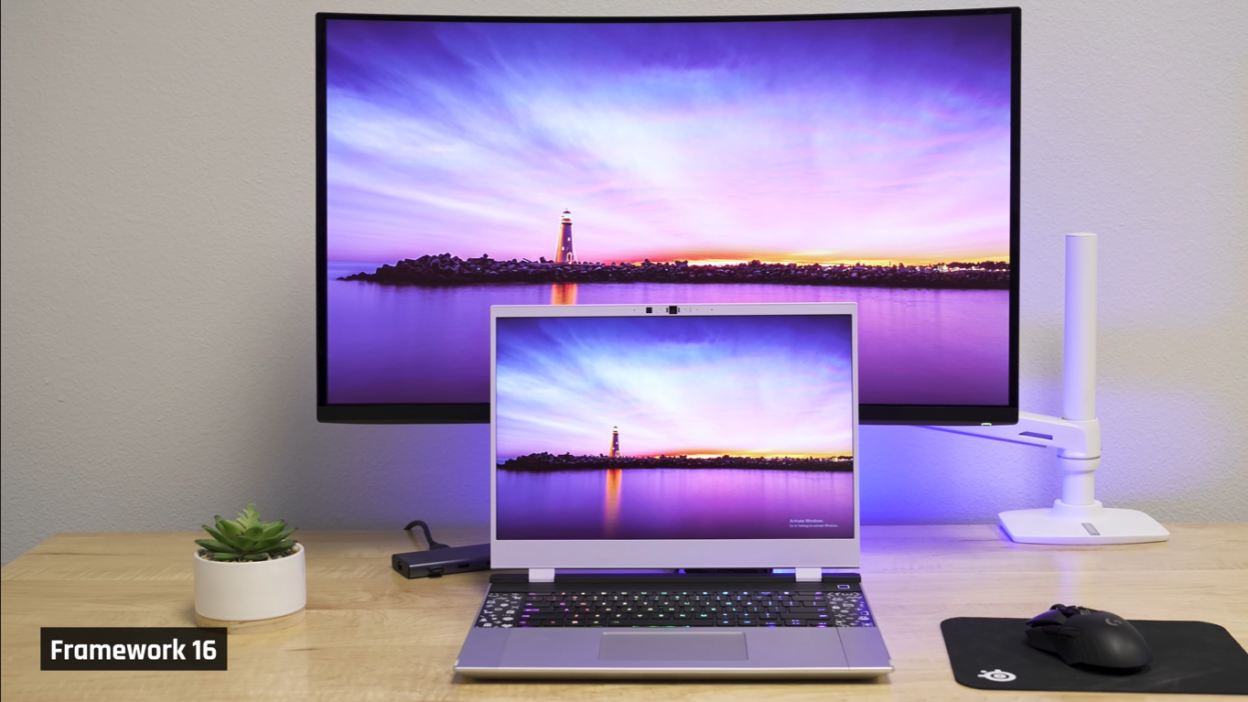
The Framework 16 represents something genuinely unique in the laptop world: a fully upgradeable, modular 16-inch performance laptop with AMD Zen 5 chips and an optional Nvidia RTX 5070. After extensive testing, one thing became crystal clear—this laptop appeals to two very different camps of buyers, and understanding which camp you fall into will determine whether the Framework 16 is a dream machine or an expensive disappointment.
If you’re looking for a solid 16-inch performance laptop based on traditional metrics—power, value, premium feel—you’ll be disappointed. The Framework 16 costs substantially more than powerful laptops and feels less refined. It’s also surprisingly large and heavy for the performance it delivers.
However, if you’re a techie who wants a unique device with unprecedented potential for customization and longevity, there’s nothing quite like the Framework 16. In fact, several tech enthusiasts on our team were so impressed they purchased the original Framework 16 for themselves.
Here’s the complete breakdown of what the Framework 16 gets right, where it falls short, and who should actually consider buying one.
What the Framework 16 Gets Right
Full Upgradeability That Actually Works
The Framework 16’s modularity isn’t just a marketing gimmick—it’s genuinely functional. The laptop comes with easy-to-understand manuals and benefits from excellent community support. There’s truly nothing else in the industry quite like it.
Unlike the Framework 13, which competes with laptops that are typically sealed units, the 16 faces tougher competition from gaming laptops that already offer replaceable memory, storage, Wi-Fi, and batteries. However, Framework takes upgradeability several steps further, allowing you to swap out the motherboard, GPU module, and even individual port configurations.
Smart Thermal Solution: Phase Change Compound Over Liquid Metal
Framework made a crucial decision to avoid liquid metal for CPU cooling, instead using phase change thermal compound. This might seem like a minor technical detail, but it’s significant.
Liquid metal cooling has a dirty secret: it can leak and destroy motherboard contacts. Even high-profile tech reviewers have experienced catastrophic failures from liquid metal leakage. By choosing phase change thermal compound, Framework eliminates this risk entirely while still maintaining effective cooling performance.
Revolutionary Hot-Swappable Port System
The hot-swappable port system is genuinely impressive. You can configure your laptop with:
- UHS-II SD card reader
- Third-gen HDMI port
- Second-gen DisplayPort
- 2.5 Gig Ethernet port
- USB-A ports
- Headphone/mic combo jack
- Multiple USB-C ports
The real breakthrough? Four of these hot-swappable ports support up to 240 watts of USB-C charging using the Power Delivery 3.1 standard. The RTX 5070 GPU module’s rear port also supports this standard. No other laptop on the market currently offers 240-watt USB-C charging, making Framework a genuine innovator here.
Surprisingly Pleasant User Experience During Intensive Tasks
Unlike many gaming laptops that sound like jet engines under load, the Framework 16 stays remarkably quiet. Most gaming laptops quickly hit 56-60 dB during intensive tasks, but the Framework stays well under that threshold.
The trade-off? It does get moderately warm on the keyboard deck during heavy use, similar to its competitors. This thermal behavior remains consistent across different Windows performance modes, though this consistency is somewhat disappointing—many users prefer the option to ramp up fans for higher FPS or dial them down for quieter operation.
The Framework doesn’t provide extensive built-in tuning functionality, but unsurprisingly, the community has developed open-source projects to fill this gap.
For CPU-intensive tasks like programming, the lowest performance mode offers decent improvements in heat and fan noise with only minimal performance drops. During light use, the laptop only gets uncomfortably warm when driving an external display directly from the dedicated GPU—otherwise, it remains comfortable.
Solid Build Quality Despite Modularity
Given its modular nature, you might expect the Framework 16 to feel flimsy or compromised. It doesn’t. The laptop has minimal keyboard deck flex and feels genuinely well-built. The keyboard itself is comfortable with customizable RGB lighting, the trackpad has a satisfying soft click, and the screen is bright and color-accurate.
Where the Framework 16 Falls Short
Severely Underwhelming Performance for the Price
This is the Framework 16’s most significant weakness. For a big, heavy, and expensive laptop, its performance lags dramatically behind competitors.
The review unit featured a Ryzen 7 9750 CPU and RTX 5070 GPU, priced around $2,450. That’s far too much money for these components, especially considering how they perform compared to similarly priced laptops.
The Power Problem: The CPU and GPU aren’t fed as much power as comparable laptops provide. The CPU tops out at approximately 45W—quite low for a laptop this large. The GPU maxes out at 100W, despite RTX 5070s being capable of up to 125W including boost.
Thinking about upgrading to a Ryzen 9 CPU? Framework claims it doesn’t receive any additional power, so you won’t see meaningful performance gains.
In gaming scenarios, the Framework 16 performs slightly better than synthetic benchmarks suggest because it can sustain high power draws more consistently. It even occasionally competes with the ASUS Zephyrus G14 with an RTX 5070 Ti. However, this still doesn’t save it from trailing far behind other thick, heavy 16-inch laptops at this price point.
Limited VRAM Creates Future-Proofing Concerns
The RTX 5070 maxes out at 8GB of VRAM, and modern titles are increasingly pushing beyond this limitation. Monster Hunter Wilds, for example, experiences significant drops in 1% lows during graphically challenging sections when run at ultra settings. You need to dial down to high settings to avoid this issue.
While most players won’t notice the difference between ultra and high, games are becoming more graphically intensive. It’s disappointing to have this limitation in a laptop positioned for longevity. Other laptops at this price and size offer RTX 5070 Ti and 5080 GPUs with more VRAM.
Framework founder Nirav acknowledged they considered including a 5070 Ti but couldn’t fit it into the modular component. This represents one of the distinct trade-offs of the modular design philosophy.
Display: Good But Not Great for Coding
The display has many positives—brightness, color accuracy, and gaming-friendly refresh rates. However, if you’re buying this laptop primarily for coding (a common use case for Framework buyers), there are better options.
The 2560×1600 resolution isn’t particularly sharp for text-heavy work. Small code will look noticeably crisper on higher-resolution displays like those in the Lenovo Yoga Pro 9i or MacBook Pro 16.
The flip side? A QHD panel like the Framework’s is better for gaming since the GPU can drive fewer pixels more effectively. Hopefully, Framework will introduce higher-resolution panel options to give buyers more choice.
Important Note: The display required calibration out of the box—common for DIY solutions but not something everyone wants to deal with. The screen had a noticeable green tint and looked quite poor before calibration. After calibration, it looked great, but this extra step may deter less technical users.
The Upgrade Economics Don’t Make Sense
Here’s the harsh reality: at $700, the GPU module is extremely expensive for what it offers. While it improves graphics performance from the previous generation, it’s a pricey upgrade that doesn’t deliver proportional value.
As the Framework 16 ecosystem matures, GPU upgrades might make more financial sense. However, at current component prices, most users would be better off selling their Framework and buying a new laptop entirely. When you factor in resale value, this approach often provides better performance gains for the same money.
This defeats the fundamental purpose of an upgradeable laptop.
Battery Life Doesn’t Match Performance Limitations
When unplugged, the Framework 16 doesn’t significantly throttle CPU performance—which sounds good until you remember it doesn’t perform particularly well to begin with. Given its mediocre performance, you’d expect excellent battery life as compensation. You don’t get it.
Testing revealed approximately 8 hours for basic office tasks. That’s acceptable but not impressive, especially considering the performance limitations.
Aesthetics: Frankenstein’s Monster
This is subjective, but the Framework 16 lacks visual cohesion. It looks like Frankenstein’s monster—assembled from disparate parts rather than designed as a unified whole. While you might configure it to look better than the review unit, it’s never going to match the refined appearance of an ASUS Zephyrus G16.
The metal pieces meeting next to the trackpad feel particularly janky. Some pieces wiggle slightly or exhibit more flex than the keyboard deck itself, which feels cheap—especially on a laptop that can approach $3,000 fully configured.
Size and Ergonomics Issues
The Framework 16 lands among the larger, thicker class of 16-inch laptops, but its components are what you’d typically find in thinner, more portable machines. With the GPU module installed, it becomes one of the deepest 16-inch laptops available.
The thickness creates an ergonomic problem: the wrist angle while typing feels awkward. Even though the keyboard itself is good and the edge is rounded to avoid cutting into your wrists, the angle remains uncomfortable during extended typing sessions.
Complexity That Challenges Even Tech-Savvy Users
While the Framework 16’s upgradeability is simpler than building a desktop PC, it’s not simple for the average buyer. During testing, the GPU required reseating—it took considerable time to get seated correctly, and initial performance results were much worse before realizing the issue.
Most Framework buyers are technical enough to handle this, but it raises concerns about recommending it to newcomers. Even Seth, a self-described techie on the review team, wasn’t sold on the Framework 16.
The Linux Reality Check: When Philosophy Meets Nvidia
Framework’s core value proposition includes excellent Linux support alongside full upgradeability. Unfortunately, for the Framework 16 with the RTX 5070, this promise falls apart.
The Nvidia Problem: Getting Nvidia GPUs working properly on Linux is notoriously difficult, and the Framework 16 is no exception. Despite Framework providing admirable documentation and guides, expect several days of troubleshooting to get everything functioning.
Even after configuration, issues persist. Forza launches to a black screen—you can hear the game running in the background, but you can’t actually play it. Some applications like FurMark and LM Studio eventually worked with similar performance to Windows, but the process is far from the “it just works” experience you might expect from Framework.
Ironically, AMD GPUs offer superior Linux support, but there aren’t currently any competitive AMD laptop GPUs available. This creates a frustrating catch-22 for Linux enthusiasts.
Who Should Actually Buy the Framework 16?
You’re a Good Candidate If:
- You’re genuinely passionate about modularity for its own sake, not just as a means to an end
- You value repairability and ownership over raw performance metrics
- You want to support the right-to-repair movement with your wallet
- You enjoy tinkering and troubleshooting technical challenges
- You have realistic expectations about performance and understand the trade-offs
- You primarily use Windows or are experienced with Linux troubleshooting
You Should Look Elsewhere If:
- You prioritize performance per dollar and need maximum power for your budget
- You expect plug-and-play Linux support with Nvidia graphics
- You want a refined, cohesive design that feels like a premium finished product
- You’re new to PC hardware and want something straightforward
- You need the absolute best display for text-heavy coding work
- You value portability and sleek design over upgradeability
The Framework 13 Alternative
If you’re intrigued by the Framework concept but not convinced by the 16, consider the Framework 13 instead. It makes more sense within the Framework lineup because it competes against laptops that typically aren’t upgradeable at all. In the 13-inch category, Framework’s modularity becomes a genuine differentiator rather than competing against gaming laptops that already offer reasonable upgradeability.
The ThinkPad Counterargument
Seth from the review team offers a compelling alternative perspective: ThinkPads provide extensive repairability with official part support while feeling like more complete, refined devices.
Lenovo’s website lists multiple pages of replacement parts per ThinkPad model. Used ThinkPads on eBay are popular in the Linux community and available at attractive prices. For users who want repairability and Linux support without the modularity complexity, ThinkPads represent a proven solution.
The difference? You can order an OEM Framework battery and have it on your doorstep within days. Finding a replacement battery for something like an ASUS Zephyrus G14 means gambling on eBay or third-party sites, hoping you don’t receive a defective part.
The Final Verdict: Respect Without Recommendation
Framework built exactly what they set out to build, and that deserves respect. The Framework 16 is genuinely innovative, pushing the industry toward repairability and user ownership in ways few other companies dare to attempt.
However, innovation doesn’t always equal the best purchase decision.
At nearly $2,450 (and approaching $3,000 fully configured), the Framework 16 is substantially more expensive than comparable-performing laptops. Those competitors are already upgradeable enough for most users, featuring replaceable RAM, SSDs, Wi-Fi modules, and batteries. Even if you want to upgrade the Framework’s motherboard or GPU, those components are so expensive that selling your current laptop and buying a new one often makes more financial sense.
If you have your heart set on the Framework 16 and understand what you’re getting into, absolutely buy one. You’ll enjoy it. The community is strong, the support is excellent, and you’ll be supporting a company trying to change the industry for the better.
But if you’re looking for a high-powered 16-inch laptop based on traditional performance and value metrics, there are objectively better options available. Gaming laptops from ASUS, MSI, Lenovo, and others offer more power, better displays, similar upgradeability for practical purposes, and more refined designs at competitive or lower prices.
The Framework 16 is an admirable engineering achievement and a statement about what’s possible in laptop design. Whether it’s the right laptop for you depends entirely on whether you value that statement more than traditional performance metrics.
For most buyers, the answer is probably no. For the right buyer—the techie who genuinely values modularity as a feature, not just a means to an end—the Framework 16 remains the only game in town.
Just make sure you’re that buyer before you commit to this expensive, complex, and genuinely fascinating machine.