📌 TLDR (Too Long; Didn’t Read)
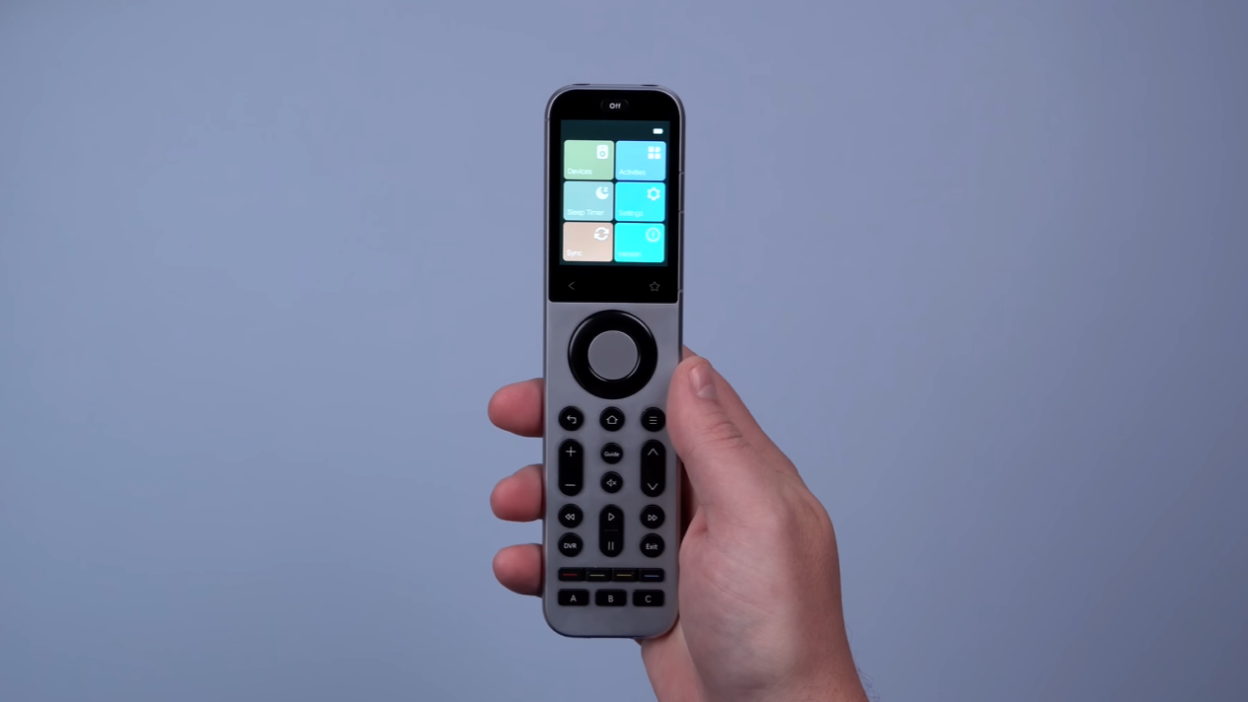
The Sofabaton X2 is a premium universal remote ($330-$360) that controls everything in your home theater and smart home. Key upgrades over the X1S include a touchscreen, wireless charging dock, IR blaster on the remote, and seamless Home Assistant integration. While setup can be tricky, once configured, it eliminates the need for multiple remotes and smart home dashboards.
Bottom line: If you’re tired of juggling remotes and want one device to control your entire entertainment system and smart home, the X2 is the best solution available in 2026.
Introduction: The Search for the Perfect Remote is Over
How many remotes are sitting on your coffee table right now? Three? Five? More?
If you’re like most people with a home theater setup, you’re drowning in remotes. One for the TV, another for the soundbar, one for the streaming box, maybe another for the Blu-ray player. It’s chaos.
I’ve spent the last year searching for the perfect universal remote—the one remote to rule them all. After testing the Sofabaton X2 extensively, I can confidently say this is the closest we’ve come to remote perfection.
The X2 made my elaborate smart home dashboard completely obsolete. I don’t touch it anymore because this remote controls everything—my TV, projector, Xbox, Apple TV, lights, fans, and more. All from one device.
Is it perfect? Not quite. But it’s damn close. Let me show you why.
What Makes the X2 Different?
The Sofabaton X2 is the upgraded successor to the X1S, and it addresses nearly every complaint users had with the original.
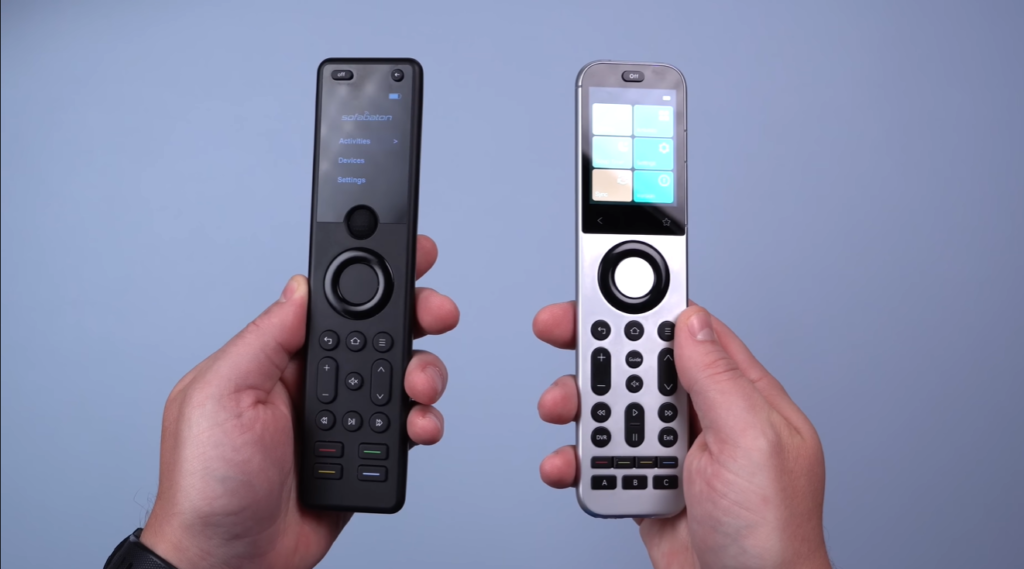
Key Upgrades Over the X1S
What Was Missing in X1S:
- No touchscreen (just a scroll wheel)
- No IR blaster on the remote itself
- No wireless charging dock
- Limited smart home integration
What X2 Brings:
- ✅ Full color touchscreen display
- ✅ IR blaster built into the remote
- ✅ Wireless charging dock included
- ✅ Deep Home Assistant integration
- ✅ Premium metal build quality
- ✅ Additional programmable buttons
The X2 isn’t just an incremental update—it’s a complete reimagining of what a universal remote should be.
Wireless Charging Dock (Finally!)
This was the most-requested feature from X1S users, and Sofabaton delivered.
Why This Matters
Without a charging dock, remotes end up:
- Thrown randomly on the couch
- Lost between cushions
- Dead when you need them most
- Charging in weird spots nobody can find
The wireless charging dock solves all of this.
How It Works
Simply place the remote on the dock when you’re done watching. The remote automatically charges and is always ready to use. No fumbling with cables, no dead batteries during movie night.
One Small Complaint
When you place the remote on the dock, the charging indicator is tiny—just a small symbol in the corner. You have to look closely to confirm it’s charging properly.
My suggestion: A large, clear “CHARGING” graphic would be much better. This could easily be fixed with a firmware update.
Still, having wireless charging is a game-changer for daily use.
Touchscreen Upgrade
The X2 replaces the X1S’s scroll wheel with a full touchscreen, and it’s massively better.
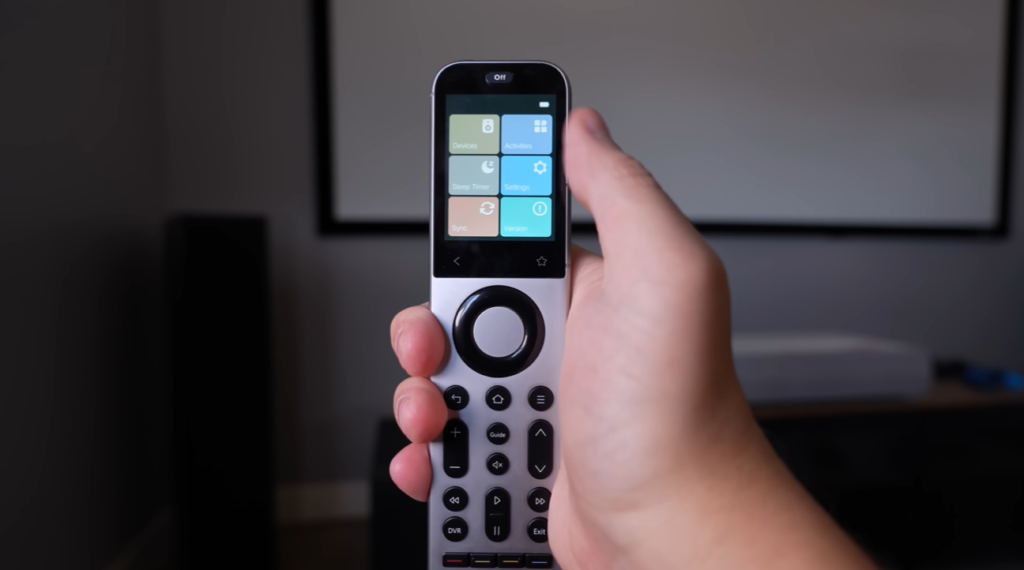
Why Touchscreen > Scroll Wheel
Easier Navigation:
- Swipe between activities instead of scrolling
- Tap directly on what you want
- Much more intuitive for family members
- Faster to use
On-Screen Number Pad: The touchscreen gives you access to a digital number pad. Need to type in a channel number? Just tap the screen.
But What About Physical Number Buttons?
Some people prefer physical number buttons for quick channel switching. Here’s the solution:
You can program the extra physical buttons on the X2 as macro commands to jump to your favorite channels. So if you frequently switch between channels 5, 11, and 28, assign them to physical buttons.
Best of both worlds.
The touchscreen makes the remote accessible for everyone in the family, not just the tech-savvy person who set it up.
IR Blaster on the Remote
This was the biggest complaint about the X1S, and it’s completely fixed.
Multiple IR Options
The X2 gives you four different ways to send IR commands:
- IR blaster on the remote itself (NEW!)
- IR blaster on the hub
- IR extender cables that plug into the hub (included)
- Additional IR extenders for other rooms
Why This Flexibility Matters
Example Setup:
- TV in front of you: Use remote’s built-in IR blaster
- AV receiver in cabinet: Use IR extender cable
- Equipment in server room: Use wireless IR extender in that room
You can choose one or multiple options for each device. This ensures every piece of equipment responds reliably, no matter where it’s located.
You’re basically covered for any IR scenario now.
Premium Build Quality
Pick up the X2, and you immediately notice the difference.
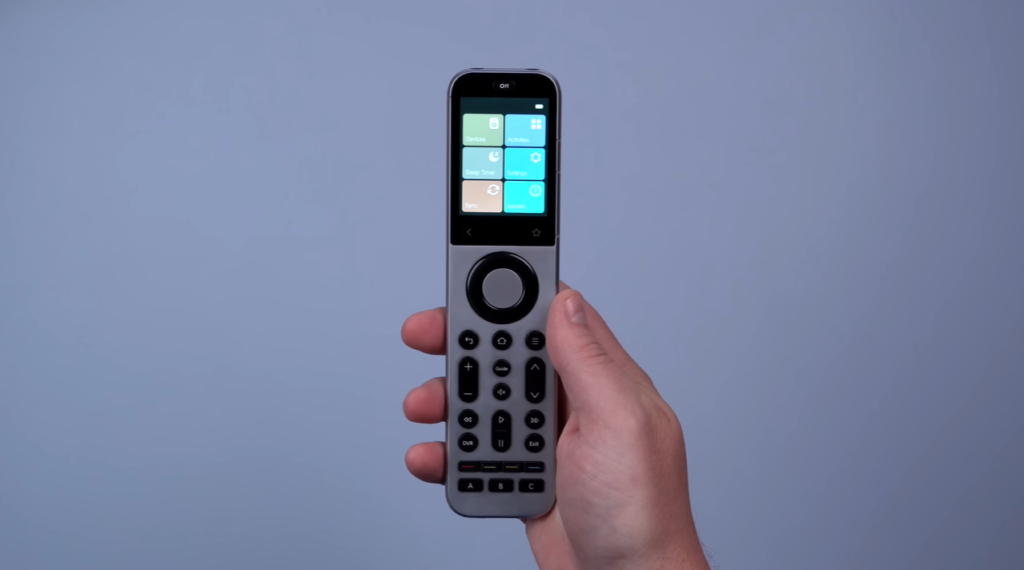
Metal Construction
The X2 is made from metal, not plastic. It has real heft and feels like a premium smartphone.
Comparison:
- X1S: Lightweight plastic, felt cheap
- X2: Solid metal, premium feel
Additional Programmable Buttons
The X2 includes extra buttons you can program for custom commands:
- Smart home controls
- Favorite channel macros
- Lighting scenes
- Custom device shortcuts
Familiar Yet Improved Design
If you’re upgrading from the X1S, the layout feels familiar. But the back button has been moved from the top to the bottom—a much more intuitive placement.
Everything about the X2 screams quality. This isn’t a cheap remote pretending to be premium—it’s genuinely well-built.
Setup Process (The Good and the Bad)
Let’s be honest: Setup isn’t perfect. But it’s not terrible either.
The Rocky Start
Full transparency: I received a pre-production unit first, and during firmware update, it bricked completely. Sofabaton sent a replacement production unit, which updated without issues.
If you see old reviews mentioning firmware problems, they’re likely talking about pre-production units. The retail version updates fine.
Can’t Import X1S Settings
I hoped to backup my X1S configuration and import it to the X2. Unfortunately, they’re not compatible with each other.
This means: You’ll need to set up all devices from scratch if you’re upgrading.
The silver lining: The X2 app now shows you how each device is connected (Wi-Fi, Bluetooth, IR, etc.), making future troubleshooting easier.
Device Setup Experience
Easy Devices:
- Xbox: Worked immediately out of the box (easier than X1S)
- Streaming devices: Generally straightforward
- Smart home: Seamless with Home Assistant
Tricky Devices:
- Denon receiver: Imported all buttons but none worked. Had to reprogram IR commands manually
- Projector: Had to remember if it was IR or Bluetooth from a year ago
Overall Setup Time
Expect to spend 1-2 hours setting everything up initially. It’s not plug-and-play, but once configured, it’s set-and-forget.
How Activities Work
Activities are the secret to making the X2 simple for everyone in your family.
What Are Activities?
Instead of controlling individual devices, you create “activities” like:
- Watch Apple TV
- Play Xbox
- Watch Blu-ray
- Listen to Music
Creating an Activity
- Name your activity (e.g., “Watch Netflix”)
- Select which devices need to turn on
- Set the on/off commands for each device
- Save
Using Activities
To start watching:
- Swipe the touchscreen to your activity
- Tap it
- All devices turn on automatically in the correct order
Example: Selecting “Watch Apple TV” turns on:
- TV
- AV receiver (switches to correct input)
- Apple TV
- Lights dim automatically (if connected to smart home)
To switch activities:
- Tap “Play Xbox” activity
- Apple TV turns off
- Xbox turns on
- Receiver switches inputs
- Seamless transition
To stop watching:
- Press the power button at the top
- Everything shuts down
This is why families love it. No confusion about which remote to use or what order to press buttons. Just pick the activity and go.
Smart Home Integration
This is where the X2 absolutely shines and separates itself from cheaper universal remotes.
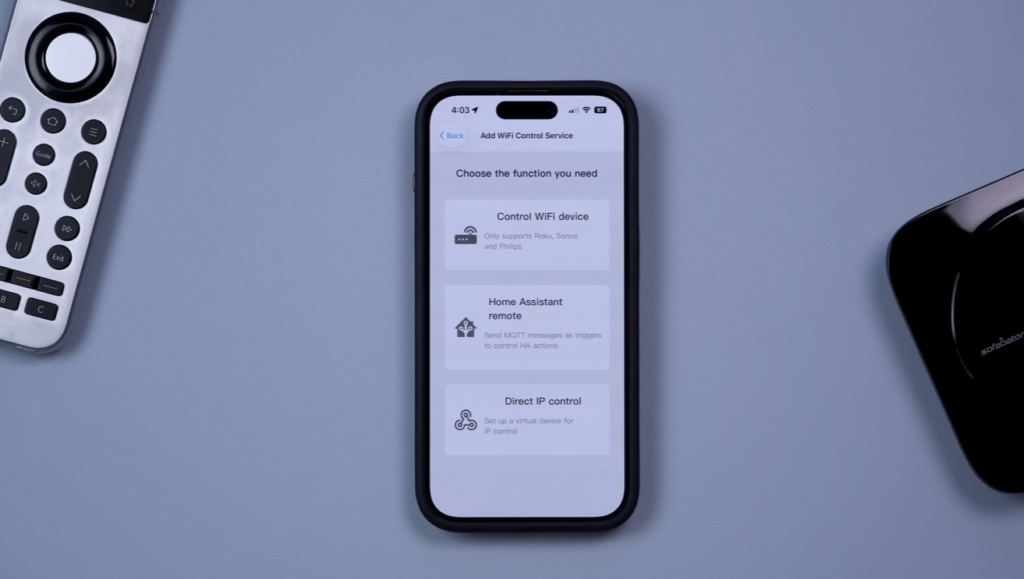
Works With Your Smart Home
Supported platforms:
- Home Assistant (best integration)
- Amazon Alexa
- Google Home
Basic Smart Home Control
At minimum, you can:
- Use voice commands to trigger activities
- “Alexa, turn on Watch TV activity”
- Remote triggers smart home routines
Advanced Home Assistant Integration
If you use Home Assistant, the X2 becomes incredibly powerful.
How It Works:
- Create a Wi-Fi device in Sofabaton app for Home Assistant
- Create virtual buttons for that device
- Sofabaton generates MQTT codes
- Create automations in Home Assistant using those codes
- Assign physical buttons on remote to virtual buttons
Example Setup:
- Program a button to “Turn off all lights”
- Press button → triggers virtual button → sends MQTT command → Home Assistant runs automation → lights turn off
Real-World Smart Home Uses
What I control with my X2:
- Room lights (on/off/dimming)
- Ceiling fan speed
- Bias lighting behind TV
- Blackout shades
- Scene activation
- Temperature adjustments
It replaced my smart home dashboard completely.
The One Limitation
Smart home buttons are activity-specific. If you want a button to work across multiple activities, you need to program it for each activity individually.
My wish: Universal smart home buttons that work in all activities.
Still, having physical buttons beats relying purely on automations. Automations can be annoying when you have guests over and the lights keep turning off on them.
Price Comparison
Let’s address the elephant in the room: The X2 costs $330-$360.
Is It Worth the Price?
Context matters: The Logitech Harmony Elite (discontinued) cost about the same price over 10 years ago.
Adjusted for inflation, the X2 is actually cheaper than the Harmony Elite was, while offering:
- Touchscreen (Harmony didn’t have this)
- Better smart home integration
- Wireless charging
- Modern connectivity options
What You’re Paying For
This isn’t just a remote. It’s a:
- Universal remote for all entertainment devices
- Smart home controller
- Home automation hub
- Family-friendly interface that works for everyone
Alternative approach: Buy 5-6 individual remotes and a separate smart home controller. You’ll spend similar money and still juggle multiple devices.
Who Should Consider Alternatives?
If you have a simple setup (TV + streaming stick), the X2 is overkill. A $20 universal remote from Amazon will work fine.
The X2 is for people with:
- Multiple AV components
- Home theater systems
- Smart home integration needs
- Family members who struggle with technology
Common Concerns Addressed
Let me tackle the most common questions and criticisms head-on.
“Can’t I Just Use My Smartphone with Home Assistant?”
Yes, technically. But here’s reality:
Smartphone issues:
- Needs to be unlocked
- Open the app
- Navigate to controls
- Not family-friendly
- Everyone needs the app installed
- Kids can’t easily use it
- Guests definitely can’t use it
Remote advantages:
- Pick it up and press one button
- Everything turns on automatically
- Physical controls everyone understands
- Always in the same spot (charging dock)
- No learning curve for family members
A smartphone works for YOU. A remote works for EVERYONE.
“What About the Unfolded Circle Remote 3?”
The Unfolded Circle Remote 3 gets mentioned a lot. Here’s my take:
Price: It’s more expensive than the X2
Recent concerns: A Reddit thread highlighted customer service issues and product problems. I reached out to Unfolded Circle about these concerns, offering to test their product. They never responded.
My recommendation: Until Unfolded Circle addresses these concerns publicly, the Sofabaton X2 is the safer choice.
“The Setup Seems Complicated”
Fair criticism. Setup isn’t as simple as pairing a Bluetooth speaker.
But consider:
- You set it up once
- After that, it’s completely automated
- Your family never touches the settings
- It just works every day
Think of it like setting up a new router. Pain upfront, smooth sailing after.
“What If I Don’t Use Home Assistant?”
You don’t need Home Assistant! The X2 works perfectly fine as a universal remote without any smart home integration.
Home Assistant just unlocks additional capabilities. The core remote functionality works with:
- Any TV
- Any streaming device
- Any AV receiver
- Any IR/Bluetooth device
Pros and Cons
Let’s break down the complete picture.
What We Love ✅
Hardware:
- Premium metal build quality feels expensive
- The wireless charging dock is convenient
- The touchscreen is responsive and intuitive
- IR blaster on the remote provides flexibility
- Extra programmable buttons
Functionality:
- Controls unlimited devices
- Activity-based system is family-friendly
- Multiple IR options ensure compatibility
- Works with Wi-Fi, Bluetooth, and IR devices
- Eliminates remote clutter
Smart Home:
- Deep Home Assistant integration
- Physical buttons for smart home control
- MQTT support for advanced users
- Replaces smart home dashboards
- Triggers automations reliably
What Could Be Better ❌
Setup:
- Initial configuration takes time
- Can’t import X1S settings
- Some devices require manual IR programming
- Learning curve for advanced features
Software:
- Smart home buttons are activity-specific
- Charging indicator too small
- No compatibility between X1S and X2 backups
Price:
- $330-$360 is expensive upfront
- Not for simple TV setups
- Overkill for casual users
Minor Issues:
- Sunroof can be noisy at highway speeds (wait, wrong review 😄)
Who Should Buy This?
Perfect For: ✅
Home Theater Enthusiasts
- Multiple AV components
- Projector setups
- Surround sound systems
- Multiple source devices
Smart Home Users
- Home Assistant users
- People with integrated lighting
- Automated home setups
- Tech enthusiasts who want physical controls
Families
- Multiple users with varying tech skills
- Kids who need simple controls
- Spouses tired of complicated remotes
- Anyone who wants “one button” simplicity
Remote Collectors (Former Harmony Users)
- Miss the Logitech Harmony remotes
- Want modern replacement
- Need reliable universal remote
- Willing to invest in quality
Skip It If: ❌
Simple Setups
- Just a TV and streaming stick
- No smart home devices
- Casual viewing only
- Budget is primary concern
Not Tech-Savvy
- Uncomfortable with initial setup
- No patience for configuration
- Want plug-and-play simplicity
- Won’t use advanced features
Happy With Current Setup
- Already have working universal remote
- Satisfied with Harmony remote
- Don’t need smart home control
- Not bothered by multiple remotes
Unlimited. There’s no practical limit on the number of devices you can add.
Final Verdict
Rating: ⭐⭐⭐⭐½ (4.5/5 Stars)
The Sofabaton X2 is the best universal remote available in 2026, period.
What Makes It Special: The X2 successfully replaced both my pile of remotes AND my smart home dashboard. That’s not hyperbole—I genuinely don’t use my tablet-based smart home controller anymore because the X2 handles everything more conveniently.
The Premium Experience: From the metal construction to the wireless charging dock to the responsive touchscreen, everything about the X2 feels premium. This isn’t a budget remote with delusions of grandeur—it’s genuinely well-engineered.
Smart Home Integration: If you use Home Assistant, the X2 becomes transformative. Having physical buttons to control lights, fans, shades, and scenes while watching TV is incredibly convenient. It proves that sometimes old-school physical controls beat app-based solutions.
Family Friendly: My family went from confused button-mashers to confident TV-watchers. One button turns everything on in the right order. One button switches activities. One button shuts everything down. That simplicity is worth the price of admission.
The Honest Drawbacks: Setup isn’t trivial. You’ll spend 1-2 hours getting everything configured, and some devices require manual programming. The inability to import X1S settings is frustrating for upgraders. And $330-$360 is real money—this isn’t an impulse purchase.
Who Wins: If you have a home theater with multiple components, use Home Assistant, or are tired of juggling remotes, the X2 is absolutely worth the investment. It’s not perfect, but it’s the closest thing to “one remote to rule them all” that exists today.
Who Loses: If you have a simple TV + streaming stick setup, save your money. The X2 is overkill. Get a basic universal remote for $30 and spend the savings on streaming subscriptions.
The Bottom Line
After a year with the X1S and extensive testing of the X2, I can confidently say this is the universal remote I’ve been waiting for. It checks nearly every box I wanted in a smart home remote.
Is it perfect? No. Perfect doesn’t exist.
Is it the best option available? Absolutely yes.
If you’re serious about home theater and smart home integration, the Sofabaton X2 deserves serious consideration. It’s expensive upfront but invaluable in daily use.
Technical Specifications
What’s Included
- Sofabaton X2 Remote
- Wireless Charging Dock
- Hub Unit
- IR Extender Cables
- Power Adapters
- USB Cable
- Quick Start Guide
Connectivity
- Remote to Hub: Bluetooth 5.0
- Hub Outputs: IR, Bluetooth, Wi-Fi
- Smart Home: MQTT, Wi-Fi
- Range: 30+ feet (typical)
Compatibility
- IR Devices: Yes (virtually all)
- Bluetooth: Yes
- Wi-Fi Devices: Yes
- Smart Home: Home Assistant, Alexa, Google Home
Display
- Full color touchscreen
- Responsive touch interface
- Number pad on screen
- Activity selection interface
Battery
- Built-in rechargeable battery
- Wireless charging via dock
- All-day battery life typical use
Dimensions & Weight
- Premium metal construction
- Comfortable one-handed use
- Substantial weight (feels premium)
Where to Buy
Official Website: Check Sofabaton.com for current pricing and availability
Current Pricing:
- Regular: $360
- Sale Price: Often $330
- Check for holiday discounts
What to Look For:
- Authorized retailers only
- Avoid gray market sellers
- Ensure warranty coverage
- Check return policy
Alternatives to Consider
If X2 Is Too Expensive:
Sofabaton U2
- Budget-friendly option
- Basic universal remote functions
- No touchscreen
- Under $100
Harmony Remotes (Used Market)
- No longer manufactured
- Used market only
- No warranty support
- May lack modern device support
If You Want Different Features:
Unfolded Circle Remote 3
- More expensive
- Different approach
- Research recent reviews carefully
- Consider customer service reputation
Smartphone + IR Blaster
- Cheapest option
- Less family-friendly
- Requires everyone to install app
- Good for solo users
Final Thoughts
The search for the perfect universal remote has been long and frustrating. Logitech abandoned the Harmony line. Cheap universal remotes don’t cut it for modern setups. Smart home apps aren’t family-friendly enough.
The Sofabaton X2 fills this void better than anything else on the market.
It’s not perfect. Setup could be smoother. Smart home buttons should work across all activities. The charging indicator should be bigger.
But it’s really, really good. Good enough that my elaborate smart home dashboard sits unused. Good enough that my family actually uses it without calling me for help. Good enough that I genuinely look forward to movie night again instead of dreading the “which remote do I need?” question.
If you’re tired of remote chaos and want one elegant solution that controls everything, the Sofabaton X2 is the remote you’ve been waiting for.
Check it out using the links below, and welcome to the one-remote lifestyle.
Have questions about the X2? Drop them in the comments below! I’ll answer based on my real-world experience.
Last updated: January 2026
Disclosure: This review is based on extensive real-world testing. Links may be affiliate links that support this content.