Is the Infinix Note Edge the best budget smartphone for 2026? With its stunning curved AMOLED display, MediaTek Dimensity 7100 chipset, massive 6,500mAh battery, and sleek design starting under $300, this phone promises to deliver flagship features at a fraction of the cost. But does it live up to the hype, or are there too many compromises?
We spent extensive time with the Infinix Note Edge to bring you this comprehensive review covering design, display, performance, camera quality, battery life, and everything in between. If you’re shopping for an affordable smartphone that doesn’t feel cheap, this detailed analysis will help you decide if the Note Edge deserves a spot in your pocket.
Infinix Note Edge: Where Elegance Meets Power
As Infinix proudly states in their press materials, the Note Edge is “where elegance meets power.” While that sounds like typical marketing speak, there’s actually some truth to it. This budget smartphone manages to pack premium features like a curved AMOLED screen, fresh MediaTek chipset, and substantial battery capacity into a remarkably slim and lightweight body.
Key Specifications at a Glance:
- Display: 6.78″ curved AMOLED, 1.5K resolution (2644 x 1280), 120Hz
- Processor: MediaTek Dimensity 7100 (first phone to use this chipset)
- RAM: Multiple configurations available
- Storage: 256GB (non-expandable)
- Battery: 6,500mAh (6,150mAh actual capacity)
- Charging: 45W wired charging
- Main Camera: 50MP with 1/2″ sensor
- Front Camera: 13MP
- OS: XOS 16 based on Android 16
- Build: IP65 dust and splash resistant
- Display Protection: Corning Gorilla Glass 7i
- Thickness: Just over 7mm
- Weight: 185 grams
Let’s dive deep into every aspect of this budget contender.
Design & Build Quality: Surprisingly Premium Feel
Four Color Options with Unique Textures
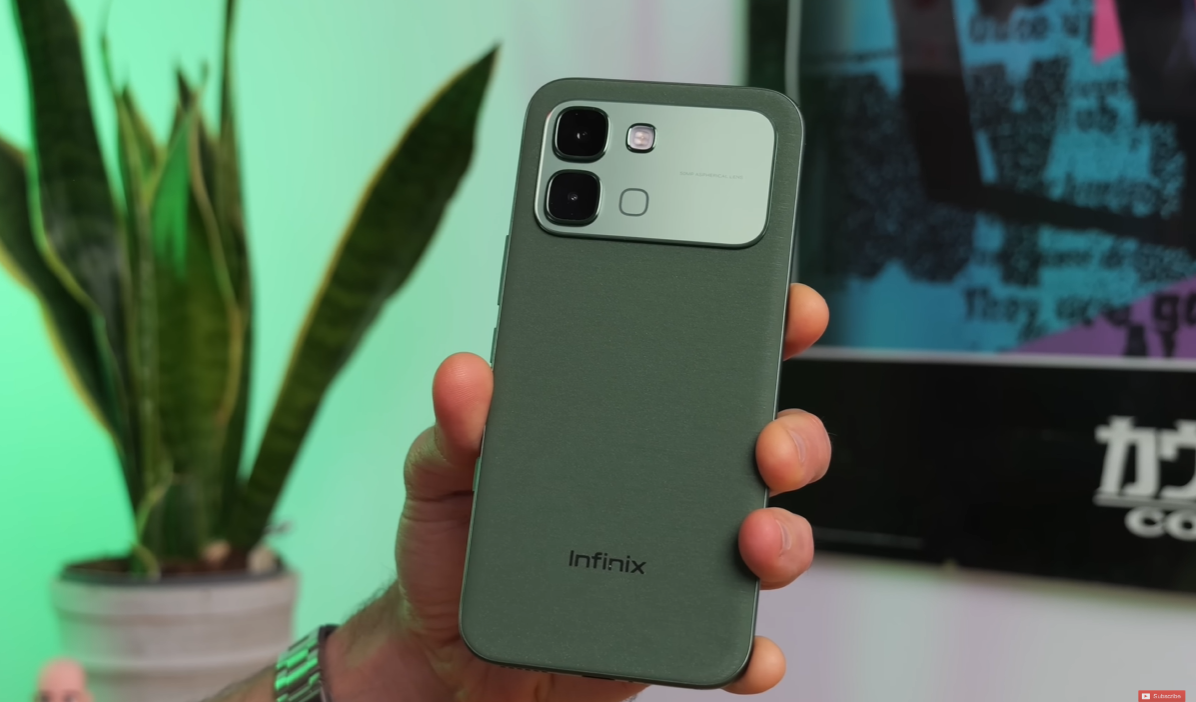
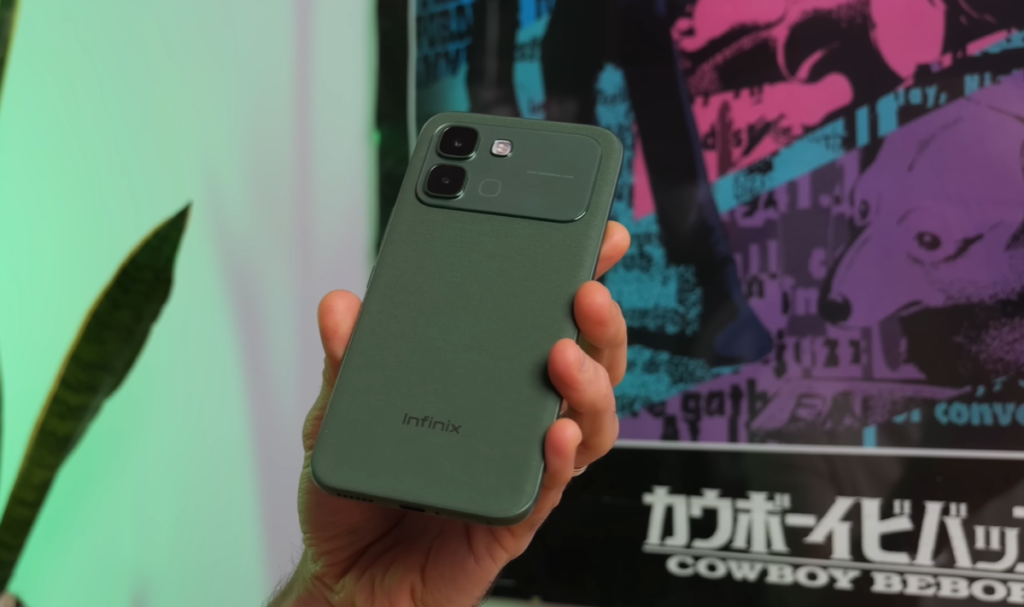
The Infinix Note Edge comes in four distinct colors: Titanium, Black, Blue, and Green. We tested the Green variant, which stands out from the others with a unique textured finish.
The Green Model’s Special Touch:
The back panel uses a textured polyurethane material (fancy word for plastic, but premium plastic) that feels distinctly different from typical smartphone backs. The texture is almost papery to the touch, providing a pleasant tactile experience and improved grip compared to smooth glossy finishes.
Marketing Claims vs Reality:
Infinix claims that under sunlight, the green back “shimmers like gentle ripples on a serene lake.” While that’s admittedly flowery marketing language, there is indeed a subtle shimmering effect visible in certain lighting conditions. It adds a touch of visual interest without being gaudy.
Design Similarities: Poco F8 Ultra Vibes
If the design looks familiar, that’s because it shares DNA with phones like the Poco F8 Ultra. You’ll notice:
- Similar soft-touch back (though the Poco uses more of a denim texture)
- Glossy rectangular camera bump positioned at the top
- Curved screen edges on both sides
- Minimalist, clean aesthetic
This isn’t necessarily a bad thing—the design language works well and feels modern.
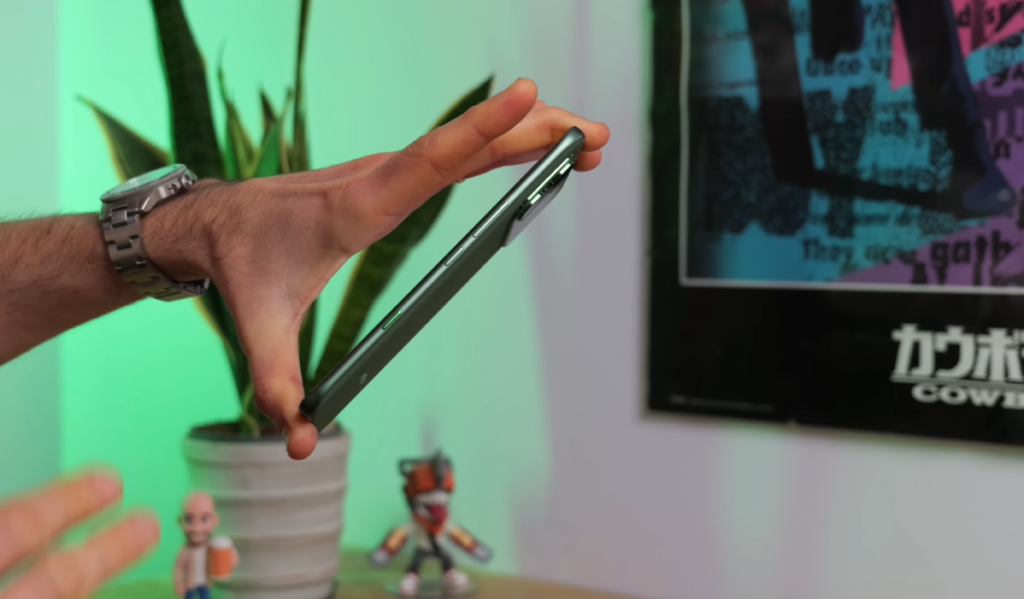
Impressively Slim and Lightweight Profile
One of the Note Edge’s most impressive physical attributes is its dimensions:
Thickness: Just over 7mm thin Weight: Only 185 grams
Thanks to sloped edges on both the screen and back panel, the phone feels even thinner than the measurements suggest. It’s genuinely remarkable how Infinix managed to cram a 6,500mAh battery into such a svelte frame.
Real-World Handling:
The combination of light weight, slim profile, and curved edges creates a phone that feels exceptionally comfortable in hand. Whether you’re using it one-handed or slipping it into a pocket, the Note Edge never feels bulky or cumbersome.
Durability Features: Built to Last
Despite the budget pricing, Infinix hasn’t completely skimped on protection:
Screen Protection: Corning Gorilla Glass 7i covers the display, providing reasonable scratch resistance for everyday use. However, there’s no pre-installed screen protector, so you’ll want to apply one yourself or purchase a case that includes one.
Water Resistance: IP65 rating for dust and splash resistance. This means:
- ✅ Protected against dust ingress
- ✅ Can handle rain, splashes, and accidental spills
- ❌ NOT submersible in water (don’t drop it in a pool or bathtub)
The IP65 rating provides peace of mind for everyday scenarios—getting caught in the rain, using the phone with wet hands, or accidental drink spills won’t spell disaster.
Active Halo Lighting: Disco in Your Pocket
Here’s a fun feature you won’t find on most smartphones: Active Halo Lighting around the camera module.
What It Does:
The camera bump includes LED lighting that can activate under various conditions:
- Starting games
- Playing music
- Incoming notifications (nostalgic notification light functionality)
- Customizable triggers
Customization Options:
While not extensively customizable, you get:
- Multiple color options
- Different lighting effects
- Control over when it activates
Is It Useful?
Honestly, it’s more of a novelty feature than genuinely practical functionality. But if you enjoy a bit of visual flair and want your phone to stand out, the halo lighting adds personality. It’s particularly eye-catching when gaming or listening to music.
Display: Stunning AMOLED Excellence
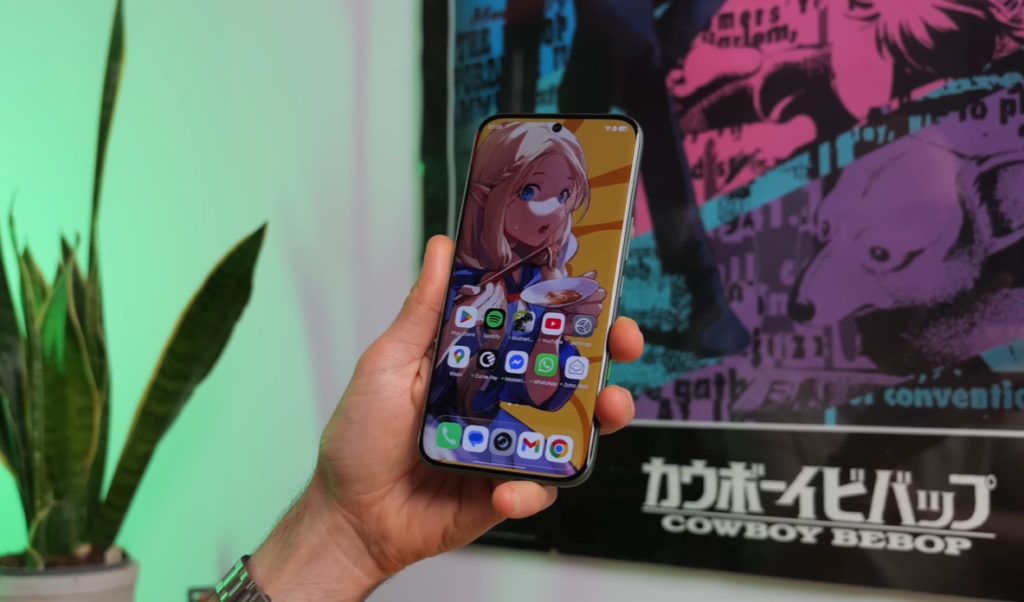
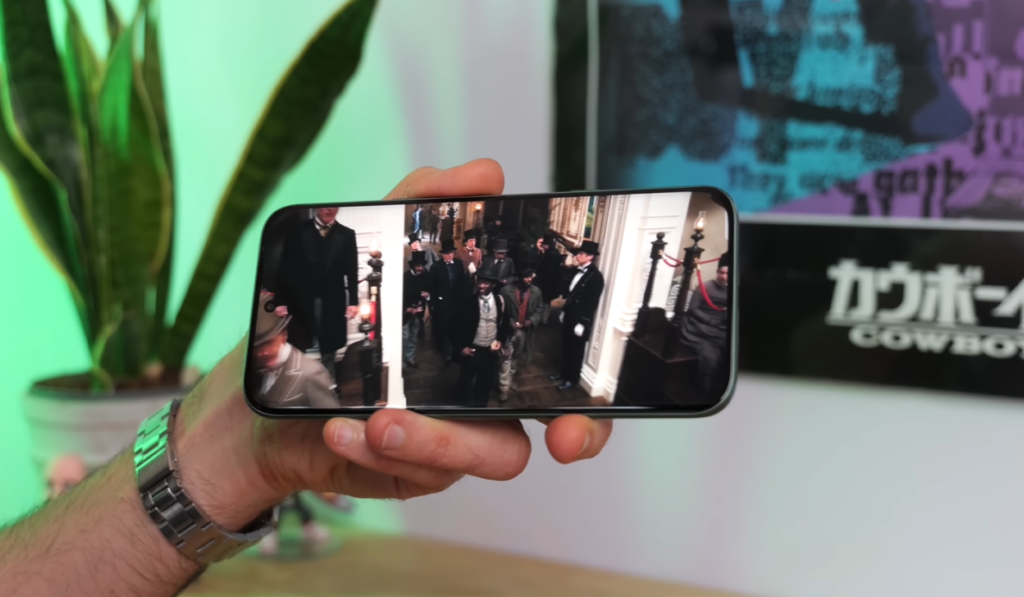
6.78″ Curved AMOLED with 1.5K Resolution
The Infinix Note Edge’s display is genuinely one of its strongest features, especially considering the budget price point.
Display Specifications:
- Size: 6.78 inches (spacious viewing area)
- Technology: AMOLED (not LCD)
- Resolution: 1.5K (2644 x 1280 pixels)
- Aspect Ratio: Standard smartphone ratio
- Refresh Rate: 120Hz
- Design: Curved edges on both sides
- Protection: Gorilla Glass 7i
Visual Quality: Crispy and Poppy
Sharpness:
The 1.5K resolution provides excellent clarity. Text is crisp, images are detailed, and the pixel density ensures you won’t notice individual pixels during normal use.
Color & Contrast:
Being an OLED panel, you get:
- Deep, true blacks (pixels turn completely off)
- Vibrant, “poppy” colors
- Excellent contrast ratios
- Punchy visuals for media consumption
HDR Support:
Unfortunately, streaming services like Netflix don’t report HDR support, so you won’t get enhanced dynamic range for compatible content. However, standard content still looks lovely thanks to the OLED technology.
Brightness: Handles Glare Well
Maximum Brightness:
When maxed out, the display gets powerfully bright, making it comfortable to use even in:
- Direct sunlight
- Brightly lit environments
- Outdoor conditions with glare
The glossy screen surface does reflect light, but the brightness compensates effectively.
120Hz Refresh Rate: Smooth Scrolling
The 120Hz refresh rate provides:
- Buttery smooth scrolling through apps and web pages
- More responsive touch interactions
- Improved gaming experience (when supported)
- Generally more fluid user experience
For a budget phone, having 120Hz is a significant advantage over cheaper models stuck at 60Hz.
Curved Screen Concerns: Responsiveness
Initial Issues:
When first using the Note Edge, there were occasional instances where swipes from the left edge didn’t register properly. This is a common concern with curved displays—the edge detection can be finicky.
After Adjustment Period:
After becoming accustomed to the phone, edge swipe detection worked fine. Your brain adapts to the required touch pressure and angle.
Palm Rejection:
Even when gripping the phone tightly with fingers and palm touching the curved edges, the display maintains good responsiveness. You can still tap and swipe without the system getting confused by accidental touches—a testament to decent palm rejection algorithms.
Security: Fingerprint & Face Unlock
In-Display Fingerprint Scanner
Technology: Optical sensor (not ultrasonic)
As expected at this price point, you get a basic optical fingerprint scanner rather than the more advanced ultrasonic technology found in flagship phones.
Performance:
- ⚠️ Not the swiftest around
- ✅ Generally reliable in normal conditions
- ❌ Can struggle when fingers are:
- Too dry
- Dirty or mucky
- Greasy
- Wet
Real-World Usage:
It works adequately for a budget phone. You’ll experience the occasional failed scan requiring a second attempt, but it’s not frustratingly slow or unreliable.
Face Unlock Backup
The Note Edge also includes face unlock as an alternative biometric option. While not as secure as fingerprint scanning, it provides convenient unlocking in situations where the fingerprint scanner might struggle.
Software: XOS 16 Based on Android 16
Operating System Details
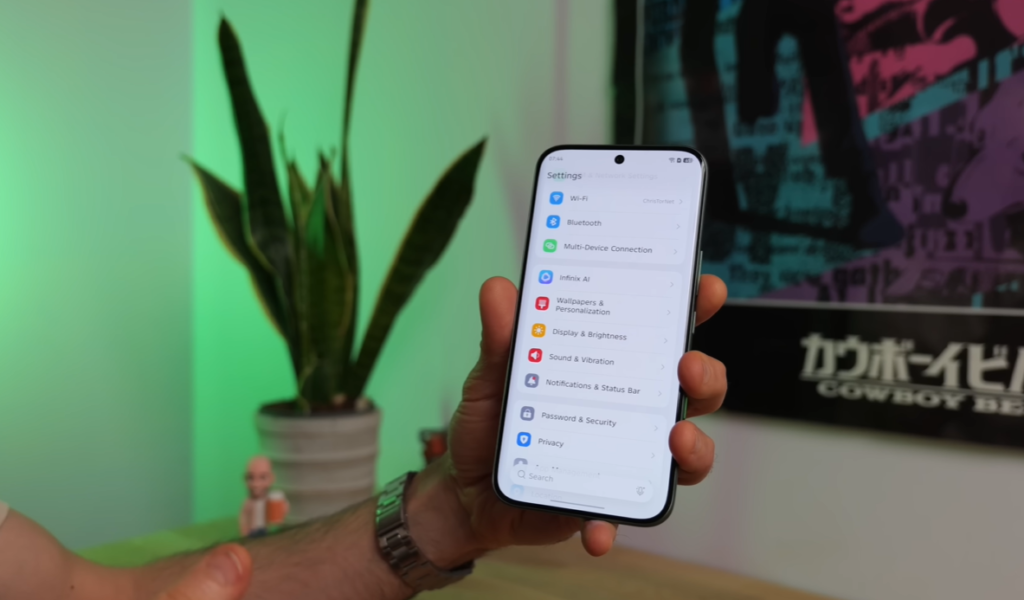
Version: XOS 16 (Infinix’s custom skin) Base: Android 16 Update Promise:
- 3 years of OS updates (will update to Android 19)
- 5 years of security patches
Update Policy Assessment:
While not as generous as Samsung or Google’s 7-year commitments, the update promise is better than many budget competitors. Three OS updates and five years of security support should keep the phone relevant through 2031.
XOS User Experience: Mixed Bag
Interface Style:
XOS maintains a fairly standard Android vibe with some customizations:
- Traditional app drawer (not forced home screen app layout)
- Swipe right for “Zero Screen” widget panel
- Separated notifications and control center (following modern Android trend)
The Zero Screen:
Swiping right reveals a widget-filled screen with:
- Weather information
- Calendar events
- Quick app links
- News headlines (often sensationalized and negative)
- Links to App Store games (mostly low-quality)
Control Center Design:
The control center isn’t the slickest implementation—it’s basically a mishmash of icons without much visual refinement. It’s functional but not beautiful.
Personalization Features: Color OS Influence
Theming Options:
XOS includes decent personalization features, including:
- Color OS-style wallpapers with depth effects
- Theme customization
- Icon pack options
- Color accent changes
Always-On Display… Sort Of:
The phone claims to have an Always-On Display (AOD), but there’s a major limitation: it only stays on for 5 seconds before disappearing, and there’s no setting to change this behavior.
This makes it barely functional as an “always-on” display—it’s more of a “sometimes-on display.”
Landscape Display Mode:
When the phone is plugged in and laid on its side, it activates a landscape display mode showing:
- Clock
- Date
- Photos (if configured)
This creates a makeshift smart display function.
One-Tap Button: Customizable Quick Action
Location: Right edge, below power and volume buttons
Default Function: Long press to quick-launch the camera
Customization Options:
- Toggle flashlight
- Screen recording
- Open any installed app
- AI features (more on that later)
Current Limitations:
- Only supports long press (no double-tap or other gestures)
- Single action only
Accidental Activation:
Fortunately, the button placement and requirement for a long press means you’re unlikely to trigger it accidentally when pulling the phone from your pocket.
Software Quirks and Issues
Occasional Freezing:
XOS can sometimes be buggy. Specific issue encountered:
- Phone occasionally goes into hibernation mode
- Refuses to wake up when this happens
- Requires force restart
This didn’t happen constantly, but it occurred enough times to be noteworthy.
Bloatware Situation:
The Note Edge comes with a fair amount of pre-installed apps you probably don’t want:
- WPS Office
- “Call Care” (function unclear)
- Various games
Good News: Most of these can be quickly uninstalled. A couple (like Call Care) can only be disabled rather than fully removed, but overall the bloatware situation is manageable compared to some budget phones.
Storage: Generous but Not Expandable
Internal Storage: 256GB
Expandable Storage: None (no microSD card slot)
The SIM tray has space for two SIM cards only, so you can’t sacrifice a SIM slot for expandable storage.
256GB Assessment:
For most users, 256GB should be plenty of space for:
- Apps and games
- Photos and videos
- Music downloads
- Offline Netflix/YouTube content
- Documents and files
Unless you’re a content creation powerhouse storing massive 4K video files locally, you probably won’t need more than 256GB.
Performance: MediaTek Dimensity 7100 Debut
First Phone with Dimensity 7100
The Infinix Note Edge is a pioneer in the budget smartphone world as the first device to feature MediaTek’s brand new Dimensity 7100 chipset.
Chip Specifications:
- Manufacturing Process: Modern process node (exact specifications vary)
- GPU: Mali-G610 (recycled from older chipsets)
- Performance Tier: Affordable mid-range
What This Means:
MediaTek is using some older technology (particularly the GPU) in this new chipset to keep costs down while providing decent performance for everyday tasks.
Everyday Performance: Generally Fine
Daily Tasks:
For typical smartphone usage, the Dimensity 7100 handles things well:
- ✅ Smooth scrolling through social media
- ✅ Web browsing without major lag
- ✅ App switching without delays
- ✅ Multitasking with multiple apps
Minor Hiccups:
You will occasionally notice:
- ⚠️ Slight stutter when starting apps
- ⚠️ Camera app can be slow to respond when:
- Switching between modes
- Processing images after capture
- Applying effects
Setting Expectations:
These performance quirks are completely normal for a budget phone. If you’re used to flagship devices, you’ll need to adjust your expectations. If you’re coming from another budget phone, the Note Edge’s performance will feel familiar.
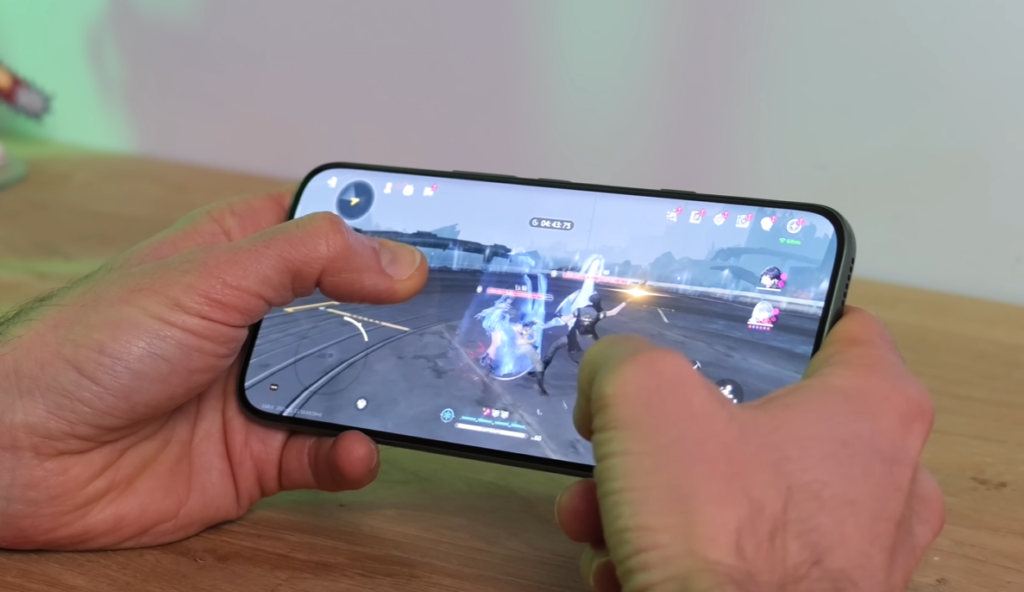
Gaming Performance: Moderate Capabilities
Test Game: Wuthering Waves (demanding action RPG)
Graphics Settings: Low/Medium (didn’t push too hard)
Performance Results:
Wuthering Waves was technically playable on the Note Edge, but with significant caveats:
- ✅ Ran on lower graphics settings
- ⚠️ Frame rate dropped noticeably during intense battles
- ❌ Single-digit FPS at times when fighting multiple enemies
- ❌ Not an ideal gaming experience for demanding titles
Frame Rate Issues:
When combat got “tasty” (busy with multiple enemies and effects), the frame rate absolutely plummeted—sometimes into the single digits. This creates a choppy, frustrating experience.
Gaming Recommendations:
For better gaming experiences, stick to:
- ✅ Call of Duty Mobile (well-optimized)
- ✅ PUBG Mobile (good optimization)
- ✅ Casual games (puzzle games, platformers)
- ✅ Older AAA mobile games
Avoid expecting smooth performance in:
- ❌ Genshin Impact
- ❌ Wuthering Waves
- ❌ Honkai: Star Rail
- ❌ Other graphically demanding titles
Gaming Mode: Feature-Packed
Despite the moderate gaming performance, Infinix includes a comprehensive gaming mode stuffed with useful features:
Performance Controls:
- Performance mode toggles
- Frame rate monitoring
- Temperature monitoring
Convenience Features:
- Notifications blocker (prevents interruptions)
- Screen sensitivity adjustments
- Screen recording tools
- Floating toolbar access
Bypass Charging:
One particularly useful feature is bypass charging—when the phone is plugged in during gaming, it can power the device directly without cycling through the battery. This:
- Reduces heat generation
- Prevents battery degradation from constant charge/discharge
- Allows extended gaming sessions without worrying about battery health
Overall Gaming Mode Assessment:
The gaming mode is impressively feature-rich for a budget phone, even if the underlying hardware can’t always deliver flagship-level performance.
Battery Life: All-Day Champion
Massive 6,500mAh Capacity
Rated Capacity: 6,500mAh (Infinix’s claim) Actual Capacity: 6,150mAh (phone’s internal reading)
The difference between these numbers is typical—manufacturers often rate total battery cell capacity, while the system reports usable capacity after accounting for battery management overhead.
Real-World Battery Performance
All-Day Battery Life:
From a full charge, you can comfortably get through an entire day even with demanding usage patterns:
- ✅ Hours of screen-on time
- ✅ Extensive video chatting
- ✅ Social media browsing
- ✅ Music streaming
- ✅ Navigation
- ✅ Photography
Mixed Usage Results:
With typical mixed usage (browsing, social media, messaging, calls, photos), expect:
- 8-10+ hours of screen-on time over a full day
- Comfortably lasting from morning until bedtime
Gaming Battery Drain:
Testing with Wuthering Waves on medium graphics settings:
- Approximately 5.5 hours of continuous gaming from full charge
- This is impressive considering how demanding the game is
Battery Life Verdict:
The Note Edge’s battery life is excellent, easily competing with and often exceeding competitors in this price range. You won’t experience battery anxiety with this phone.
45W Wired Charging
Charging Speed: 45W wired charging support
Charging Time: Full charge in under an hour
Assessment:
While 45W isn’t the fastest charging available (some phones now offer 100W+ charging), it’s perfectly adequate:
- Not frustratingly slow
- Fast enough for convenient top-ups
- Full charge during breakfast or while getting ready
- No wireless charging support (common omission at this price)
Charging Strategy:
With such massive battery capacity, you’ll rarely need to charge during the day. Most users can charge overnight and make it through the following day easily.
Camera System: Simple but Adequate
Camera Hardware Breakdown
Main Camera:
- Resolution: 50 megapixels
- Sensor Size: 1/2 inch
- Features: Standard smartphone camera features
Ultrawide Camera: None Telephoto Camera: None
Front Camera:
- Resolution: 13 megapixels
- Use: Selfies and video calls
2x Zoom Option:
The camera app includes a “2x zoom” button, but this is digital zoom only—it’s simply cropping into the main sensor’s image. Don’t expect the quality benefits of optical zoom.
Camera Modes and Features
Portrait Mode:
Standard portrait photography with background blur, plus a slightly creepy body retouching feature that allows you to:
- Slim down waist
- Adjust shoulder width
- Enhance certain body features
Unfortunately, these adjustments don’t work on animated characters or objects—only human bodies.
Night Mode:
Dedicated night photography mode for low-light situations (though performance is limited, as we’ll discuss).
Pro Mode:
For photography enthusiasts, the Pro mode allows manual control over:
- ISO sensitivity
- White balance
- Various effects
RAW Support: Not observed in testing—a limitation for serious mobile photographers.
Photo Quality: Everyday Photography
Daylight Performance:
In good lighting conditions, the Note Edge produces:
- ✅ Acceptable everyday photos
- ✅ Decent color reproduction
- ✅ Adequate detail
- ✅ Suitable for social media sharing
Low-Light Performance:
This is where the camera struggles:
- ❌ Photos become quite grainy
- ❌ Detail loss in shadows
- ❌ Noise becomes very noticeable
- ❌ Colors lose accuracy
Expectation Management:
For a budget phone, the camera does an “all right job” as long as you:
- Don’t expect flagship-level image quality
- Primarily shoot in good lighting
- Understand limitations in challenging conditions
- Accept that this won’t replace a dedicated camera
Video Recording Capabilities
Main Camera Video:
- Maximum Resolution: 2K at 30fps
- Alternative: 1080p (Full HD) at 30fps or 60fps
Video Quality:
Testing at 2K/30fps reveals:
- ✅ Reasonably crisp visuals
- ⚠️ Stabilization isn’t fantastic (requires relatively steady hands)
- ✅ Microphones do a good job picking up voice
- ✅ Adequate for home movies and video chatting
Stabilization Issues:
Without optical image stabilization (OIS) or particularly advanced electronic stabilization (EIS), you’ll need to:
- Hold the phone relatively still
- Use both hands when possible
- Consider a gimbal for smooth motion shots
Microphone Performance:
The built-in mics perform admirably:
- Clear voice capture
- Decent noise reduction
- Suitable for vlogs and video calls
Front Camera (Selfie)
Specifications:
- 13 megapixels
- 2K video at 30fps
- 1080p at 60fps option
Selfie Quality:
The front camera performs adequately for:
- Video calls (Zoom, Teams, Google Meet)
- Selfies for social media
- Front-facing vlogs
Again, don’t expect miracles, but it’s perfectly serviceable for typical use cases.
Pros and Cons: The Complete Picture
✅ What the Infinix Note Edge Does Well
1. Display Quality The 6.78″ curved AMOLED screen with 1.5K resolution and 120Hz refresh rate is genuinely impressive for the price. It’s vibrant, smooth, and spacious.
2. Design and Build The slim 7mm profile, lightweight 185g body, and premium-feeling textured back create a phone that feels more expensive than it is.
3. Battery Life The massive 6,500mAh battery delivers all-day performance even with heavy usage. 5.5+ hours of gaming on a single charge is remarkable.
4. Storage Capacity 256GB of internal storage is generous and should satisfy most users’ needs.
5. Durability Features IP65 dust and splash resistance plus Gorilla Glass 7i provide peace of mind for everyday use.
6. Update Promise 3 years of OS updates and 5 years of security patches beat many budget competitors.
7. Display Brightness The screen gets bright enough to remain visible in direct sunlight and bright environments.
8. Charging Speed 45W charging fills the large battery in under an hour—fast enough to be convenient.
9. Gaming Mode Features The comprehensive gaming mode with bypass charging and customization options adds value for gamers.
10. Price-to-Features Ratio For a budget phone, you’re getting a lot of premium features that would cost significantly more from other manufacturers.
❌ What Could Be Better
1. Gaming Performance The Dimensity 7100 chipset struggles with demanding games like Wuthering Waves, delivering poor frame rates in intense scenes.
2. Camera Versatility No ultrawide or telephoto cameras limits photographic flexibility. The single 50MP main camera is all you get.
3. Low-Light Photography Photos in dim conditions become quite grainy and lose significant detail.
4. Video Stabilization The lack of optical stabilization and mediocre electronic stabilization means shaky video unless you have steady hands.
5. Always-On Display The AOD only stays on for 5 seconds with no way to change this—making it barely useful.
6. Software Quirks Occasional freezing and refusal to wake from hibernation can be frustrating.
7. Bloatware While most can be uninstalled, the pre-installed apps are annoying and waste time during initial setup.
8. No microSD Expansion With only 256GB non-expandable storage, heavy users might eventually run into space constraints.
9. Fingerprint Scanner Speed The optical sensor is noticeably slower than ultrasonic alternatives or flagship implementations.
10. No HDR Streaming Lack of HDR support in Netflix and other streaming services means you miss out on enhanced video quality.
11. Camera App Responsiveness The camera can be sluggish when switching modes or processing images.
12. Control Center Design The mishmash of icons without visual refinement makes the control center feel unpolished.
Who Should Buy the Infinix Note Edge?
✅ Perfect For:
Budget-Conscious Buyers If you want maximum features for minimum money, the Note Edge delivers impressive value.
Display Enthusiasts Anyone prioritizing screen quality will appreciate the gorgeous AMOLED panel with curved edges and 120Hz refresh.
Battery Life Seekers Users who need all-day battery life without carrying chargers will love the 6,500mAh capacity.
Casual Gamers If you play optimized titles like PUBG Mobile or Call of Duty Mobile rather than demanding games, performance will be adequate.
Media Consumers The large, vibrant screen makes this excellent for watching videos, browsing social media, and reading.
First-Time Smartphone Buyers Someone upgrading from a basic phone will find the Note Edge feature-packed and impressive.
Style-Conscious Users The slim design, curved display, and halo lighting create a phone that looks premium despite the budget price.
❌ Look Elsewhere If You:
Need Top Gaming Performance Serious mobile gamers playing Genshin Impact, Wuthering Waves, or other demanding titles should invest in gaming-focused phones.
Prioritize Camera Quality Photography enthusiasts wanting versatile camera systems with ultrawide, telephoto, and excellent low-light performance need to spend more.
Want Flagship Performance If you need the snappiest possible app launches and multitasking, flagship processors deliver noticeably smoother experiences.
Require Expandable Storage Users who need more than 256GB and want microSD expansion should consider phones with expandable storage.
Demand Software Perfection If occasional bugs and software quirks frustrate you, cleaner Android experiences from Google or Samsung might suit you better.
Need Professional Video Recording Content creators requiring stable, high-quality video with advanced features should look at phones with better stabilization and pro video modes.
Infinix Note Edge vs Competition
How Does It Stack Up?
Similar Price Range Competitors:
- Redmi Note 13 Pro
- Realme 12 Pro
- Samsung Galaxy A35
- Motorola Moto G Power (2026)
- Nokia G400
Note Edge Advantages:
- Slimmer and lighter than most competitors
- Larger battery than many rivals
- Curved AMOLED display (rare in budget segment)
- Unique halo lighting feature
- MediaTek’s newest budget chipset
Where Competitors Win:
- Some offer ultrawide cameras (Realme, Redmi)
- Better software optimization (Samsung, Motorola)
- Stronger gaming performance (some Snapdragon competitors)
- microSD expansion (Nokia, Motorola)
- Better low-light photography (Samsung, Realme)
Final Verdict: Is the Infinix Note Edge Worth It?
The Bottom Line
The Infinix Note Edge is a solid budget smartphone that delivers impressive features where it counts most—display quality, battery life, and design. It’s not perfect, with notable weaknesses in gaming performance, camera versatility, and software polish, but it offers remarkable value for money.
Rating Breakdown:
Display: ⭐⭐⭐⭐⭐ (5/5) The curved AMOLED screen is genuinely excellent for this price range.
Performance: ⭐⭐⭐☆☆ (3/5) Adequate for daily tasks but struggles with demanding games.
Battery Life: ⭐⭐⭐⭐⭐ (5/5) All-day performance even with heavy usage is outstanding.
Camera: ⭐⭐⭐☆☆ (3/5) Decent in good light, but lacking versatility and low-light capability.
Design: ⭐⭐⭐⭐☆ (4/5) Slim, lightweight, and premium-feeling with minor durability concerns.
Software: ⭐⭐⭐☆☆ (3/5) Functional but occasionally buggy with bloatware.
Value: ⭐⭐⭐⭐⭐ (5/5) Exceptional features for the budget price point.
Overall Rating: 4/5 Stars
Who Wins with the Note Edge?
If you prioritize screen quality, battery life, and design over camera excellence and gaming performance, the Infinix Note Edge is an easy recommendation. It’s a budget phone that doesn’t feel cheap—a rare accomplishment in this competitive market.
For everyday users who browse social media, watch videos, take occasional photos, and need their phone to last all day, the Note Edge delivers everything necessary and more. Just don’t expect it to compete with flagships or gaming-focused devices.
Final Recommendation: The Infinix Note Edge earns its place as one of the best budget phones of 2026 for users with realistic expectations and priorities aligned with its strengths.
No, it’s not fully waterproof. The IP65 rating means it’s dust-tight and protected against water jets (splashes, rain), but it’s not designed for submersion in water.
Infinix Note Edge Specifications Summary:
- Display: 6.78″ AMOLED, 2644×1280, 120Hz, Curved
- Processor: MediaTek Dimensity 7100
- Storage: 256GB (non-expandable)
- Battery: 6,500mAh, 45W charging
- Camera: 50MP main, 13MP selfie
- OS: XOS 16 (Android 16)
- Build: IP65, Gorilla Glass 7i
- Dimensions: 7mm+ thick, 185g
- Special Features: Active Halo Lighting, One-Tap button, Gaming Mode
- Colors: Titanium, Black, Blue, Green
- Price Range: Budget segment (under $300)
Bottom Line: A beautifully designed budget phone with an excellent display and outstanding battery life, held back by moderate gaming performance and camera limitations. Highly recommended for media consumers and battery life seekers.