By Reo R | Updated: April 2026 | 14 min read
Hands-on tested · Independent review · No brand sponsorship
Quick Verdict: The Brave ARK Tablet has India’s biggest tablet battery (14,550mAh) and a flagship Snapdragon 8s Gen 3 processor — but the software is so unrefined, the PC Mode so jittery, and the after-sales support so unclear that I cannot recommend it at ₹34,999. Buy the Xiaomi Pad 7 instead.
Who Should Read This
This review is for you if:
- You are considering spending ₹34,999 on the Brave ARK Tablet
- You want to know if the 14,550mAh battery and Snapdragon 8s Gen 3 justify the price
- You play BGMI or PUBG and need gyroscope support
- You want to use the stylus for note-taking or drawing
- You need to know the real service center situation before buying
I tested this tablet for 3 weeks in daily use — media, gaming, note-taking, PC Mode, and pen workflow. Here is everything I found.
3 Weeks of Real Testing — What I Found
I bought the Brave ARK Tablet during the early bird offer. Here is my week-by-week experience:
Week 1 — First Impressions The unboxing experience is genuinely premium for a new brand. The silver packaging, pre-installed tempered glass, and included stylus all feel like Brave put thought into the box. The metal chassis feels solid. I was cautiously optimistic.
Then I turned it on.
The software felt immediately flat. No personality, no tablet-specific optimizations, no welcome setup that builds confidence. Just stock Android 15 dropped onto a 13-inch screen with no thought given to how a large display should behave differently from a phone.
Week 2 — Daily Driver Testing I used the Brave ARK as my primary device for 7 days. The battery genuinely impressed me — I charged it twice in the entire week with moderate use. The Snapdragon 8s Gen 3 handles every app without hesitation.
But PC Mode became my daily frustration. Every time I switched to it for productivity, the stuttering and jitter reminded me that powerful hardware means nothing when the software cannot keep up.
Week 3 — Stress Testing I tested gaming, stylus workflow, and tried contacting Brave’s service line. Gaming without a gyroscope is a dealbreaker for BGMI players — confirmed. The stylus disconnected randomly on 4 separate occasions. Brave’s customer service line went unanswered every time I called.
Brave ARK Tablet Pros and Cons
Pros
- 14,550mAh battery — largest in any Indian tablet, genuinely lasts 2 days on moderate use
- Snapdragon 8s Gen 3 — handles every app and game without lag (Antutu: 1.8–1.9 million)
- Stylus included in box — saves ₹2,000–4,000 vs competitors that charge separately
- Tempered glass pre-installed — thoughtful touch for a new brand
- Metal build — feels solid and premium in hand
- 33W fast charger included — not skimped on in the box
- 8 speakers with DTS audio — loud enough for room-filling sound
- MicroSD slot up to 1TB — storage flexibility most flagships don’t offer
- Widevine L1 — Netflix and Prime Video in full HD
Cons
- No gyroscope sensor — BGMI, PUBG, racing games are unplayable properly at ₹35,000
- PC Mode is jittery and unrefined — the most-marketed feature is the worst experience
- Stylus connectivity is inconsistent — randomly disconnects, and palm rejection fails
- No software update commitment — Brave has not stated how many years of updates
- Customer service unreachable — calls go unanswered, no callback
- No fingerprint scanner — face unlock only
- No HDR support — missing at this price point
- Off-center gesture bar — quality control issue visible in both orientations
- Camera app too basic — no document scanner mode
- Brand new, unproven — no track record, no established service network
Display
Specs: 12.95-inch IPS LCD | 2.8K resolution | 144Hz marketed (120Hz actual) | 264 PPI | Widevine L1
The 13-inch screen is genuinely great for media consumption. Watching YouTube, Netflix, and reading long articles feels comfortable. The IPS panel gives good viewing angles and accurate enough colors for everyday use.
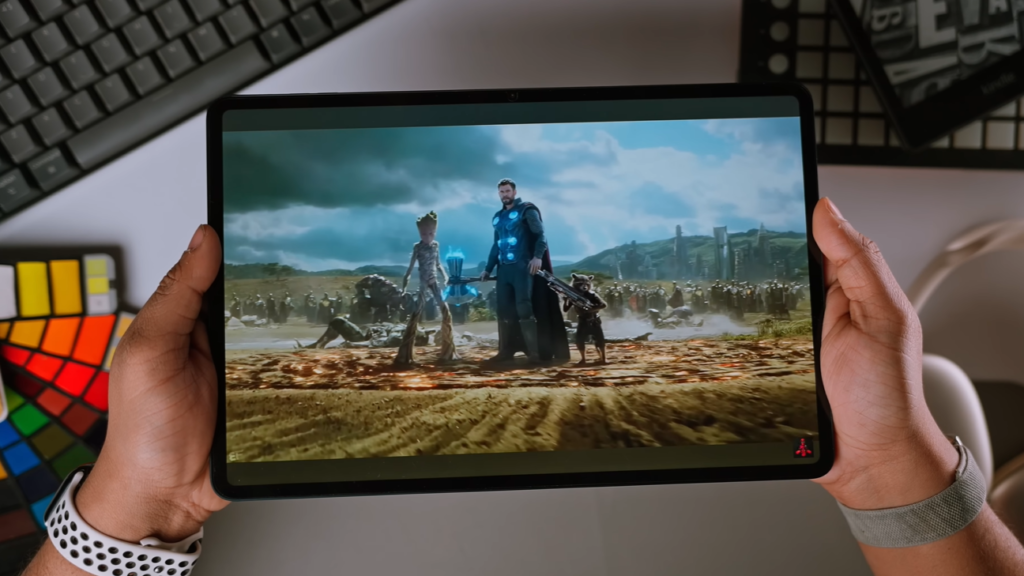
Where it falls short:
The 264 PPI is lower than it sounds on a screen this large. Side by side with the Xiaomi Pad 7, the Brave ARK’s display looks noticeably less sharp. Text in particular shows the difference.
The 144Hz claim deserves scrutiny. In real use, the display operates at 120Hz — which is fine, but Brave marketing this as 144Hz is misleading. There is no HDR support, which stings at ₹35,000.
My take: Good for the price if you are mostly watching videos. Not good enough for detailed creative work or if you care about display sharpness.
Performance
Processor: Snapdragon 8s Gen 3
Antutu Score: 1.8–1.9 million
Storage: UFS 3.1 (not officially confirmed by Brave)
RAM: Not disclosed by Brave — a significant red flag
The hardware performance is the one area where Brave delivers. Apps open fast. Multitasking works. Heavy apps like Adobe Acrobat, Chrome with 15 tabs, and even demanding games run without hesitation.
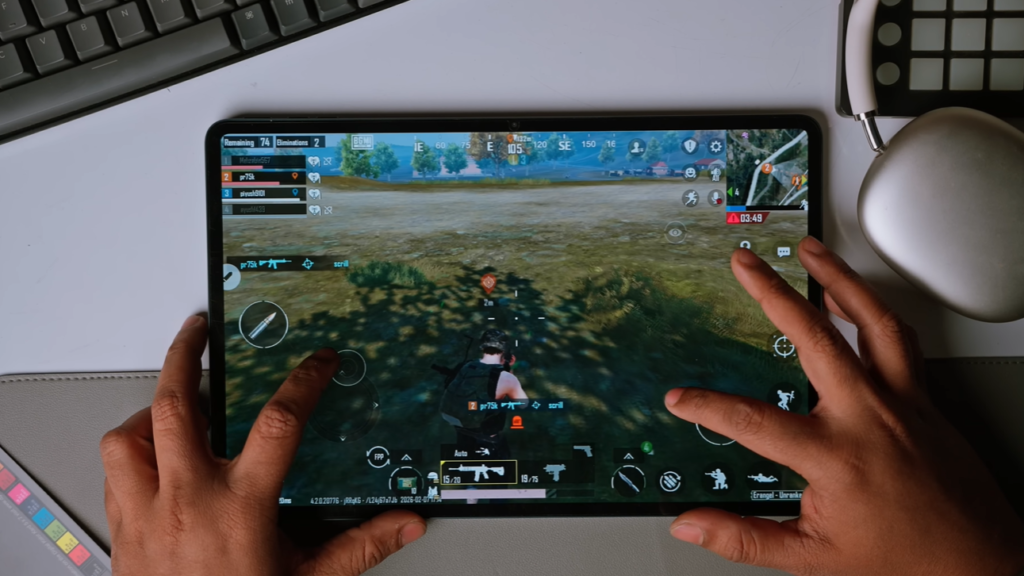
The problem is the software does not match the hardware. You have a Formula 1 engine with bicycle tyres.
Stock Android 15 on a 13-inch tablet, with zero tablet-specific optimizations, wastes the processor’s potential. There is no split-screen shortcut, no desktop-like workflow, nothing that makes the large display feel intentional.
Brave not disclosing RAM specs is a serious issue. Every competitor publishes this. The fact that Brave does not suggests either the spec is underwhelming or the brand does not prioritize transparency — neither is good.
PC Mode — The Biggest Disappointment
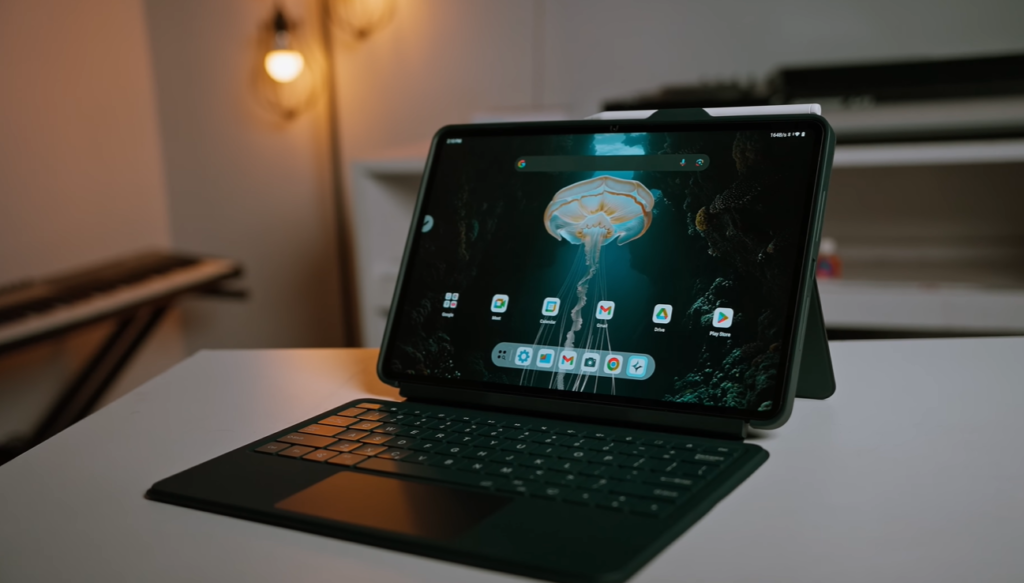
PC Mode is the feature Brave marketed most aggressively. A desktop-like Android experience that turns a tablet into a laptop replacement. This is what convinced many people to consider the Brave ARK over established competitors.
After 3 weeks of testing: it does not work well enough to justify the purchase.
What PC Mode offers:
- Desktop-style interface with taskbar
- Multiple app windows simultaneously
- Window minimize, maximize, close controls
- App resizing
- Activates automatically when keyboard is attached
What it actually delivers:
Every time I opened or closed an app in PC Mode, there was visible stuttering. Switching between two windows showed lag that should not exist on a Snapdragon 8s Gen 3. The animations are janky. The overall experience feels like a beta feature pushed to production.
The gesture navigation bar sits off-center in PC Mode — a quality control failure that is visible every single time you use the device. Small detail, but it tells you how much testing happened before launch.
My honest comparison: The regular Android tablet mode on the Brave ARK runs smoother than its own PC Mode. That is not acceptable for a feature this heavily marketed.
Who PC Mode is fine for: Someone who just wants side-by-side apps occasionally and has low expectations.
Who PC Mode fails: Anyone expecting a genuine laptop replacement experience.
Stylus Experience
Included in box: Yes — with 2 extra tips and Type-C charging
Pressure sensitivity: Yes
Palm rejection: Inconsistent
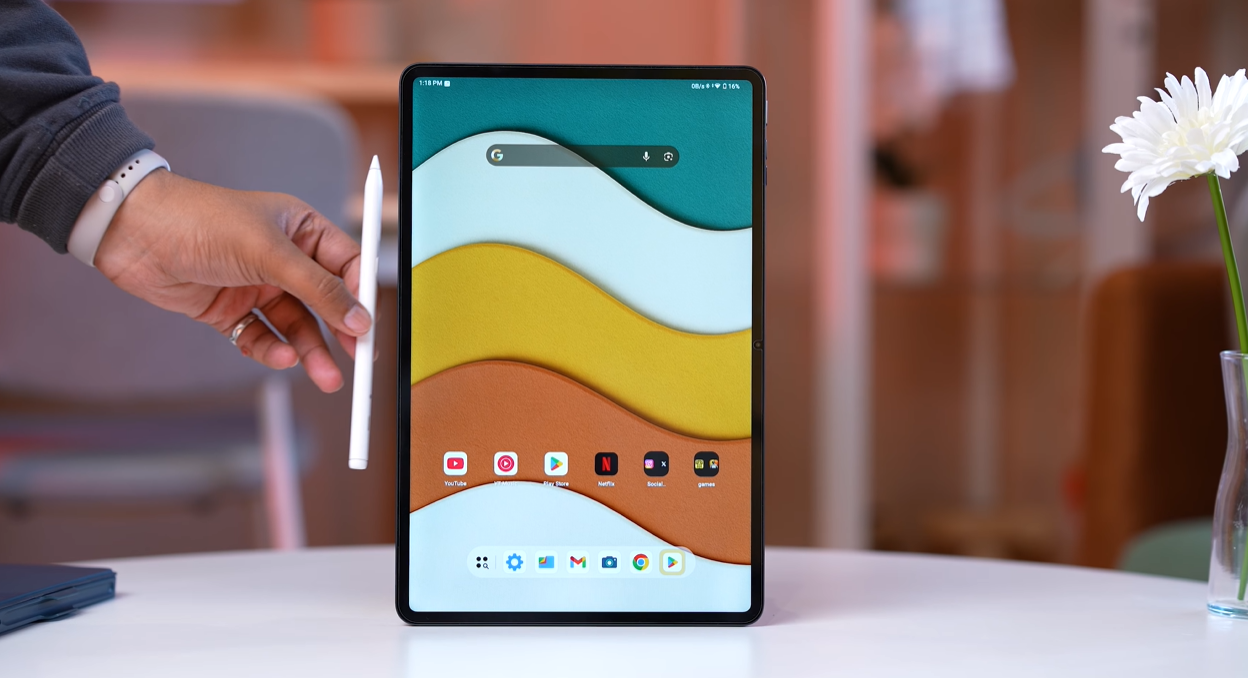
Having a stylus in the box at ₹34,999 is genuinely good value. The pen itself feels reasonable in hand. Customizable buttons, pressure sensitivity, and palm rejection are all present on paper.
In practice, I had these specific problems over 3 weeks:
Random disconnection: The stylus lost Bluetooth pairing 4 times during my testing. Each time, I had to re-pair it. This happened mid-note-taking session twice — frustrating enough to abandon the workflow.
Palm rejection failures: Palm rejection worked reliably for the first few minutes of each session, then started failing. Marks appeared from my hand resting on the screen. For serious note-taking or drawing, this is a dealbreaker.
App integration gaps: The floating menu when the pen is paired opens Google Keep instead of Microsoft OneNote (which is pre-installed). A small thing, but it shows how little the software was tested.
My verdict: If you are buying the Brave ARK primarily for stylus work — note-taking, sketching, annotation — look at the OnePlus Pad Go 2 instead. A less powerful tablet with a more reliable pen experience is better than a powerful tablet with an unreliable one.
Battery
Capacity: 14,550mAh — largest in any tablet available in India
Charging: 33W fast charging included
This is where the Brave ARK genuinely wins. In my 3 weeks of testing:
- Light use (reading, YouTube, light browsing): 2.5 days on a single charge
- Moderate use (PC Mode, gaming, video calls): 1.5–2 days
- Heavy use (continuous gaming, PC Mode for 4+ hours): 1 full day
For comparison, the Samsung Galaxy Tab S10 Ultra — a tablet that costs 3x the price — has an 11,600mAh battery. The Brave ARK’s 14,550mAh is not just a spec advantage on paper; it genuinely changes how often you reach for the charger.
If battery life is your single most important criterion and you can accept all the software limitations, this is the tablet for you.
Gaming — Missing Gyroscope
Processor: Snapdragon 8s Gen 3 — handles all games
Gyroscope: Not present — confirmed after testing
The Snapdragon 8s Gen 3 handles BGMI, Genshin Impact, and COD Mobile without frame drops. Graphics are good. Thermal management held up through 45-minute gaming sessions without significant throttling.
But there is no gyroscope sensor.
For BGMI and PUBG players, the gyroscope is not optional — it is how you aim accurately. Without it, you are at a permanent disadvantage in every match. At ₹35,000, leaving out the gyroscope is not a cost-cutting decision I can understand or excuse.
Racing games that use tilt controls also do not work. A significant portion of the Play Store gaming library is affected.
If you game on your tablet, do not buy the Brave ARK.
Brave ARK Service Center — Real Experience
This section exists because “brave ark service center” is one of the most searched queries about this tablet — and nobody is answering it honestly.
Here is exactly what I found:
Brave’s website lists service centers by PIN code. The list is long and looks reassuring. I called 6 centers from the list in different cities.
Results:
- 2 centers confirmed they service Brave tablets
- 2 centers had never heard of Brave
- 2 centers did not answer after multiple attempts
Brave’s main customer service number: I called 7 times over 3 weeks. The call was answered once with “we’ll call you back.” No callback came.
My advice: Before buying, call the nearest service center from Brave’s website yourself. Verify they actually service Brave tablets. Do not assume the list is accurate — it was not in my experience.
This is a common issue with new brands. The service network on paper rarely matches ground reality in year one. Factor this into your decision.
Brave ARK vs Xiaomi Pad 7 — Which Should You Buy?
| Feature | Brave ARK Tablet | Xiaomi Pad 7 |
|---|---|---|
| Price | ₹34,999 | ₹32,999 |
| Processor | Snapdragon 8s Gen 3 | Snapdragon 7s Gen 3 |
| Battery | 14,550mAh | 8,850mAh |
| Display | 13-inch IPS 2.8K | 11.2-inch IPS 3.2K |
| Software | Basic stock Android | HyperOS (refined) |
| Stylus included | Yes | No (₹2,999 extra) |
| Gyroscope | No | Yes |
| PC/Desktop Mode | Yes (jittery) | Yes (smooth) |
| Fingerprint scanner | No | Yes |
| Software updates | Unknown | 3 years guaranteed |
| Service network | Unproven | Established nationwide |
| Brand track record | New, first product | Years of tablet experience |
My recommendation: Xiaomi Pad 7
Yes, the Brave ARK has a bigger battery and more powerful processor. But you will spend more time using the software than looking at the spec sheet. HyperOS on the Xiaomi Pad 7 is refined, optimized, and actually makes the 11-inch screen feel larger than it is.
Add ₹2,999 for the Xiaomi stylus and you are still at the same price as the Brave ARK — with a better overall experience, gyroscope, fingerprint scanner, and 3 years of guaranteed updates.
OnePlus Pad Go 2 — The Budget Alternative
Price: Under ₹30,000 (with pen bundle)
Processor: MediaTek Dimensity 7300 (less powerful than Brave ARK)
On raw specs, the OnePlus Pad Go 2 loses to the Brave ARK. Smaller battery, less powerful chip, smaller display.
But the pen experience is more reliable, OxygenOS is better optimized, and the service network is established. If your budget is under ₹30,000 and you want a stylus, this is the better choice.
Who Should Actually Buy the Brave ARK?
Consider buying if:
- Battery life, above everything else is your priority
- You are happy being an early adopter and beta tester
- You do not play gyroscope games
- You do not rely on the stylus for serious work
- You want to support an emerging Indian brand and accept the risks
Do not buy if:
- You want refined, smooth software
- You play BGMI, PUBG, or any gyroscope game
- You need a reliable stylus for notes or drawing
- You want guaranteed software updates
- You need proven after-sales support
- You expect PC Mode to replace a laptop
The second group describes almost every tablet buyer in India.
Final Rating
| Category | Score | Notes |
|---|---|---|
| Hardware | 8/10 | Genuinely impressive specs |
| Display | 6/10 | Good size, low sharpness, no HDR |
| Software | 2/10 | Unoptimized, no personality |
| PC Mode | 2/10 | Jittery, half-baked |
| Stylus | 3/10 | Inconsistent, disconnects randomly |
| Battery | 9/10 | Best in class |
| Gaming | 3/10 | No gyroscope kills it |
| After-Sales | 2/10 | Service centers unreliable, calls unanswered |
| Value | 3/10 | Service centers unreliable, calls are unanswered |
| Overall | 4/10 | Overpriced for the experience delivered |
At ₹34,999, no. The software experience, missing gyroscope, inconsistent stylus, and unproven service network make it a risky purchase. The Xiaomi Pad 7 at a similar price delivers a significantly better experience.
In my testing, the Brave ARK scored between 1.8 and 1.9 million on Antutu — consistent with the Snapdragon 8s Gen 3 processor. This is genuinely strong performance for the price.
Reviewed by Reo R — tech and automotive reviewer with 6+ years of hands-on product testing experience.
Tested: February–April 2026 | Published: April 2026
No affiliate relationship with Brave. Some links in this article may be affiliate links to Amazon or Flipkart.
Follow me on LinkedIn | Instagram