Amazon has just rolled out the biggest redesign in Fire TV’s history — and if you haven’t seen it yet, you’re in for a genuine surprise.
This is not a minor refresh. This is not a few tweaked icons and a new colour scheme. Announced at CES 2026 in January and rolling out to devices from February 2026, the new Fire TV user interface is the first major overhaul since 2020 and only the third full redesign in the platform’s 12-year existence. Amazon says the new UI is up to 30% faster than the old interface, with a completely rebuilt underlying codebase to back it up.
The question everyone is asking is obvious: does the new Fire TV finally rival Google TV? Is it worth upgrading your device? And what exactly has changed?
This is a complete, detailed walkthrough of everything that is new, what works, what still needs improvement, and how the new Fire TV stacks up against its biggest competitors in 2026.
Why This Update Is Such a Big Deal
To understand how significant this update is, you need to know what Fire TV looked like before it.
The previous Fire TV interface launched in 2020. Before that, the last major redesign was in 2016. For six years, the core design language of Fire TV remained largely unchanged — a navigation bar running across the middle of the screen, pinned apps across the top row, and a sea of content recommendations cascading down the home screen. It was functional. It was familiar. And by 2025 standards, it was starting to look and feel dated.
Competitors had not been standing still. Google TV launched with a clean, discovery-first interface in 2020. Roku updated its platform with cleaner layouts and better cross-platform content surfacing. Apple TV’s tvOS continued to refine one of the slickest TV operating systems available. Amazon, despite holding a 36% market share of streaming media devices in the US — second only to Roku — was running on an interface that had not fundamentally changed in half a decade.
The 2026 redesign changes that. Amazon has rebuilt Fire TV from the ground up with a new design language, new navigation structure, faster performance, and smarter content discovery powered by Alexa+, their generative AI assistant.
Which Devices Are Getting the New Fire TV Update?
The new Fire TV UI began rolling out in February 2026. Not every device is getting it at the same time — and some older devices may not receive it at all.
First devices to receive the update (rolling out now):
- Fire TV Stick 4K Max (2nd Generation / 3rd Generation)
- Fire TV Stick 4K Plus (previously called Fire TV Stick 4K)
- Fire TV Omni Mini-LED Series
- Fire TV 2-Series, 4-Series, and Omni QLED Series smart TVs
- Amazon Ember Artline (new for 2026)
Additional devices: Amazon has confirmed the update will expand to more Fire TV models through spring and into the remainder of 2026.
Devices unlikely to receive the update: The Fire TV Stick 4K Max 1st Generation and older Fire TV devices running Fire OS 7 are currently not on the confirmed update list. Amazon has not officially confirmed whether these devices will ever receive the new interface.
The update runs on Fire OS 8.1.6.0 on the Fire TV Stick 4K Max. It is a free over-the-air update. To check manually:
- Go to Settings on your Fire TV home screen
- Select My Fire TV
- Select About
- Select Check for Updates
- If available, download and restart when prompted
The New Fire TV Interface — A Complete Walkthrough
Navigation Menu — Moved to the Top Left
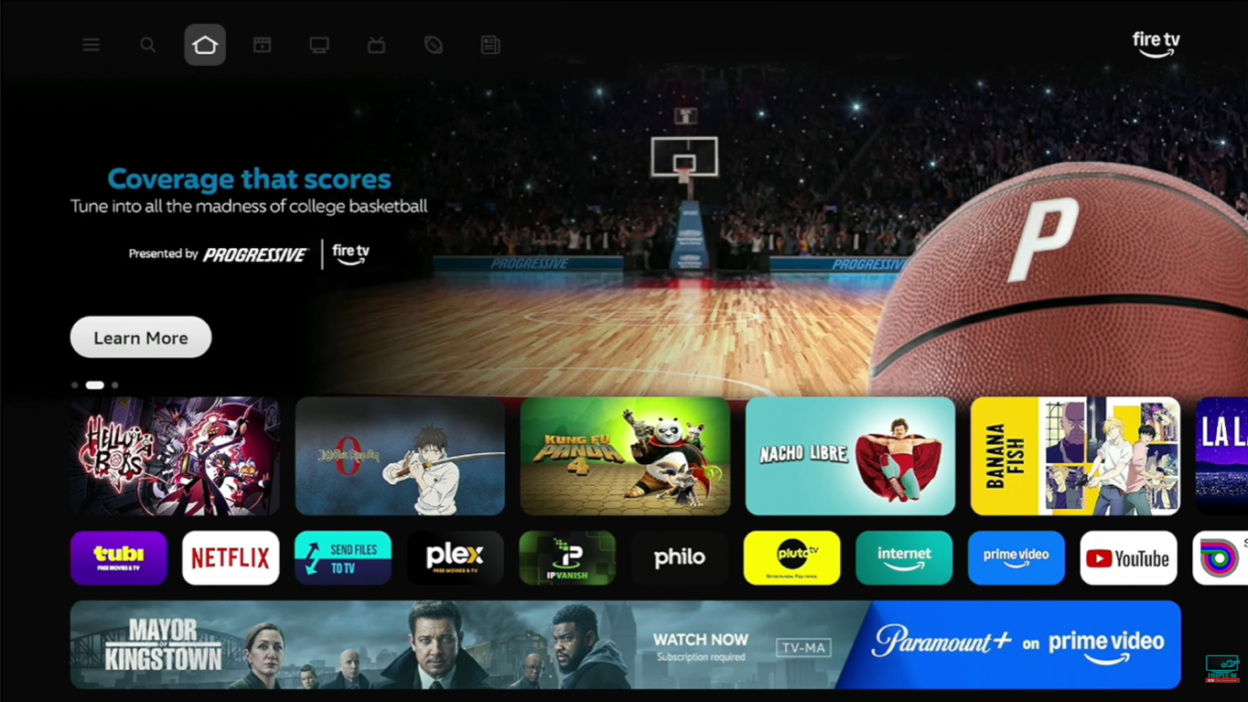
The single most immediately noticeable change in the new Fire TV UI is where the navigation lives. In the old interface, the navigation bar ran horizontally across the middle of the home screen. In the new design, it has moved entirely to the top left of the screen.
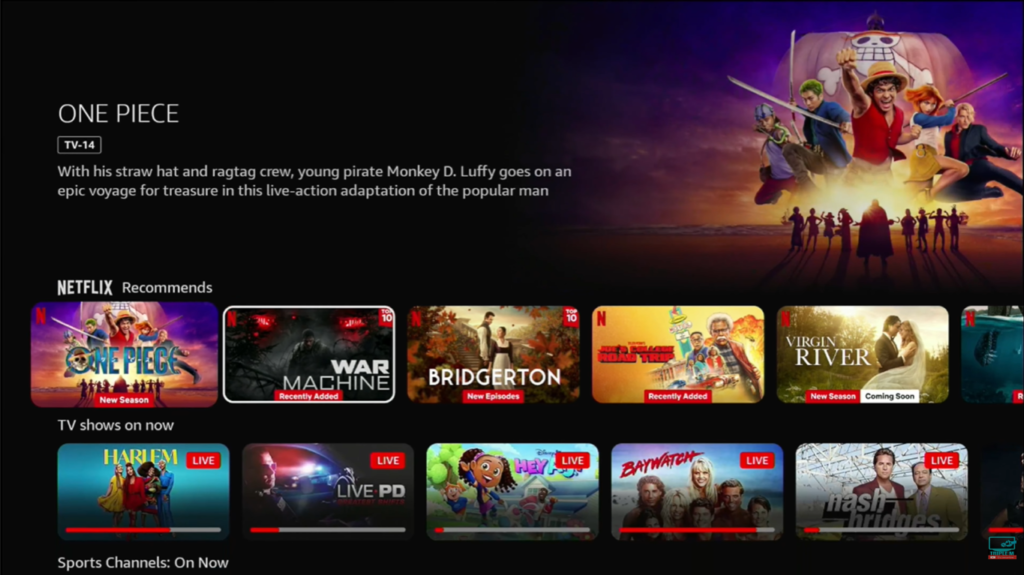
The new top navigation menu contains eight dedicated sections:
- Menu — accessed via the Menu button on the remote, opens a system-wide shortcut panel
- Search — cross-platform search across all your subscribed services
- Home — your personalised home screen with Next Up and app row
- Movies — dedicated movie discovery hub across all your streaming services
- TV Shows — dedicated TV discovery across all subscriptions
- Sports — live and on-demand sports content including MLB, NBA, NFL highlights and upcoming events
- News — dedicated news tab with live and on-demand news content
- Live TV — live TV guide and free live TV recommendations
The separation of Movies, TV Shows, Sports, News, and Live TV into dedicated tabs is one of the most meaningful improvements in the entire update. Previously, all of this content competed for space on a single home screen that often felt cluttered and Prime Video-heavy. Now each content type has its own organised space.
The settings icon has also moved — it is now accessed from the top navigation area rather than the far right of a horizontal bar. This will take existing Fire TV users a few days to get used to, but the new location is logical once you adapt to the new layout.
Home Screen — What Changed
The home screen has been significantly reorganised. Here is what the new layout looks like from top to bottom:
Row 1 — Next Up For You: This is the first content row you see below the navigation menu. It surfaces personalised recommendations for what to watch next, drawing from your watch history and subscriptions across all your connected services — not just Prime Video. Long-pressing any title in this row gives you options including Watch Trailer, Add to Watchlist, and quick information about where it is available and at what price.
Row 2 — Your Apps: Your pinned applications now live in the second row rather than the very top of the screen. This is the most controversial layout change for existing users — apps used to be the first thing you saw. In the new design, you have to navigate past the content recommendation row to reach them. That said, you can now pin up to 20 apps in this row, up from the previous limit of six. Apps can be rearranged by holding down the centre select button and repositioning them. App icons now feature rounded corners and are spaced slightly further apart for a cleaner look.
Rows 3 and below — Personalised Content: The remainder of the home screen continues with content recommendation rows curated from your subscriptions. Free content is labelled clearly. Content available on Prime Video is highlighted. Third-party content from Netflix, Disney+, YouTube, Apple TV+, and others is surfaced alongside Prime Video results — though Prime Video does tend to receive prominent placement throughout.
Dedicated Content Tabs — Movies, TV Shows, Sports, News, Live TV
This is where the new Fire TV makes its strongest argument against Google TV and Roku.
Each dedicated tab aggregates content from across all your streaming subscriptions in one unified view. When you tap into Movies, you see films available across Netflix, Prime Video, Apple TV+, Disney+, and any other connected services — all in one place. The same applies to TV Shows, Sports, News, and Live TV.
The Sports tab is particularly welcome. You can check upcoming tournament schedules, browse live games, catch highlights from MLB, NBA, NFL, and more — without needing to jump in and out of individual apps. For sports fans who previously had to remember which streaming service had which game, this is a meaningful improvement.
The News tab similarly aggregates news content across services, making it far easier to get to live or on-demand news programming without navigating to specific apps.
New Settings Design
The settings menu has received a visual redesign with new icons and a full-screen layout that feels more modern than the old horizontal settings bar. The categories remain familiar — Network, My Fire TV, Accounts and Profiles, Applications, Displays and Sound, Notifications, Live TV, Equipment Control, Preferences, Controllers and Devices, Accessibility, and Help.
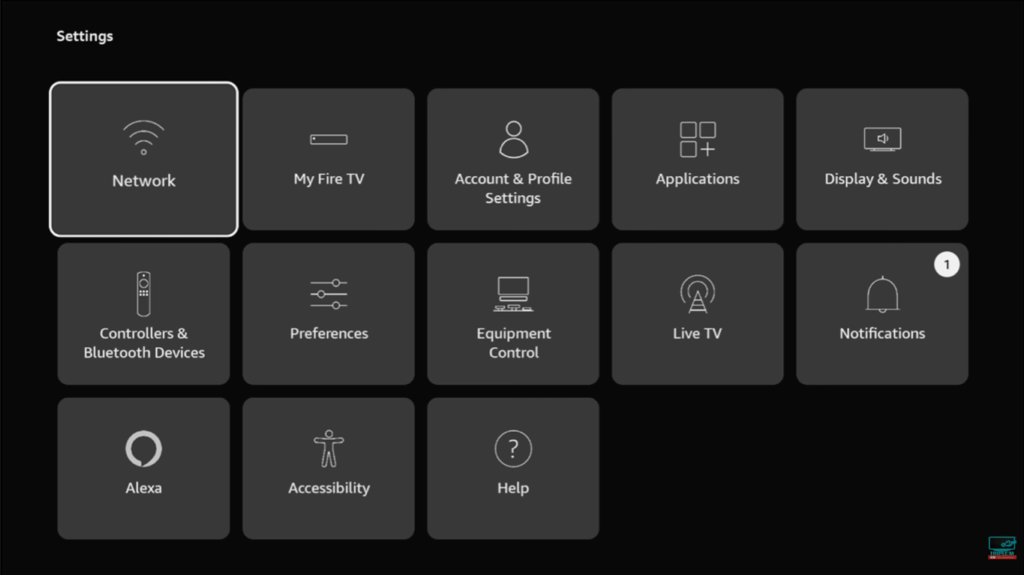
Importantly, once you click into individual settings sub-menus, the older 2020-era design still appears in many areas. This inconsistency — where the outer shell looks new but some inner screens still use the old UI — is one of the genuine criticisms of the current rollout. Amazon will likely address this in subsequent updates.
The New Menu Button and Shortcut Panel
Pressing the Menu button on your Fire TV remote no longer opens the app options menu as it used to. Instead, it opens a new system-wide shortcut panel that provides quick access to:
- Audio and display settings
- Accessibility options
- Smart home device management
- Connected Ring camera feeds
- Games, Art and Photos, and the Ambient Experience
Holding down the Home button on the remote opens the same quick-access shortcut panel from any screen — a genuinely useful addition that reduces the number of steps required to access common settings.
To access the old app options menu (Move, Delete, etc.) you now need to hold down the centre select button on an app icon rather than pressing Menu. It takes a few minutes to learn the new behaviour but it is straightforward once you know.
Third-Party App Sideloading — Still Supported
For those who use Fire TV specifically because it allows installation of third-party applications not available in the Amazon App Store — good news. Developer Options remain available in the new interface and the ability to sideload APKs is still fully present on the updated firmware. Apps like Downloader continue to work exactly as they did before. Amazon has not locked down sideloading with this update.
The Redesigned Fire TV Mobile App
Alongside the device interface update, Amazon has also launched a completely redesigned Fire TV mobile app for iOS and Android. Previously the app functioned essentially as a backup remote control. The updated app is substantially more capable:
- Browse movies, TV shows, sports, and news on your phone
- Manage your watchlist from anywhere — add recommendations while away from home
- Play content directly to your Fire TV from your phone
- Matching design language to the new Fire TV UI
The Fire TV mobile app is available as a free download on iOS and Android and is rolling out to all users over the coming weeks.
What Is New With Alexa+ on Fire TV
The 2026 Fire TV update coincides with the broader integration of Alexa+, Amazon’s generative AI-powered upgrade to their voice assistant, into the Fire TV experience.
Key Alexa+ features now available on Fire TV:
- Conversational content discovery: Ask Alexa+ natural language questions like “find me a thriller where the twist ending is a surprise” and it will surface relevant recommendations across your subscriptions
- Jump to specific scenes: On Prime Video, you can tell Alexa+ to skip to a specific scene in a film and it will navigate directly there
- Personalised recommendations: Alexa+ learns your viewing habits over time and surfaces increasingly accurate suggestions
- Smart home integration: Voice control of Ring cameras, smart lights, and connected devices directly through Fire TV
Amazon reports that customers are using Alexa+ on Fire TV 2.5 times more frequently than they used the original Alexa — suggesting the conversational AI approach is resonating with users who previously found voice commands too rigid to be useful.
How Does the New Fire TV Compare to Google TV?
This is the question at the heart of the update — and the honest answer is: it depends on what matters most to you.
Where the New Fire TV Is Better
- Third-party app sideloading: Fire TV still allows installation of apps outside the Amazon App Store. Google TV does not natively support this in the same way.
- Alexa integration: If you are invested in the Amazon smart home ecosystem — Ring cameras, Echo devices, smart plugs — Fire TV’s Alexa integration is significantly tighter than Google TV’s Google Home integration for most users.
- Price: Fire TV Sticks start at around $25–$50 and offer this updated experience at a fraction of the cost of Google TV devices like the Chromecast with Google TV ($50) or the Nvidia Shield TV Pro ($200).
- Sports and News tabs: The dedicated Sports and News tabs in the new Fire TV UI are more prominently featured than in Google TV’s current interface.
Where Google TV Is Still Ahead
- UI consistency: Google TV’s interface is fully consistent throughout. The new Fire TV still has pockets of 2020-era and even 2016-era design showing through in some settings sub-menus.
- Google Assistant: For users in the Google ecosystem — Gmail, Google Calendar, YouTube, Google Photos — Google Assistant integration is more seamless than Alexa+ for non-Amazon services.
- Content neutrality: Google TV’s interface is arguably more balanced in how it surfaces content across platforms, with less obvious prioritisation of one streaming service over others. Fire TV continues to favour Prime Video in its recommendations and layout.
- Speed: Amazon claims up to 30% speed improvements in the new UI. Real-world testing has been mixed — some reviewers report noticeable improvements, others have not seen a significant difference. Google TV on the Chromecast 4K is already very responsive.
The Honest Verdict on Fire TV vs Google TV in 2026
The gap has closed significantly. The new Fire TV is the best version of the platform Amazon has ever shipped and it is now a genuinely competitive interface rather than an outdated one. For most everyday users who want a fast, organised, affordable streaming experience — particularly those in the Amazon ecosystem — the new Fire TV is an excellent choice.
Google TV still has the edge in interface consistency and cross-platform neutrality. But for the first time in years, Fire TV is a peer-level competitor rather than a platform playing catch-up.
What Still Needs Improvement
No update is perfect. Here are the areas where the new Fire TV still has room to grow:
- UI inconsistency: Some settings screens and sub-menus still display the 2020 or 2016-era design. A fully consistent UI is still not here.
- Ad banner prominence: The large ad banner on the home screen still expands to take up nearly the full screen if you pause on it. This can be adjusted in settings but is on by default.
- Prime Video prioritisation: Amazon’s own content still receives more prominent placement than third-party services in recommendations and layouts. This is understandable commercially but worth being aware of.
- App row placement: Moving apps to the second row (below the Next Up content row) means more button presses to reach your apps from the home screen. Some users will find this frustrating.
- Limited device rollout: Older devices including the Fire TV Stick 4K Max 1st Generation are not confirmed to receive the update, leaving a significant portion of the installed user base on the old interface.
The new Fire TV user interface is the biggest redesign in the platform’s history — the first major overhaul since 2020. It was announced at CES 2026 in January and began rolling out to compatible devices in February 2026. The update runs on Fire OS 8.1.6.0 and is free for all supported devices.
The initial rollout covers the Fire TV Stick 4K Max (2nd and 3rd Generation), Fire TV Stick 4K Plus, and the Fire TV Omni Mini-LED Series. Amazon’s smart TVs, including the 2-Series, 4-Series, and Omni QLED Series are also included. The rollout is expanding to more devices through spring 2026. The Fire TV Stick 4K Max 1st Generation is not currently confirmed to receive the update.
Final Verdict — Is the New Fire TV Worth It?
Yes. Unambiguously yes — if you are on a supported device.
The 2026 Fire TV redesign is the update the platform has needed for years. The new navigation structure is cleaner and more logical. The dedicated content tabs for Sports, News, and Live TV are genuinely useful. The ability to pin 20 apps gives users far more flexibility. The performance improvements make the interface noticeably snappier in everyday use. And Alexa+ brings a meaningful AI-powered layer to content discovery that none of the competitors fully match yet.
Is it perfect? No. The interface consistency is still a work in progress. The ad banners are still there. Prime Video still receives preferential treatment in recommendations. And too many existing Fire TV owners are sitting on devices that may never receive the update.
But as a platform update for supported devices in 2026, this is exactly what Amazon needed to deliver — and they have largely delivered it. Fire TV is no longer playing catch-up with Google TV and Roku. It is now firmly in the conversation as one of the best streaming interfaces available at any price.
New Fire TV UI Rating: 8.5 / 10
- ✅ Biggest and most needed redesign in 6 years
- ✅ Up to 30% faster performance with rebuilt underlying code
- ✅ Dedicated tabs for Sports, News, and Live TV
- ✅ Pin up to 20 apps — up from just 6
- ✅ Alexa+ generative AI integration for smarter discovery
- ✅ Third-party app sideloading still fully supported
- ✅ New shortcut panel for quick settings access
- ✅ Free update — no new hardware required on supported devices
- ❌ UI inconsistency — some sub-menus still use 2020 and 2016 designs
- ❌ Apps moved to second row — more presses to reach your favourite apps
- ❌ Ad banners still prominent on the home screen by default
- ❌ Prime Video still prioritised in recommendations over third-party services
- ❌ Older devices including Fire TV Stick 4K Max 1st Gen not confirmed for update