I’ve always thought dual-screen laptops were stupid. There, I said it. They seemed like those concept cars at auto shows that look amazing but would be terrible to actually drive. Beautiful engineering that solves problems nobody actually has.
But after seeing what Asus did with their 2026 lineup, I need to admit something. I was wrong. Not partially wrong. Completely, totally wrong.
Let me explain why.
The Problem With Every Dual-Screen Laptop Before This
People actually liked the previous ZenBook Duo. The reviews were positive, customers seemed happy, but there was always this “but” hanging in the air. It ran an older Intel chip that just couldn’t handle what this crazy form factor demanded. The battery died too quickly. Performance wasn’t quite there. It felt like a really cool idea that shipped about a year too early.
That’s the worst kind of product, honestly. Something almost great is more frustrating than something completely terrible. You can see the potential, you understand the vision, but the execution falls just short enough to be annoying.
This year is different. Intel released their Core Ultra Series 3 chip, Qualcomm came out with the Snapdragon X2 Elite, and most importantly, Asus actually listened to feedback and redesigned everything from scratch.
The New ZenBook Duo Feels Like Magic
The moment you pick up the 2026 ZenBook Duo, you notice something is different. The whole thing is covered in this material, Asus calls ceraluminum. Top panel, keyboard area, bottom. Everything.
If you’ve never felt ceraluminum before, imagine if someone made laptop aluminum feel like stone. It has this matte texture that’s almost grippy but not sticky. And here’s the crazy part – it’s basically indestructible.
I’ve been using an older laptop with this material for over a year, and I treat my laptops terribly. I throw them in bags. I toss them on tables. I’m basically a laptop degenerate. But this ceraluminum stuff just doesn’t care. No scratches, no worn spots, nothing. It still looks new.
Why don’t more companies use this? I have no idea, but I’m glad Asus put it all over the ZenBook Duo instead of just on the lid.
That Hinge Though
Open the laptop and look at the spine. It looks like a Samsung Galaxy Fold phone got stretched into laptop size. This wild hinge mechanism reveals and hides itself as you open and close the device, and watching it is genuinely mesmerizing.
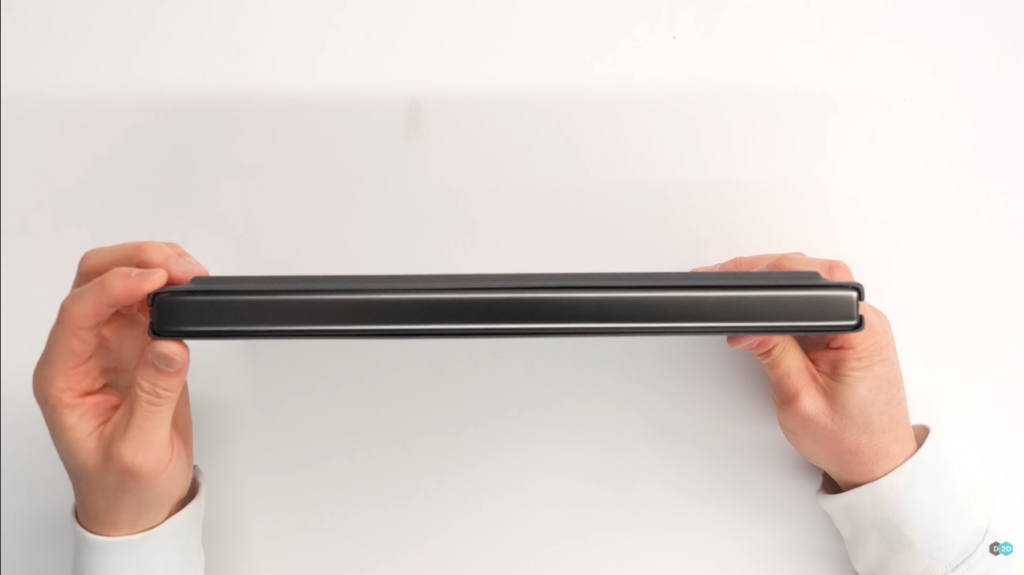
But it’s not just showing off. The whole point is to make the gap between the two screens as small as possible. And it works. The break is much smaller than before, though these are still two separate displays, not one foldable screen. Making it foldable would probably cost as much as a used car.
Two Screens That Actually Make Sense
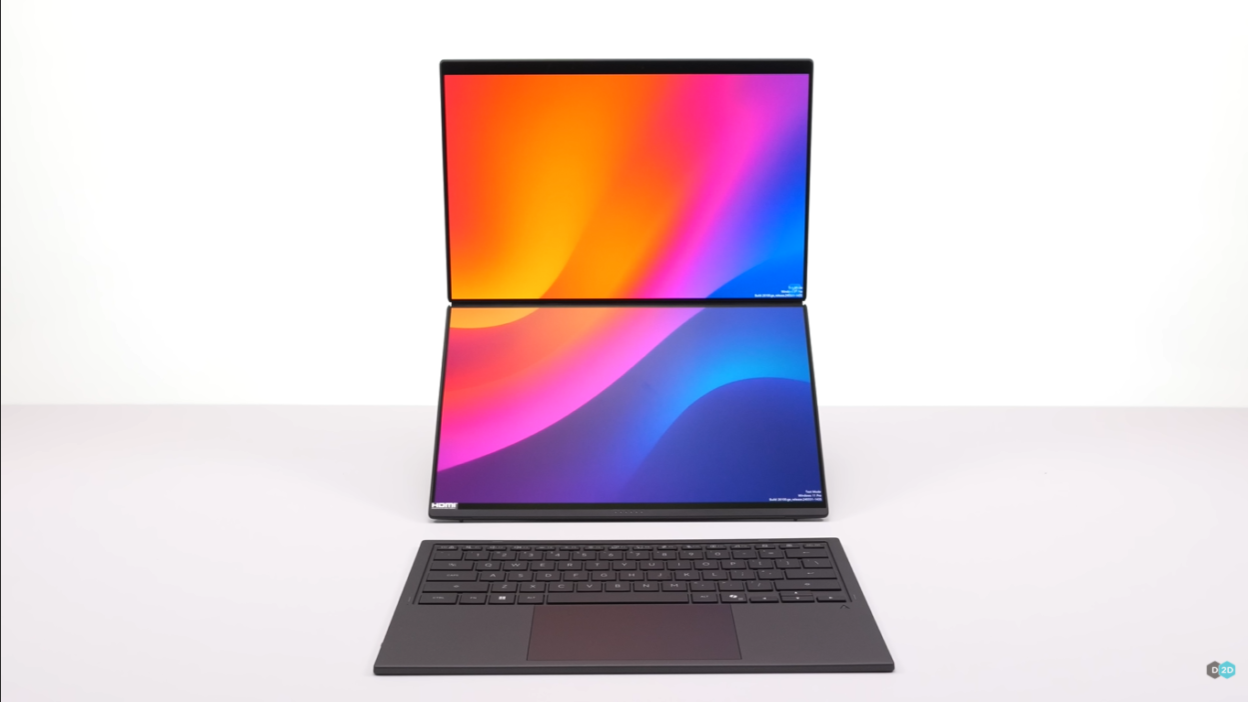
Pop open the laptop and you get two 14-inch OLED displays. Both run at 144Hz with variable refresh rate, which sounds excessive until you actually use it. Scrolling feels butter-smooth, dragging windows around is satisfying, and everything just looks gorgeous.
You can stack them vertically or put them side by side, and the kickstand works great either way. Vertical stacking is perfect when you want your main work at eye level with reference stuff below. Side by side turns this into basically a desktop dual-monitor setup that fits in a laptop bag.
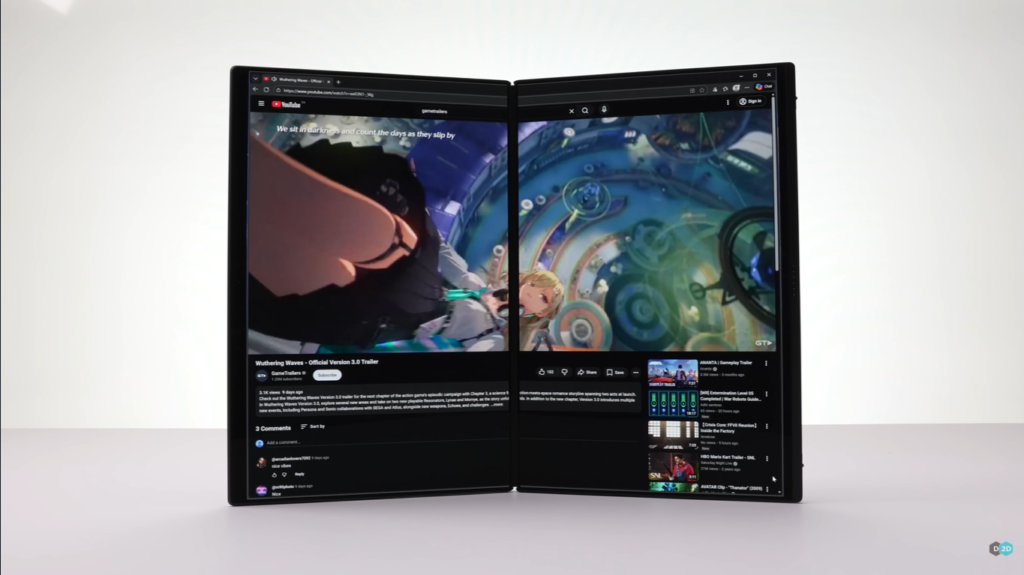
Here’s the thing about that gap between the screens. You’re not going to watch a movie spanning both displays – that would look ridiculous with a line through the middle. This isn’t about creating one mega screen. It’s about having more room for actual work.
If you use multiple apps at once, you know the pain of constantly switching between windows. If you write code while reading documentation while watching build processes, you get it. If you’re editing photos while checking client feedback while responding to emails, you understand. More screen space just makes work better. How could it not?
The ZenBook Duo gives you that extra space in the same size as a regular 14-inch laptop. That’s the breakthrough.
The Keyboard Doesn’t Suck Anymore
The detachable Bluetooth keyboard got a major upgrade. It types well, battery life is way better, but the coolest part is how it connects now.
When you place the keyboard on the lower screen, these little magnetic pogo pins pop up from the laptop body to charge it and transfer data. It sounds like a small detail, but it transforms how the whole system feels.
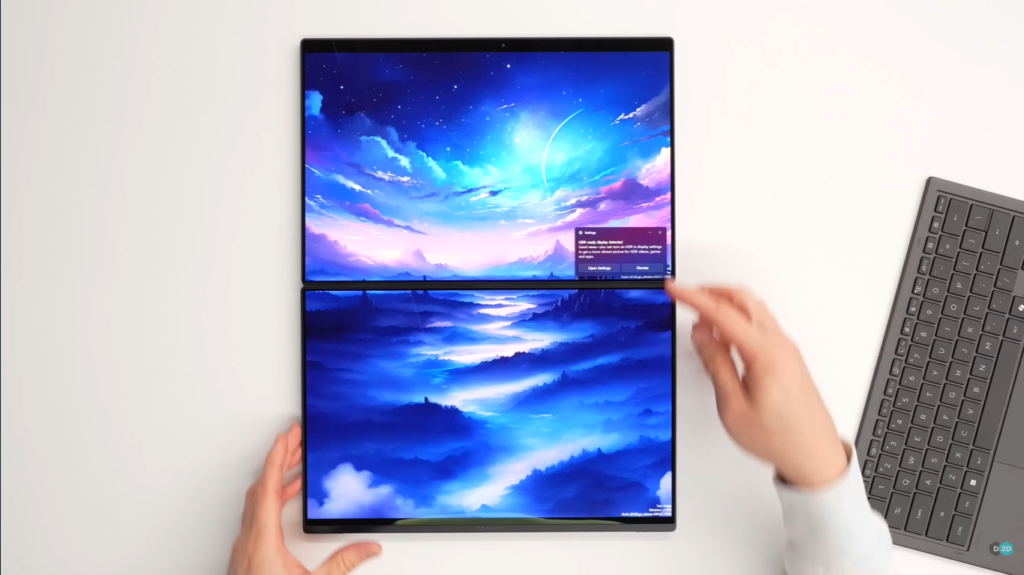
The old keyboard felt tacked on, like someone realized at the last minute they needed a physical keyboard and just Bluetooth-ed one in. This new version feels intentional. The magnetic alignment is perfect. Connecting and disconnecting happens smoothly. Everything just works the way you expect it to.
The Power That Makes It Work
Under all this is Intel’s Core Ultra Series 3 chip, and this is why the ZenBook Duo finally makes sense. I can’t share specific benchmarks yet, but this chip is exactly what dual-screen laptops needed.
It’s powerful enough to actually use that second screen for real work, not just as a glorified notification center. The GPU can handle creative work and even gaming. But most importantly, it’s efficient enough that you can actually power two OLED displays without the battery dying in two hours.
Asus split the 99Wh battery into two cells for better weight balance, and combined with this new chip, battery life claims actually sound reasonable instead of optimistic fiction.
The whole system runs at 45 watts, supports pen input, and has surprisingly good speakers. From the outside, it looks like a slightly thick regular laptop. But open it up and suddenly you have a mobile productivity station.
The Normal Laptops Got Better Too
The Core Ultra Series 3 isn’t just in the crazy dual-screen laptop. Asus also put it in the ZenBook S16 and S14, which are their regular thin-and-light premium laptops.
These aren’t revolutionary. They’re the same great laptops from last year but with the new chip. Better CPU performance, way better GPU, more battery life. The design got slightly tweaked to look more modern, though sadly only the lid gets ceraluminum coverage instead of the full body.
Sometimes products don’t need revolution. Sometimes you just need to take something good and make it better. That’s what happened here.
ARM Laptops Stop Being a Compromise
Now we get to the interesting stuff. The ZenBook A14 and the new A16 run Qualcomm’s Snapdragon X2 Elite chip, which is their second-generation ARM processor for Windows laptops.
Last year’s A14 had the right idea. It was light, well-made, and the concept was solid. But that first-gen Snapdragon chip made everything feel slightly unfinished. Performance was okay. Battery life was good. Software compatibility was… complicated.
This year feels completely different.
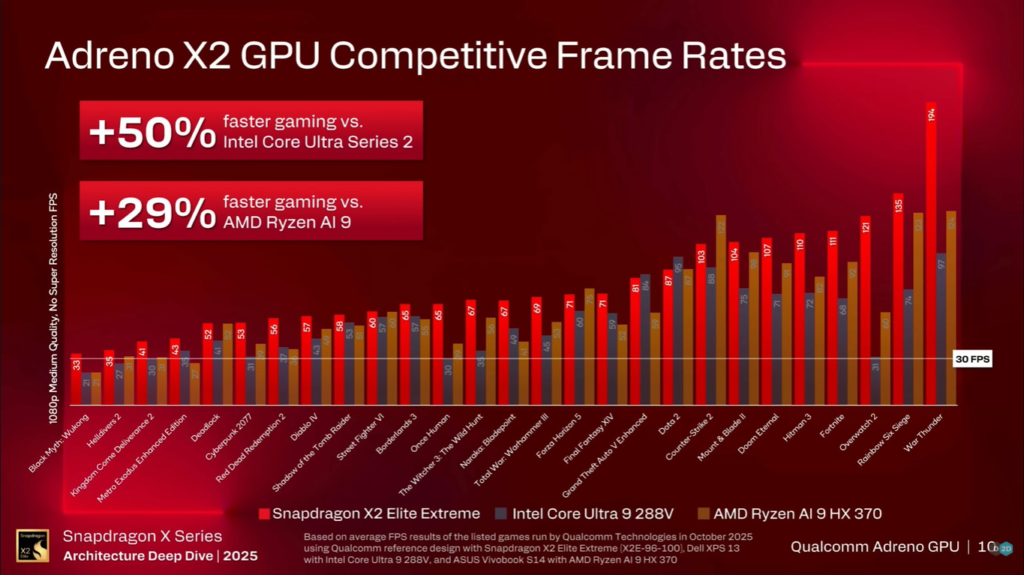
Qualcomm claims the X2 Elite has way more CPU and GPU power while using less electricity. From what I’ve tested so far, they’re not lying. The performance jump is real and noticeable, though I need more time with final drivers to be completely sure.
But here’s the insane part. Asus claims 35 hours of video playback. Thirty. Five. Hours.
I can’t verify that yet because these aren’t retail units, but I can tell you this – these are absolutely laptops you charge every few days instead of every day. That’s not just better battery life. That’s transformative.
The A16 gets an even more powerful version called the Snapdragon X2 Elite Extreme. Higher clock speeds, faster memory, and more cooling space means it can sustain better performance. Basically, the A16 is the serious work machine while the A14 is the ultraportable version.
The ARM Windows Question Everyone Asks
Let’s talk about the elephant in the room. ARM Windows compatibility has been a mess for years. First-gen Snapdragon laptops ran most things okay but had weird issues with random programs.
This year is legitimately better. Microsoft’s Prism emulator now supports AVX and AVX2 instructions, which means most Windows games should work. Most, not all. There will always be niche industry software that doesn’t run well.
And some mainstream stuff still doesn’t work. Valorant’s kernel-level anti-cheat called Vanguard doesn’t work on ARM Windows, so you just can’t play Valorant on these laptops. That sucks if you play Valorant.
But here’s why I’m optimistic. The hardware is finally good enough that developers will actually bother optimizing for ARM Windows. When the hardware is barely adequate, nobody wants to invest development time. When the hardware is genuinely compelling, support improves naturally.
We’re at that inflection point now.
The Hardware Is Genuinely Great
Both the A14 and A16 have two USB-C ports, one USB-A, and the A16 gets a full-size SD card reader (sadly missing on the A14, which is annoying). Both have gorgeous 120Hz OLED displays that make everything look beautiful.
The weight is almost absurd. The A14 weighs 990 grams. The A16 is about 1.2 kilos. These are incredibly light but don’t feel flimsy at all. Full ceraluminum construction on top, keyboard deck, and bottom makes them feel premium and durable.
Asus even made both models one-hand openable despite being so light. This sounds trivial but it’s actually really hard to do. Heavy laptops are easy to open one-handed because the base has weight. Light laptops are difficult because you need perfect hinge tension.
Most companies skip this because it’s expensive and time-consuming. The fact that Asus bothered shows they care about the details.
The Weird GoPro Thing
The last product is genuinely strange but kind of cool. Asus partnered with GoPro to make the ProArt PX13, which is obviously aimed at people who shoot a lot of GoPro footage.
Everything about this laptop screams GoPro. The packaging, the foam storage cubes, the hard shell case, even the laptop itself. There’s a dedicated GoPro button that launches their software, and it runs AMD’s Strix Halo chip which has an absurdly powerful GPU for video editing.
This is not for normal people. This is for GoPro users who need a portable editing station. It’s incredibly niche, but niche products deserve to exist when they solve real problems for specific users.
Why This Actually Matters
Looking at this whole laptop lineup, something becomes obvious. We’re not just getting faster chips in the same boring chassis. Companies are actually trying new things and executing them properly.
The ZenBook Duo proves dual-screen laptops can be practical. The ARM laptops prove Windows on ARM is finally ready for real use. The materials, engineering details, and thoughtful design choices show companies are listening to feedback instead of just updating spec sheets.
Battery life that sounded impossible a few years ago is now achievable. Software compatibility issues that plagued first-gen products are being fixed. Premium materials are spreading to more products instead of staying on flagships.
This feels like actual innovation instead of incremental improvements.
Who Should Actually Buy These?
The ZenBook Duo makes sense for way more people than I expected. If you constantly wish you had more screen space but need portability, this solves that problem. If you run multiple apps at once and hate switching windows, two screens help.
Content creators, developers, financial analysts, researchers – basically anyone who works with complex software that benefits from seeing multiple windows simultaneously. These are real use cases, not marketing fantasy.
The Snapdragon laptops make sense if battery life matters more than maximum performance. If you need something incredibly light that lasts multiple days between charges, these are genuinely impressive. Just check if your essential software works on ARM Windows first.
The previous generation dual-screen laptop felt like a compromise you accepted to get dual screens. This generation feels like a properly designed laptop that happens to have two screens. That’s a massive difference.
The Bottom Line
Double-screen laptops are finally good because the hardware finally caught up to the concept. The chips are powerful enough. The batteries last long enough. The software works well enough. The engineering is refined enough.
If you’ve been curious about dual-screen laptops but waited for them to mature, 2026 is that year. If you were interested in ARM Windows laptops but held back because first-gen was rough, these new Snapdragon machines fix most issues.
Asus did something impressive here. They took concepts that felt gimmicky and made them practical. They invested in materials and details that improve daily use. They created laptops that feel genuinely exciting instead of just faster.
I started this skeptical about dual-screen laptops. I’m ending it convinced they finally make sense. And I genuinely didn’t expect that.
What do you think? Would you actually use a dual-screen laptop, or is it still solving problems you don’t have? Let me know in the comments.