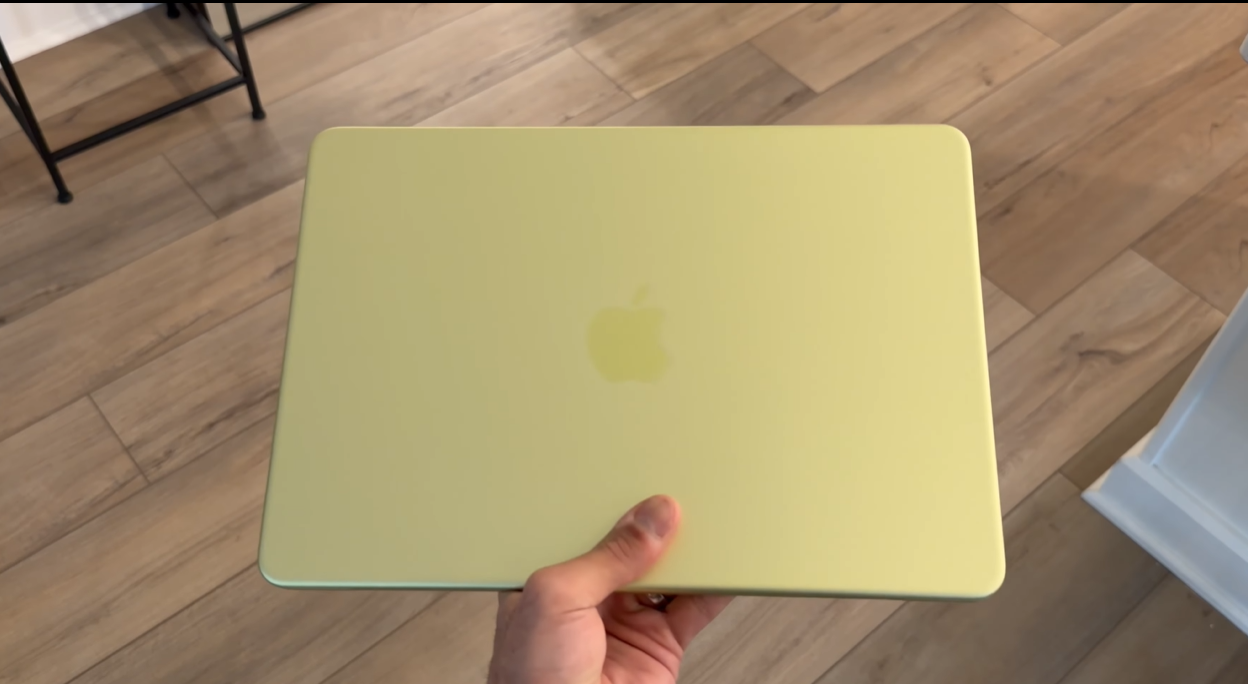
Apple just made one of the most interesting decisions in its history — launching two completely different devices at the same starting price of $599 on the same day.
The MacBook Neo is Apple’s first-ever sub-$1,000 MacBook. A full laptop running macOS, powered by the A18 Pro chip from the iPhone 16 Pro, available from March 11, 2026, at $599.
The M4 iPad Air is the latest version of Apple’s most popular tablet, now powered by the M4 chip with 12GB of RAM and Wi-Fi 7, also starting at $599 for the 11-inch model from March 11, 2026.
Same price. Same release date. Completely different devices. And the question everyone is asking right now is: which one should you buy?
This guide covers every angle — specs, performance, software, versatility, accessories, and the honest truth about who each device is right for — so you can make the right call.
Quick Answer — MacBook Neo or M4 iPad Air?
Buy the MacBook Neo if: you want a traditional laptop experience with full macOS, you rely on desktop-class apps that are not available on iPadOS, you do not care about a touchscreen, and you want the most affordable Mac ever made.
Buy the M4 iPad Air if: you want versatility — a tablet when you want a tablet and a computer when you want a computer — you value a touchscreen experience, you are into content creation with Apple Pencil, or you want the more powerful M4 chip at the same entry price.
Keep reading for the full breakdown.
MacBook Neo vs M4 iPad Air — Full Specs Comparison
- MacBook Neo price: $599 (256GB) | $699 (512GB with Touch ID) | $499 education pricing
- M4 iPad Air price: $599 (11-inch, 128GB) | $799 (13-inch, 128GB) | $549 / $749 education pricing
- MacBook Neo chip: Apple A18 Pro — 6-core CPU, 5-core GPU, 16-core Neural Engine
- M4 iPad Air chip: Apple M4 — 8-core CPU, 9-core GPU, 16-core Neural Engine
- MacBook Neo RAM: 8GB unified memory (not upgradeable)
- M4 iPad Air RAM: 12GB unified memory
- MacBook Neo storage: 256GB or 512GB SSD
- M4 iPad Air storage: 128GB, 256GB, 512GB, or 1TB
- MacBook Neo display: 13-inch Liquid Retina, 2408 x 1506, 500 nits, 218 ppi — no touchscreen
- M4 iPad Air display: 11-inch Liquid Retina, 2360 x 1640, 600 nits (13-inch: 2732 x 2048) — touchscreen
- MacBook Neo battery: Up to 16 hours (wireless web), up to 18 hours video playback
- M4 iPad Air battery: Up to 10 hours (Wi-Fi use)
- MacBook Neo OS: macOS Tahoe — full desktop operating system
- M4 iPad Air OS: iPadOS 26 — tablet-first operating system with desktop features
- MacBook Neo keyboard: Built-in Magic Keyboard — not backlit, mechanical trackpad (not haptic)
- M4 iPad Air keyboard: None included — Magic Keyboard for iPad Air sold separately from $269
- MacBook Neo connectivity: Two USB-C ports (one USB 3, one USB 2), headphone jack — no Thunderbolt, no MagSafe
- M4 iPad Air connectivity: One USB-C port (USB 3), Smart Connector, Wi-Fi 7, Bluetooth 6, optional 5G cellular
- MacBook Neo camera: 1080p FaceTime HD — no 12MP upgrade unlike other current Macs
- M4 iPad Air camera: 12MP front camera with Center Stage, 12MP rear wide camera
- MacBook Neo colours: Silver, Blush, Citrus, Indigo
- M4 iPad Air colours: Space Gray, Blue, Purple, Starlight
- MacBook Neo weight: 2.7 pounds
- M4 iPad Air weight (11-inch): 1.04 pounds (without keyboard)
Design and Build — Two Very Different Form Factors
MacBook Neo Design
The MacBook Neo looks and feels like a MacBook. That sounds obvious, but it is genuinely worth saying — Apple has not cut corners on the build quality to hit the $599 price point. You get the same recycled aluminium unibody enclosure used across the MacBook lineup. The same rounded corners. The same premium feel in your hands.
What you do not get: a backlit keyboard, a haptic Force Touch trackpad (this one is mechanical), MagSafe charging, or Thunderbolt ports. These are the deliberate omissions Apple made to bring the price down, and for most everyday users, none of them will matter much. The keyboard feels great to type on regardless of backlight. The mechanical trackpad works perfectly well with the same multi-touch gesture support as the rest of the Mac lineup.
The MacBook Neo is also Apple’s most repairable laptop in 14 years. iFixit found that the battery, keyboard, ports, and speakers can all be replaced independently — without swapping out the entire top case. This matters for long-term ownership costs.
At 2.7 pounds and under 18mm thick, it is portable and easy to carry. The four colour options — Silver, Blush, Citrus, and Indigo — are among the most vibrant Apple has ever offered on a MacBook. The keyboard and feet are colour-matched to the chassis on all variants.
M4 iPad Air Design
The M4 iPad Air is essentially unchanged in design from the M3 model — and that is not a complaint. Apple’s current iPad Air design is clean, slim, and immediately recognisable. At just 6mm thin and 1.04 pounds for the 11-inch model, it is dramatically lighter and more portable than any laptop.
The big design advantage of the iPad Air is its dual identity. Without a keyboard, it is a thin glass tablet you hold in your hands. With a keyboard attached, it becomes a laptop. This flexibility is simply not possible with the MacBook Neo — the screen does not detach, and there is no touchscreen to fall back on.
Touch ID is built into the top button on both models. The bezels are thin and uniform. The overall build quality is excellent at the price point, using the same aluminium construction as the Pro.
Chip Performance — A18 Pro vs M4
What the A18 Pro Delivers in the MacBook Neo
The MacBook Neo uses the Apple A18 Pro — the same chip found in the iPhone 16 Pro. This is the first time Apple has ever put an A-series chip in a Mac, and it is a historically significant decision.
The A18 Pro is genuinely fast for everyday tasks. Web browsing, email, document creation, video calls, spreadsheets, light photo editing, watching content, note-taking — all of it runs smoothly with no hesitation. Real-world use over several weeks confirms the chip handles everything you would expect to do on an everyday Mac without any issues.
For content creation, the A18 Pro is more capable than people expect. Video editing in apps like LumaFusion, photo work in Lightroom and Photoshop — it handles these tasks well. It is not the fastest Mac available, but it is far from slow.
Where the A18 Pro does fall short compared to the M4: sustained heavy workloads over extended periods. If you are doing serious 4K video editing, 3D rendering, or running complex code compilations for extended sessions, you will notice the difference. But for the vast majority of everyday users, the A18 Pro is more than enough.
What the M4 Delivers in the iPad Air
The M4 chip in the iPad Air is up to 30% faster than the M3 it replaces, and up to 2.3x faster than the M1 iPad Air. The M4 also brings 12GB of unified memory — up from 8GB — which makes a real difference for multitasking, keeping multiple apps open simultaneously, and handling large creative files.
For content creators specifically: the M4’s 9-core GPU supports second-generation hardware-accelerated ray tracing and mesh shading. Final Cut Pro and Pixelmator Pro see meaningful performance gains. The 16-core Neural Engine handles Apple Intelligence tasks up to three times faster than M1.
The honest performance comparison: the M4 chip is faster than the A18 Pro. It is a more powerful processor. For demanding creative work — video editing, graphic design, 3D work — the M4 iPad Air handles it more comfortably. But unless you are doing that kind of work regularly, the performance gap will not be noticeable in daily use.
Operating System — macOS vs iPadOS
This is the most important deciding factor for most buyers, and it comes down to one question: do you need desktop-class software?
macOS on the MacBook Neo
The MacBook Neo runs full macOS Tahoe — the same operating system that runs on the MacBook Air and MacBook Pro. This means you get access to every Mac application ever made. Professional coding environments. Plugin-supported versions of Lightroom, Photoshop, and Final Cut Pro. Full file management. Multi-user accounts. Terminal access. Any software built for Mac runs on the MacBook Neo.
For coders, developers, and professionals who rely on specific Mac-only applications, this is the deciding factor. iPadOS does not run the same apps. Some pro apps are available on iPad, but they often have limitations compared to their Mac counterparts — no third-party plugin support, different file management workflows, and constraints on multi-window multitasking that macOS handles natively.
If your workflow depends on specific Mac applications, the MacBook Neo is the straightforward answer at $599.
iPadOS 26 on the M4 iPad Air
iPadOS 26 has come a long way. For many users — students, content creators, business professionals, travellers — it now provides everything they need from a computer. Web browsing, email, documents, presentations, video editing in Final Cut Pro for iPad, drawing and design with Apple Pencil, video calls, social media, reading, note-taking — all of these work excellently on iPad.
iPadOS 26 adds a new menu bar that appears when you swipe down from the top or move a cursor upward on a trackpad — making the interface feel more desktop-like than ever before. The Files app has expanded folder customisation. The Preview app becomes a dedicated PDF tool with direct Apple Pencil markup support.
The honest limitation: iPadOS is still a mobile-first operating system that has been extended toward desktop use. It is not macOS. For users who need specific desktop software, complex multi-window workflows, or deep system-level access, those limitations are real. For users who primarily use apps that exist natively on iPad, those limitations will rarely matter.
Versatility — The iPad Air’s Biggest Advantage
This is where the M4 iPad Air makes its strongest argument over the MacBook Neo.
The MacBook Neo is a laptop. It will always be a laptop. The screen stays attached to the keyboard. There is no touchscreen. You cannot detach it, hold it in your hands, use it flat on a desk for drawing, or tuck it into a bag without the keyboard bulk.
The iPad Air is a laptop and a tablet. When you are on a flight and do not need to work, detach the keyboard and hold the iPad to watch films, scroll social media, or read. When you land and need to create something, attach the keyboard and you have a full computing experience with keyboard and trackpad. One device does both jobs.
For travellers especially, this dual capability is genuinely transformative. The total weight of an iPad Air with a third-party keyboard case is often lighter than the MacBook Neo alone. And the ability to use the iPad as a pure tablet when you do not need the keyboard adds a flexibility that no laptop can match.
The touchscreen experience is also worth calling out separately. In 2026, most people are so accustomed to touching screens on their phones and iPads that working on a non-touch laptop can feel surprisingly limiting. Pinching to zoom into a photo, tapping a link directly, scrolling with your finger — these feel natural and modern in a way that keyboard and trackpad only interaction does not match for many users.
Accessories and Real Cost — What You Actually Need to Spend
MacBook Neo — What You Need to Buy
The MacBook Neo is a complete device out of the box. You get the laptop, the keyboard, and the trackpad. There is nothing you need to add to use it as a full computer. Total cost for the base configuration: $599.
Optional extras worth considering:
- USB-C hub for additional ports: $30–$80 (the two USB-C ports on the Neo are limited compared to other MacBooks)
- USB-C to HDMI adapter if you need an external display: $15–$30
M4 iPad Air — What You Need to Buy
Here is where the conversation gets more nuanced. The iPad Air at $599 comes with the iPad, a USB-C cable, and a power adapter. That is it. No keyboard. No stylus. To use it as a laptop replacement, you need to add accessories.
Apple’s first-party options (expensive but excellent):
- Magic Keyboard for iPad Air (11-inch): $269
- Magic Keyboard for iPad Air (13-inch): $319
- Apple Pencil Pro: $129
- Apple Pencil (USB-C): $79
If you go with Apple’s Magic Keyboard and Apple Pencil Pro for the 11-inch iPad Air, you are looking at $599 + $269 + $129 = $997 — nearly double the base price.
Third-party alternatives that deliver excellent value:
You do not have to buy Apple’s accessories. Third-party keyboard cases offer comparable — and in some ways better — experiences at a fraction of the price. The ESR Shift Keyboard is one popular option at $89 that includes a backlit keyboard (which the MacBook Neo does not have), a detachable design, 360-degree device protection, a built-in Apple Pencil holder, and a multi-angle stand that works in both portrait and landscape mode.
For stylus use, the ESR Geo Pencil at $32 includes fine-mesh tip support, Find My integration, and a built-in speaker for locating the pencil — matching many of the Apple Pencil Pro’s features at a quarter of the price.
With a third-party keyboard and stylus, the total iPad Air setup can come in at around $599 + $89 + $32 = $720 — significantly more reasonable and still including backlit keys that the MacBook Neo lacks.
Battery Life — A Clear Win for the MacBook Neo
The MacBook Neo offers up to 16 hours of wireless web browsing and up to 18 hours of video playback according to Apple’s testing. These are strong numbers even by MacBook Air standards — the M5 MacBook Air tops out at 18 hours for web browsing.
The M4 iPad Air offers up to 10 hours of Wi-Fi use. This is typical for a tablet and is perfectly adequate for a day of work, but it is meaningfully shorter than what the MacBook Neo delivers. If all-day battery without a charger is a priority, the MacBook Neo wins comfortably.
Who Should Buy the MacBook Neo?
- First-time Mac buyers who want to enter the Apple ecosystem without spending over $1,000
- Students who need a reliable everyday laptop for assignments, research, and video calls
- Anyone who needs specific Mac-only applications — particularly developers and coders
- Users who always work with a keyboard and trackpad and have no interest in a touchscreen
- Anyone who wants maximum battery life from their device
- Budget-conscious buyers who want a complete, ready-to-use device for $599 with nothing extra to buy
- Windows or Chromebook switchers looking for the most affordable entry point into macOS
Who Should Buy the M4 iPad Air?
- Travellers who want one device that does both tablet and laptop duties
- Content creators who want to use Apple Pencil for drawing, graphic design, or precise video editing
- Anyone who values a touchscreen experience and finds traditional laptop interaction limiting
- Students who want to handwrite notes during lectures and then switch to typing for assignments
- Users who are already invested in the iPad app ecosystem
- Anyone doing sustained heavy creative work — video editing, 3D design, large file processing — where the M4 chip advantage becomes meaningful
- People who want cellular connectivity so their device works anywhere without a hotspot
Final Verdict — MacBook Neo vs M4 iPad Air
Both of these devices are outstanding at $599. Apple has genuinely delivered two compelling products at a price point that would have seemed impossible just two years ago.
The MacBook Neo is the right choice if you want simplicity, battery life, full macOS, and a complete ready-to-use laptop experience without spending anything extra. It is the best entry-level Mac Apple has ever made and a genuine threat to Chromebooks and budget Windows laptops in a way no previous Apple product has been.
The M4 iPad Air is the right choice if you want versatility, a touchscreen, the more powerful M4 chip, cellular connectivity, and a device that genuinely adapts to however you want to work. The total cost is higher once you add accessories, but with smart third-party options you can keep the premium reasonable — and what you get in return is a device more capable than any $599 laptop Apple has made.
Neither answer is wrong. Go to an Apple Store, spend time with both, think honestly about how you work and what you actually need — and you will know which one is right for you.
MacBook Neo Rating: 9 / 10
- ✅ Apple’s most affordable Mac ever at $599
- ✅ Full macOS — runs every Mac application
- ✅ Complete out of the box — keyboard and trackpad included
- ✅ Outstanding battery life up to 16 hours
- ✅ Excellent build quality — aluminium unibody, four great colours
- ✅ Apple’s most repairable laptop in 14 years
- ✅ Apple Intelligence included
- ❌ No backlit keyboard
- ❌ No haptic Force Touch trackpad
- ❌ No MagSafe, no Thunderbolt
- ❌ Only 8GB RAM
- ❌ No touchscreen
M4 iPad Air Rating: 9 / 10
- ✅ M4 chip — significantly more powerful than A18 Pro
- ✅ 12GB RAM — best in class for this price
- ✅ Touchscreen with Apple Pencil support
- ✅ Works as tablet and laptop — unmatched versatility
- ✅ Wi-Fi 7 and optional 5G cellular
- ✅ Two screen sizes — 11-inch and 13-inch
- ✅ Apple Intelligence included
- ❌ Keyboard sold separately — adds significant cost
- ❌ iPadOS still has limitations vs macOS for professional software
- ❌ Only 10 hours of battery life versus 16 hours on the Neo
- ❌ Only one USB-C port

