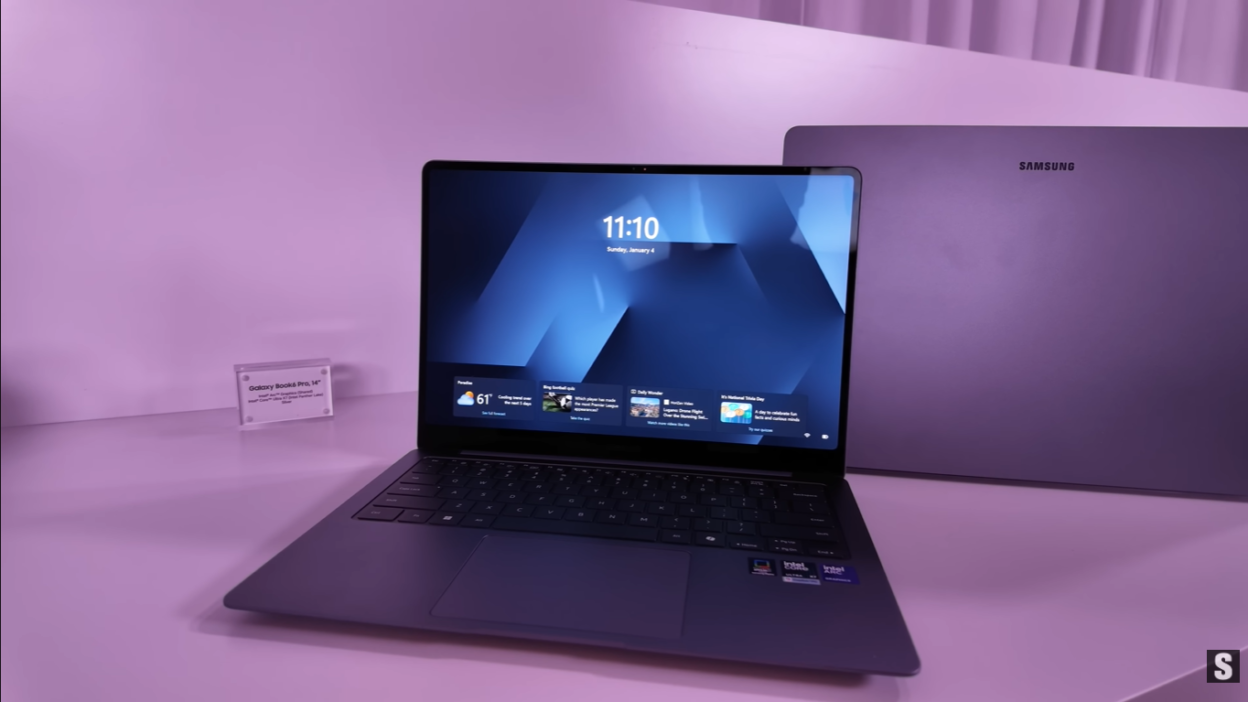
Samsung’s Galaxy Book lineup has had a tumultuous journey over the past couple of years. The Galaxy Book 4 series attempted to cover every possible configuration with both Intel and Snapdragon chips, while the Book 5 suffered from a staggered launch and notably lacked an Ultra model. Now, at CES 2025, Samsung has steadied the ship with the Galaxy Book 6 series, and the return of the Ultra model signals the company’s renewed commitment to the premium laptop segment.
After getting hands-on impressions from CES and hearing from users who lived with previous generation devices, it’s clear that Samsung didn’t just iterate—they addressed fundamental issues that plagued earlier models. From thermal management disasters to touchpad nightmares, the Galaxy Book 6 Ultra appears to be Samsung’s answer to critics who loved the hardware potential but were frustrated by execution flaws.
Let’s dive deep into everything you need to know about the Samsung Galaxy Book 6 Ultra, what’s changed, what’s improved, and whether Samsung has finally created a true competitor in the premium Windows laptop space.
The Galaxy Book 6 Lineup: Three Models, Clear Positioning
Before focusing on the Ultra, it’s worth understanding Samsung’s complete 2025 laptop strategy. The company announced three models:
Galaxy Book 6 – The entry-level option for everyday users Galaxy Book 6 Pro – The mid-tier productivity powerhouse
Galaxy Book 6 Ultra – The flagship model with no compromises
This clear tiering makes it easier for consumers to identify which device fits their needs, unlike the confusing array of options in the Book 4 generation. The return of the Ultra model is particularly significant—it shows Samsung is serious about competing at the highest end of the Windows laptop market against devices like the Dell XPS, MacBook Pro, and Microsoft Surface Laptop.
Performance: Intel Core Ultra Series 3 with Serious Graphics
Processor: Built on Cutting-Edge Technology
The Galaxy Book 6 Ultra is powered by Intel’s new Core Ultra Series 3 processors, built on Intel’s 18A process—a 1.8-nanometer class node that represents a significant advancement in chip manufacturing.
Key Performance Claims:
- 50% increase in CPU speed over previous generation Intel processors
- Advanced AI processing capabilities
- Improved power efficiency compared to previous architectures
This generational leap is substantial. The 50% performance improvement isn’t just marketing speak—it represents Intel’s response to competitive pressure from Apple Silicon and Qualcomm’s Snapdragon X Elite processors. For users who struggled with the Book 4 Ultra’s performance in demanding workflows, this upgrade addresses a fundamental bottleneck.
Graphics: NVIDIA Powerhouse Options
Samsung pairs these processors with serious graphics hardware:
GPU Options:
- NVIDIA GeForce RTX 5070 (laptop variant)
- NVIDIA GeForce RTX 5060 (laptop variant)
These aren’t integrated graphics or entry-level discrete GPUs—these are legitimate performance-class graphics cards capable of handling:
- Professional creative work: Video editing in Premiere Pro, 3D rendering in Blender, complex compositing
- Intensive productivity: Multi-monitor workflows, data visualization, complex spreadsheet operations
- Gaming: AAA titles at respectable settings and frame rates
The inclusion of RTX 50-series graphics puts the Galaxy Book 6 Ultra in direct competition with gaming laptops and mobile workstations, not just thin-and-light productivity devices.
The Thermal Solution: Finally Addressing the Elephant in the Room
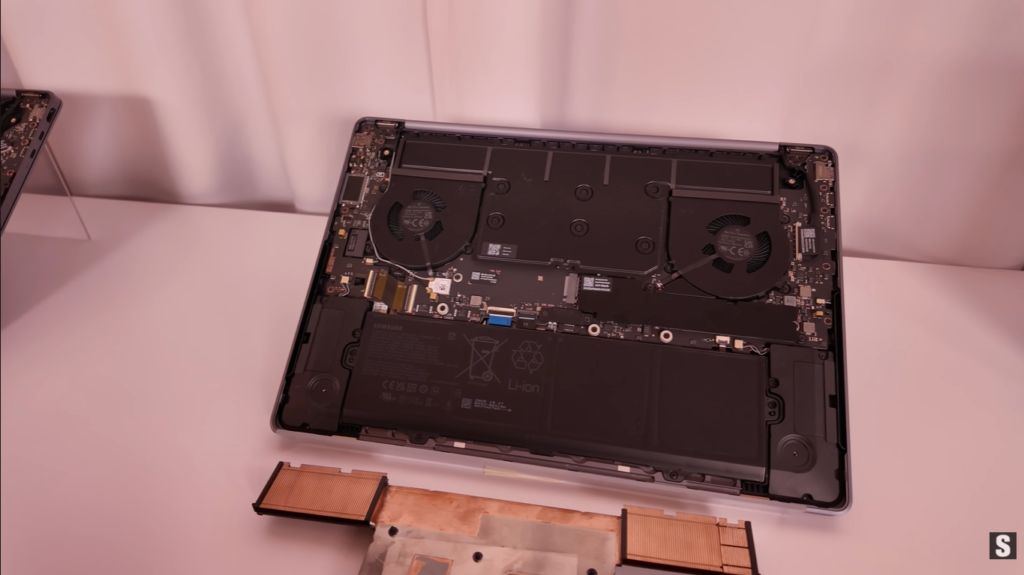
Here’s where things get really interesting. Users of the Galaxy Book 3 Ultra and Book 4 Ultra consistently reported the same frustrating problem: catastrophic thermal management.
The Previous Generation Problem
The Book 4 Ultra and Book 3 Ultra before it suffered from:
- Extremely loud fan noise during any intensive tasks
- Chassis getting uncomfortably hot to touch
- Thermal throttling reducing performance under sustained loads
- Fans spinning up even during moderate productivity work
This wasn’t just annoying—it was a fundamental design flaw that made these otherwise premium devices difficult to use in professional environments like meetings, libraries, or quiet offices. The performance was there on paper, but thermal constraints prevented sustained use of that performance.
Samsung’s Solution: Vapor Chamber Cooling
Samsung has completely redesigned the thermal architecture:
Galaxy Book 6 Pro:
- Introduction of a vapor chamber cooling system
- First implementation in the Pro tier
Galaxy Book 6 Ultra:
- Increased size and surface area of the vapor chamber
- Enhanced cooling capacity specifically for the more powerful components
- New fan outlet designs for improved airflow
- Additional heat sinks strategically placed for better heat dissipation
Why This Matters
Vapor chamber cooling is a significant upgrade from traditional heat pipe solutions. Instead of moving heat through pipes, vapor chambers spread heat across a larger surface area, allowing for more efficient dissipation. This technology is common in high-end gaming laptops and workstations but has been absent from Samsung’s previous Ultra models.
The real-world impact should be:
- Quieter operation under load
- Cooler chassis temperatures
- Ability to sustain peak performance for longer periods
- Better performance during extended creative or productivity sessions
This single improvement might be the most important upgrade in the entire Galaxy Book 6 Ultra, addressing the primary complaint that kept previous models from being truly competitive.
Battery Life: From Disappointment to All-Day Confidence
The second major pain point with previous Galaxy Book Ultra models was abysmal battery life during intensive tasks. Users found that the combination of powerful Intel processors and discrete graphics meant the device simply couldn’t survive a day away from the charger when doing real work.
The New Battery Promise
Samsung is making bold claims with the Galaxy Book 6 series:
Video Playback:
- Up to 30 hours of continuous video playback
- 5 hours longer than previous generation models
Fast Charging:
- 63% charge in 30 minutes
- Particularly impressive given the large battery capacity required
The Caveat: Real-World vs. Marketing
Video playback is the most power-efficient task a laptop can perform—it’s essentially a best-case scenario. The real question is whether the improved thermal management, more efficient Intel Core Ultra Series 3 processors, and whatever battery capacity increase Samsung implemented will translate to genuinely usable all-day battery life during:
- Multiple Chrome tabs with active web apps
- Video conferencing
- Photo and video editing
- Code compilation
- Running virtual machines
The combination of Intel chips (historically less efficient than ARM processors) and powerful discrete graphics (the RTX 5070 or 5060) creates inherent power consumption challenges. However, the improved thermals could reduce the stress on the chip, potentially improving efficiency and extending battery life during real-world productivity tasks.
This is the critical test that will determine whether the Galaxy Book 6 Ultra is a genuine mobile workstation or still requires proximity to power outlets for serious work.
Design Evolution: Modern, Premium, and Centered
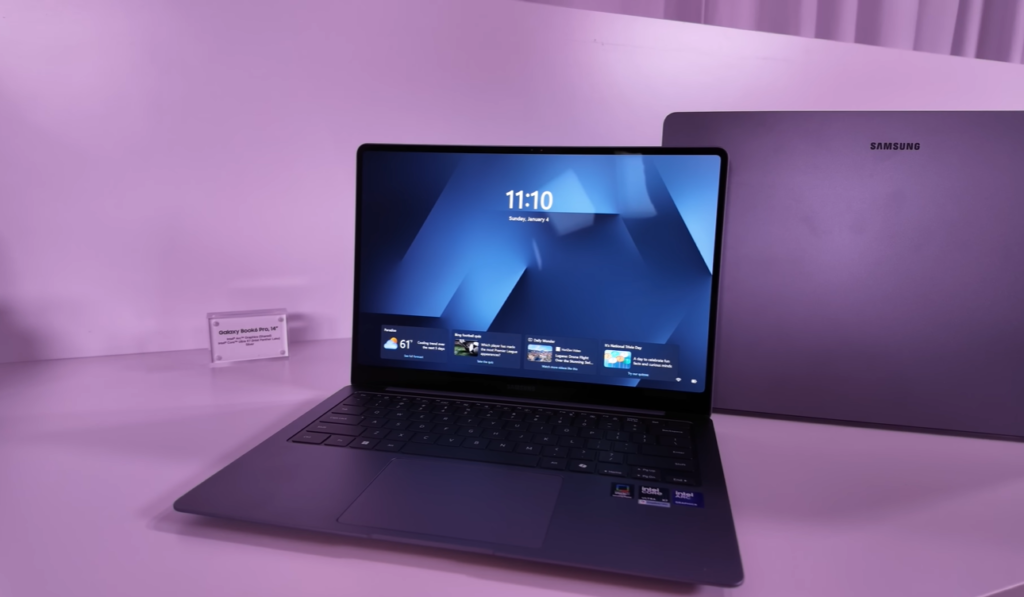
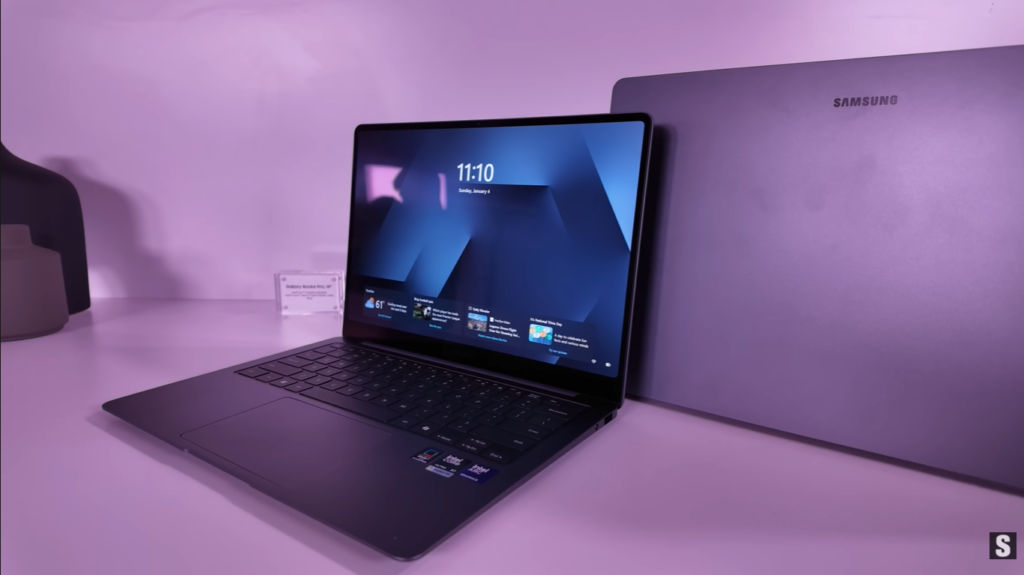
Samsung has completely redesigned the Galaxy Book 6 series with a more modern aesthetic that borrows heavily from current design trends while establishing its own identity.
The Centered Samsung Logo
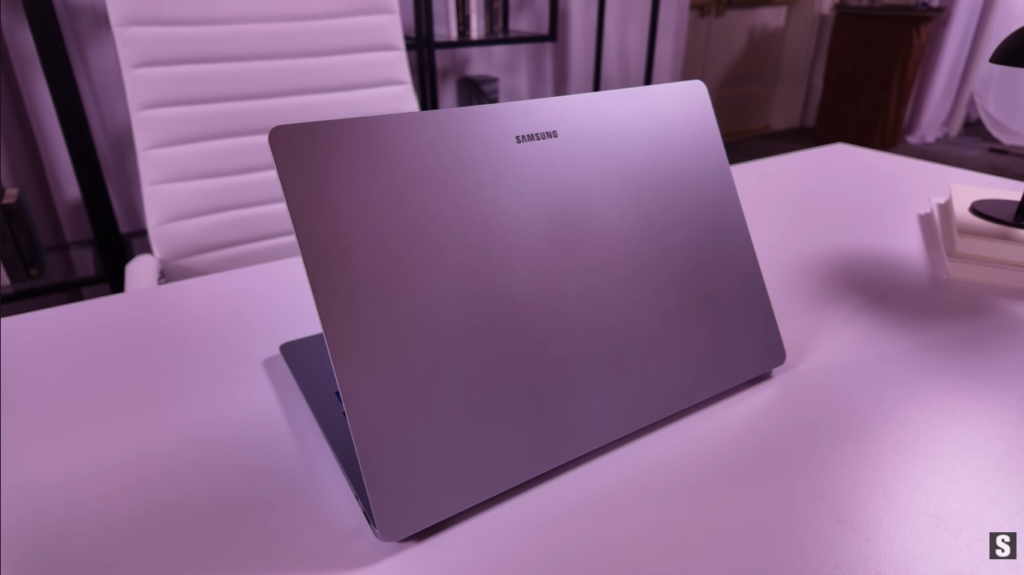
One of the most immediately noticeable changes is the centered placement of the Samsung logo on the laptop lid. This is a departure from traditional corner or off-center positioning and creates a more symmetrical, intentional appearance.
Initial reactions suggest it looks “a little odd” and will “take some getting used to,” but it’s clearly a deliberate design choice that makes a statement. It’s confident, centered, and unmistakably Samsung.
The Philosophy of Centering
The centered logo isn’t just an isolated design choice—it reflects a broader design philosophy that carries through to the interior:
Centered Keyboard Layout: Samsung has removed the number pad that appeared on previous generations, allowing the main keyboard to be perfectly centered on the deck. This creates:
- Better ergonomics for typing (hands in a more natural position)
- More symmetrical appearance
- Potentially more space for other components or better cooling
Centered Touchpad: The touchpad has also moved to the center position, aligning with modern laptop design trends popularized by Apple and high-end Windows devices.
Premium Materials and Build
The design is described as “much more modern and premium,” suggesting Samsung has elevated the materials and build quality to match the Ultra positioning. While specific materials weren’t detailed in the hands-on, the emphasis on premium feel indicates Samsung is competing directly with the MacBook Pro and Dell XPS in terms of physical quality.
The Touchpad Redemption Arc
Perhaps no single component on the Galaxy Book 4 series received more criticism than the touchpad. Users described it as “awful,” citing:
- Poor responsiveness
- Inconsistent tracking
- Unreliable gesture recognition
- General frustration during everyday use
Complete Redesign
Samsung has acknowledged this failure and completely redesigned the touchpad for the Book 6 series. The company specifically stated they’ve redesigned “how it operates,” suggesting this isn’t just a driver update but a fundamental hardware and software overhaul.
Expected Improvements:
- Smoother interaction with more precise tracking
- Responsive gesture recognition for multi-finger gestures
- Consistent performance without the quirks that plagued previous generations
A good touchpad is essential for laptop usability, especially for a premium device. If Samsung has truly fixed this, it removes a major barrier that prevented previous Galaxy Books from being daily driver material for many users.
Audio: Six-Speaker Array for Immersive Sound
Samsung has significantly upgraded the audio system in the Galaxy Book 6 Ultra with a six-speaker configuration.
Speaker Placement
The redesigned keyboard area now features speakers on either side of the keyboard, creating a more immersive audio experience. This positioning allows for:
- Upward-firing speakers that direct sound toward the user
- Better stereo separation
- Clearer dialog in video content
- More impactful audio for entertainment
Hands-On Impressions
The on-site reporter at CES noted being “very impressed with the sound” after hearing the six-speaker system in person. While previous Galaxy Book models had acceptable audio, the upgrade to six speakers positions the Book 6 Ultra as a legitimate entertainment device, not just a productivity tool.
For users who:
- Watch movies and shows on their laptop
- Participate in video conferences
- Create audio or video content
- Simply appreciate high-quality audio
This upgrade represents a meaningful improvement in the overall user experience.
Display: Samsung’s Signature Excellence
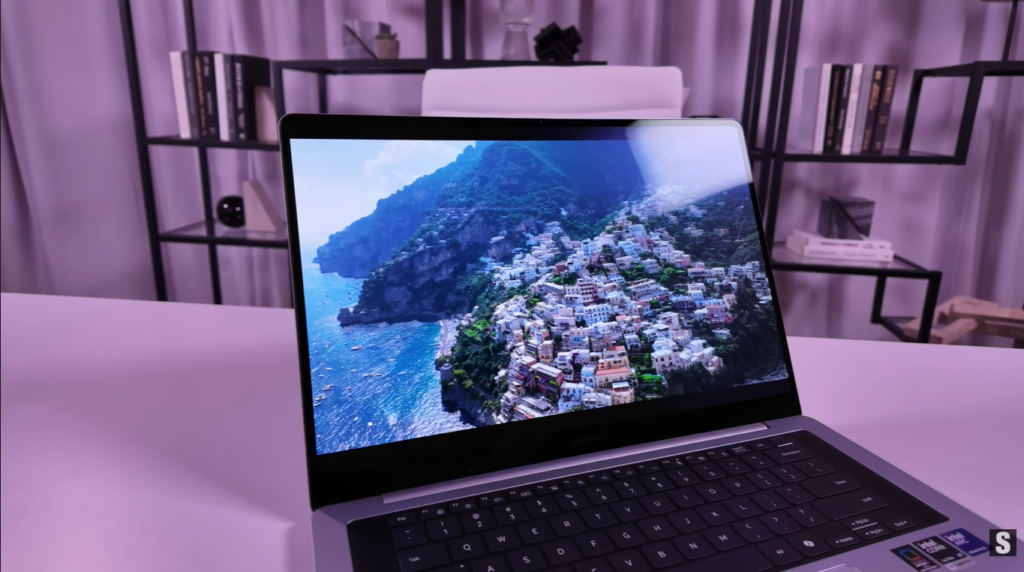
If there’s one area where Samsung has consistently delivered excellence, it’s displays. The company manufactures the best displays not just for their own devices but for competitors, including Apple’s iPhones and iPads.
Display Specifications
Technology: Dynamic AMOLED 2X
Peak Brightness: 1,000 nits (up from 500 nits on previous generation)
Touch: Yes, full touchscreen capability
Design: Rounded corners inspired by Galaxy Tab S11 series
Why This Matters
Brightness Increase: The jump from 500 to 1,000 nits peak brightness is substantial and addresses a real-world pain point. This enables:
- Comfortable outdoor use in bright sunlight
- Better HDR content reproduction
- Improved visibility in varied lighting conditions
- Reduced eye strain in bright environments
Dynamic AMOLED 2X Benefits:
- Perfect blacks (individual pixel control allows true black)
- Incredible contrast ratio (essentially infinite contrast)
- Rich, accurate colors for creative work
- Fast response times for smooth scrolling and video
Touchscreen Integration: Samsung smartly positions the touchscreen as a natural extension of the mobile ecosystem. If you use touch on your phone and tablet every day, having it on your laptop creates consistency across devices. This is particularly useful for:
- Quick interactions while in tablet or tent modes
- Precise selection in creative applications
- Natural gesture-based navigation
- Annotating documents and images
Rounded Display Corners
Taking inspiration from the Galaxy Tab S11 series, Samsung has rounded the corners of the display. This creates:
- A more modern, refined aesthetic
- Visual consistency with Samsung’s mobile device lineup
- Softer, more premium appearance
- Better integration with the overall design language
While purely aesthetic, these rounded corners contribute to the premium feel and distinguish the Galaxy Book from the sea of rectangular-cornered competitors.
Software Intelligence: Galaxy AI Comes to Laptops
Samsung is leveraging its Galaxy AI ecosystem to differentiate the Galaxy Book 6 series with intelligent software features that go beyond standard Windows functionality.
Enhanced AI Select
AI Select is a feature Samsung phone users know well—it allows you to circle or select content on screen and get contextual information or actions. Samsung has evolved this for the Galaxy Book 6 series.
Integration with Circle to Search: Samsung has integrated Circle to Search (Google’s AI-powered search feature) directly into AI Select, creating a seamless workflow:
- Launch AI Select
- Circle or select content on screen
- A search panel appears on the side
- Interact with contextual information and options
This brings the intuitive interaction model from phones to the larger laptop screen, making information lookup and context-aware actions feel natural.
New Cutout Feature
The most interesting addition is the new cutout feature, which leverages AI for object selection and extraction:
How It Works:
- Select a photo or image
- AI automatically identifies subjects within the image
- Cut out the desired subject with AI precision
- Paste directly into applications like PowerPoint, Photoshop, or other editing tools
Practical Applications:
- Presentations: Quickly extract product images or people for slides
- Design Work: Create compositions without manual masking
- Content Creation: Build social media graphics with extracted elements
- Document Creation: Enhance reports with isolated visual elements
This type of AI-assisted workflow is exactly what makes the difference between a good productivity laptop and a great one. It’s not about raw power—it’s about reducing friction in common tasks.
The Galaxy Ecosystem Advantage
For users already invested in the Samsung ecosystem with a Galaxy phone, tablet, and perhaps smartwatch, the Galaxy Book 6 Ultra becomes the natural laptop choice. Features like:
- Seamless file sharing across devices
- Unified notification system
- Quick Share for instant transfers
- Second Screen functionality
- Phone integration
These create a cohesive ecosystem that rivals Apple’s continuity features while remaining in the Windows/Android world.
The Intel and NVIDIA Partnership Question
There’s an elephant in the room that needs addressing: the decision to stick with Intel processors and NVIDIA graphics rather than exploring Qualcomm Snapdragon X Elite options.
The Battery Life Concern
Intel chips, while powerful, have historically been less power-efficient than ARM-based alternatives like Apple Silicon or Qualcomm’s Snapdragon X Elite. The addition of a discrete NVIDIA GPU (RTX 5070 or 5060) compounds this power consumption challenge.
The Concern: “Intel chips, whilst they’re powerful, and then the beefy graphics card alongside it, that combination doesn’t give you great confidence that you’re going to get good battery from it.”
This is a legitimate concern based on the track record of previous Galaxy Book Ultra models and Intel/NVIDIA-powered laptops in general.
The Counter-Argument: Improved Thermals Change Everything
However, the significantly improved thermal management might fundamentally change this equation:
Thermal Efficiency = Battery Efficiency:
- Better cooling reduces thermal stress on the processor
- Less thermal stress means the chip doesn’t have to work as hard
- Lower sustained CPU temperatures improve power efficiency
- Reduced fan usage saves additional battery power
If Samsung’s vapor chamber implementation is as effective as promised, the thermal improvements could translate directly to better battery life, even with power-hungry Intel and NVIDIA components.
Why Not Snapdragon?
The decision to use Intel likely comes down to several factors:
Software Compatibility: Despite improvements, ARM-based Windows still faces application compatibility challenges. For a device targeting creative professionals and power users, ensuring every application runs natively without emulation is critical.
Performance Ceiling: For users who need maximum performance for rendering, compiling, or gaming, current Intel/NVIDIA combinations still offer the highest peak performance, even if efficiency suffers.
Market Positioning: The Ultra is explicitly positioned as a no-compromises device. Using Intel and NVIDIA signals “maximum performance” in a way that Snapdragon doesn’t yet, fairly or not.
Availability and Final Thoughts
Samsung has announced that the Galaxy Book 6 series, including the Ultra, will be available in late January 2025. This relatively quick availability is good news for users who’ve been waiting for a refresh.
The Verdict: Has Samsung Fixed the Galaxy Book Ultra?
Based on hands-on impressions and the announced improvements, Samsung appears to have addressed the fundamental flaws that plagued previous generations:
Problems Fixed: ✅ Thermal management: Vapor chamber cooling should eliminate the noise and heat issues
✅ Touchpad: Complete redesign promises smooth, responsive tracking
✅ Battery life: 30-hour video playback claim and improved efficiency
✅ Design: Modern, premium aesthetic with centered elements
✅ Audio: Six-speaker array for better sound
✅ Display brightness: 1,000 nits peak for outdoor usability
Remaining Questions: ❓ Real-world battery life: Will it actually last during intensive productivity work?
❓ Thermal performance under sustained load: Does the vapor chamber actually work in practice?
❓ Pricing: Samsung hasn’t announced prices yet (crucial for value assessment)
❓ Weight: No weight specifications provided (important for portability)
Who Should Consider the Galaxy Book 6 Ultra?
Ideal For:
- Creative professionals who need color-accurate displays and graphics power
- Samsung ecosystem users who want seamless integration with their Galaxy devices
- Power users who need maximum Windows performance
- Content creators requiring strong CPU and GPU performance
- Users burned by previous Galaxy Books who want to see if Samsung finally got it right
Consider Alternatives If:
- Battery life is non-negotiable: Wait for real-world reviews before committing
- You want ARM efficiency: Look at Snapdragon X Elite devices
- Budget is primary concern: The Ultra will likely command a premium price
- Maximum portability is key: This appears to be a substantial device
The Broader Context: Samsung’s Laptop Strategy
The Galaxy Book 6 series, particularly the return of the Ultra, signals Samsung’s renewed commitment to the premium Windows laptop market. After the somewhat confused Book 5 launch and the flawed execution of the Book 4 series, the Book 6 represents a more focused, refined approach.
Samsung is clearly positioning these devices as ecosystem plays—if you’re invested in Galaxy phones and tablets, the Book 6 makes the entire ecosystem more valuable. This mirrors Apple’s strategy but within the Windows/Android world.
Conclusion: A Promising Return to Form
The Samsung Galaxy Book 6 Ultra appears to be exactly what the series needed: a focused, refined flagship that addresses past mistakes while adding meaningful improvements.
The vapor chamber cooling solution tackles the most significant complaint about previous models. The redesigned touchpad fixes another major pain point. The improved battery life claims, if they hold up in real-world testing, could transform the device from a desk-bound workstation to a genuinely mobile powerhouse.
The design evolution, centered aesthetic, and premium materials signal Samsung’s intention to compete directly with the best Windows laptops and even the MacBook Pro. The inclusion of serious NVIDIA graphics gives it capabilities that ultra-portable competitors can’t match.
However, the proof will be in actual usage. The thermal solution needs to work under sustained loads. The battery life needs to hold up during intensive productivity work, not just video playback. The touchpad needs to be as good as promised. And the price needs to be competitive with alternatives.
If Samsung delivers on these promises, the Galaxy Book 6 Ultra could be the laptop that finally establishes Samsung as a serious player in the premium Windows laptop market. If the improvements are more incremental than revolutionary, it’ll be another generation of “almost there” frustration.
The late January launch means we won’t have to wait long to find out. For users who’ve been burned by previous Galaxy Book Ultra models, the cautious optimism is warranted—but so is waiting for comprehensive reviews before committing.
Stay tuned for full reviews, battery life tests, and thermal performance analysis when the Galaxy Book 6 Ultra becomes available. This is one laptop that deserves thorough real-world testing before making any purchase decisions.
For users invested in the Samsung ecosystem who need serious Windows performance, the Galaxy Book 6 Ultra might finally be the laptop Samsung should have made from the beginning. The question is whether “might” becomes “definitely” once reviewers get their hands on final hardware.
What are your thoughts on the Galaxy Book 6 Ultra? Are the improvements enough to make you consider a Samsung laptop, or do the Intel/NVIDIA power concerns keep you hesitant? Let us know in the comments below.