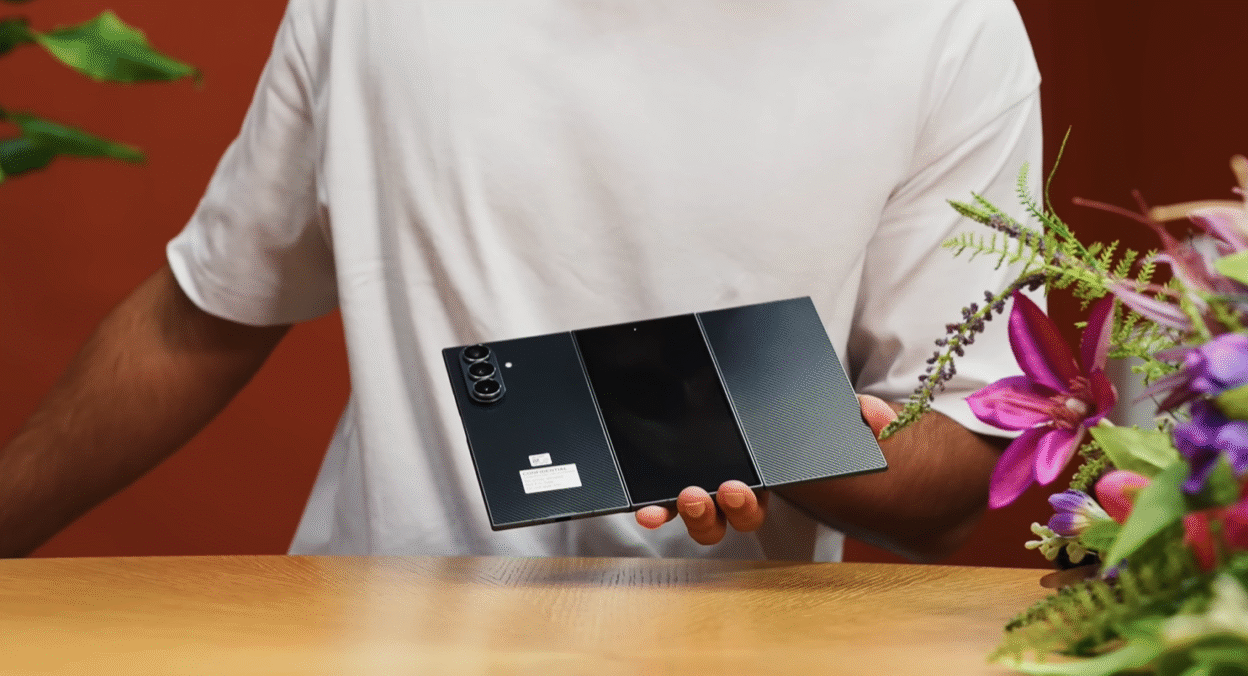
Here’s something I didn’t expect to say: Samsung’s brand new Galaxy Z TriFold might have just made regular foldables feel… incomplete.
This is a phone that folds out not once, but twice to reveal a genuine 10-inch tablet display on the inside. And after spending real time with it, I’ve ended up wanting one way more than I thought I would — not because of the novelty factor, but because of what Samsung has actually done with all that screen real estate.
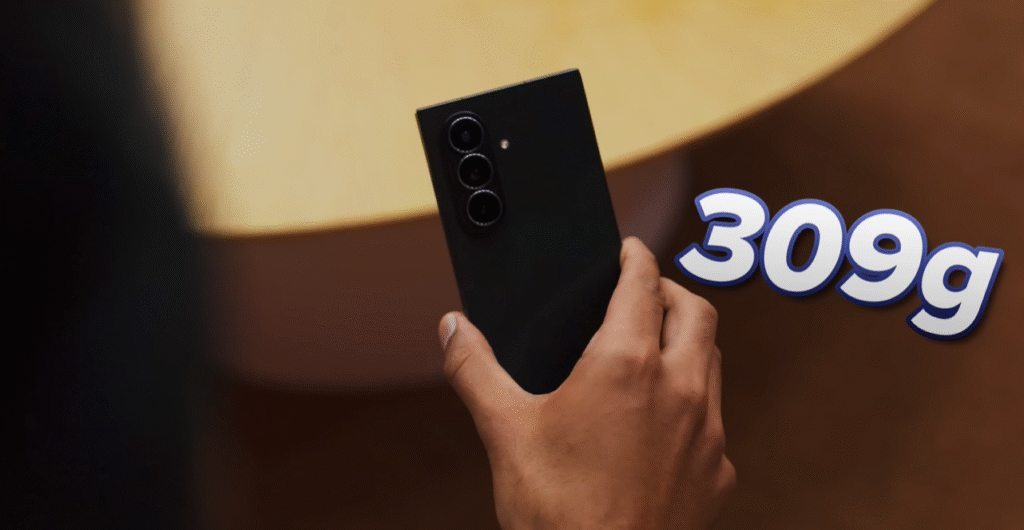
Let me be upfront: this thing costs somewhere around $2,400 to $3,000, depending on your market. It weighs 309 grams. It has two visible screen creases. And you’ll need to baby it like it’s made of glass.
But for a certain type of user — the power user who wants a tablet experience that actually fits in their pocket — this might be the most compelling foldable Samsung has ever made.
Let me explain why.
Unboxing: Samsung Goes Premium Again
Remember when the original Galaxy Fold came in that massive premium box? Samsung’s doing it again with the TriFold, and it’s their way of rewarding early adopters who are willing to drop serious money on experimental tech.
Inside the box, you’ll find:
SIM ejector tool — Standard issue
USB-C to USB-C cable — Braided, nice quality
A case — More on this in a second
45W fast charger — Wait, what?
That last one surprised me. Samsung has spent years justifying the removal of chargers from their flagship phones for “eco reasons,” yet here’s a 45W brick included with the TriFold. I’m genuinely happy to see it here because I don’t think it’s a safe assumption that people just have these 45-watt bricks lying around.
The Case: Surprisingly Essential
The included case looks skimpy at first glance — it doesn’t cover much of the phone. But there’s a clever design element: an extra lip that acts like the spine of a book, covering up the hinge when the phone is closed. This turned out to be more important than I initially thought (more on that when we talk about usability).
Design & Build: Engineering Marvel Meets Practical Nightmare
From the front, when it’s folded, the Galaxy Z TriFold looks identical to the existing Galaxy Z Fold 7. Same 6.5-inch cover display, same screen bezels. Nothing out of the ordinary.
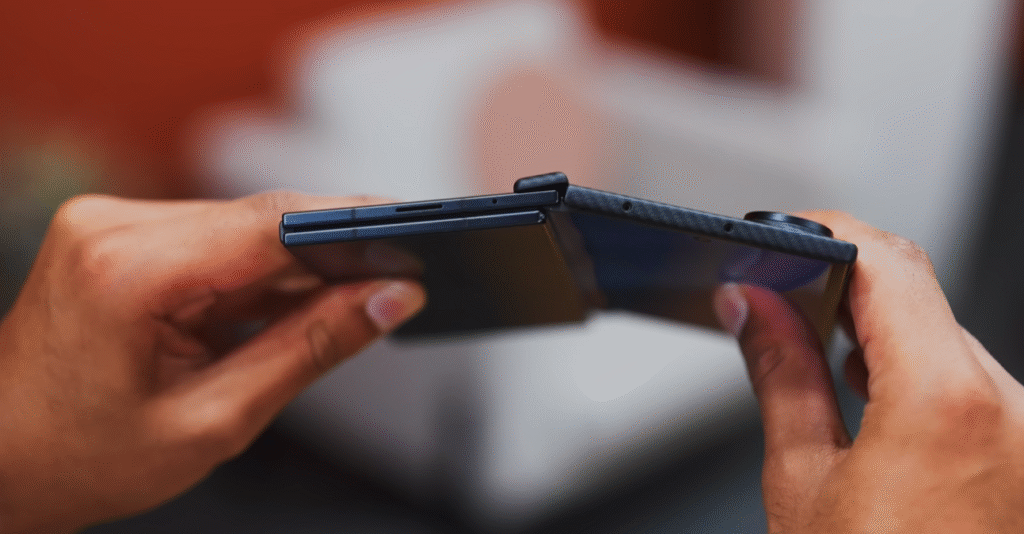
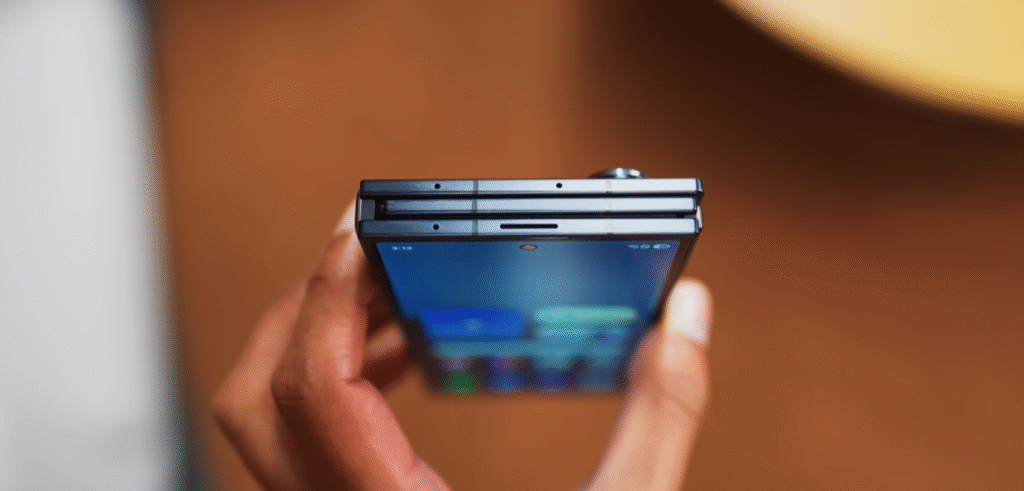
Then you pick it up, and holy hell, this is a chunker.
The Weight Problem
To put that in perspective, the TriFold is almost 50% heavier than current foldables. This absolutely cannot pass as a normal phone when it’s folded up. The sheer thickness of having an entire extra layer means this thing screams “I’m different” from across the room.
Opening It: The Two-Fold Dance
Here’s how you unfold it:
- Reach around the back like you would with a normal Fold
- Grab two layers instead of one and pull them out
- Unfold again to get to complete tablet form
It sounds complicated, but Samsung has added some genuinely clever touches:
Haptic feedback — The phone vibrates aggressively if you try to fold it the wrong way
Extended rear panel — The back section is slightly longer than the others, so when you reach around, the top two layers feel separated from the back one
Magnetic assist — When you’ve unfolded the first section, the middle panel pops up slightly because there’s a magnet pushing it. This makes it easier to lift instead of digging your nails underneath it.
It takes about 20 minutes before the movement starts feeling intuitive. After that? It becomes second nature.
Mind-Blowingly Thin
When fully unfolded, this thing measures just 3.9mm at its slimmest point. That makes it the thinnest Samsung phone by quite a margin.
I’m genuinely impressed by how solid everything feels despite that thinness:
✅ Nice snappy magnets
✅ Zero wobble
✅ Locks out completely flat when unfolded
The Compromises: What You Need to Know
Screen Creases: They’re Multiplying
With two sets of hinges, you now have two visible creases on the display. And I’m not going to sugarcoat it — each crease is fairly prominent. The moment any light casts on your screen, you’ll be reminded of their lurking presence.
Are they a dealbreaker? That depends on you. I got used to them after a day, but they’re always there.
The Wobble Problem
Here’s something I didn’t expect: the phone’s incredible weight, combined with Samsung’s typical camera placement in the top corner, and the narrow width, means this is practically unusable on a flat surface. Every tap elicits a resounding thunk from your table.
When unfolded, it’s better but still not great. The only thing that mostly fixes it? That included the case. Which suddenly makes a lot more sense.
Fingerprint Magnet Supreme
The TriFold is finished with a fiberglass composite material — likely a strength-to-weight decision since you don’t want thick Gorilla Glass across every surface when you’re trying to shave off every millimeter.
But here’s the problem: the vinyl-type texture is sticky and shiny, which means every one of the six faces of this device is constantly picking up fingerprints.
It is borderline impossible to hold and unfold this phone without getting fingerprints everywhere. Keep a microfiber cloth handy.
Screen Durability: Handle With Care
While the cover display is protected by Gorilla Glass Victus Ceramic 2, the inner screen is another story.
The screen protector that rests on the foldable display (which you can’t replace without sending the phone back to Samsung) is so soft that I managed to get deep gouges just by leaning it against a vase.
Plus, with a trifold, you’ve got more room than ever for random pocket particles to end up between your screens. Maintenance is a real consideration with this device.
Specs: Powerful, But Already Behind
| Specification | Details |
|---|---|
| Chipset | Qualcomm Snapdragon 8 Elite (3nm) |
| RAM | 16GB (standard) |
| Storage | 512GB or 1TB UFS |
| Main Display | 10.0″ Dynamic AMOLED 2X, 1584 x 2160, 120Hz |
| Cover Display | 6.5″ Dynamic AMOLED 2X, 1080 x 2520, 120Hz |
| Battery | 5,600mAh (three separate batteries) |
| Charging | 45W wired, 15W wireless, 4.5W reverse |
| Main Camera | 200MP (wide) + 12MP (ultrawide) + 10MP (3x telephoto) |
| Front Cameras | Dual 10MP (cover + inner display) |
| Water Resistance | IP48 |
| OS | Android 16 with One UI 8 |
The Snapdragon 8 Elite Situation
The Snapdragon 8 Elite is still very powerful, and gaming on this inner display is spectacular. But here’s the thing: this is not the absolute latest Elite Gen 5 chip that some phones have already started shipping with.
So the TriFold is lagging behind from day one. Not a dealbreaker, but worth noting at this price point.
Cameras: Borrowed From the Z Fold 7
The cameras are pretty much one-to-one copies from the Z Fold 7:
✅ Great 200MP main camera
⚠️ Fairly mid 10MP 3x zoom camera
⚠️ Decent 12MP ultrawide
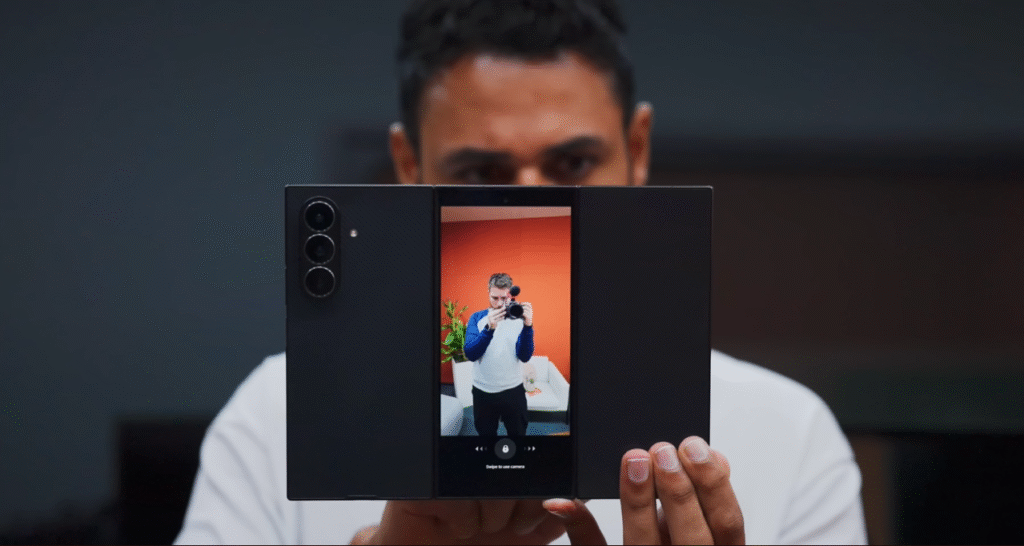
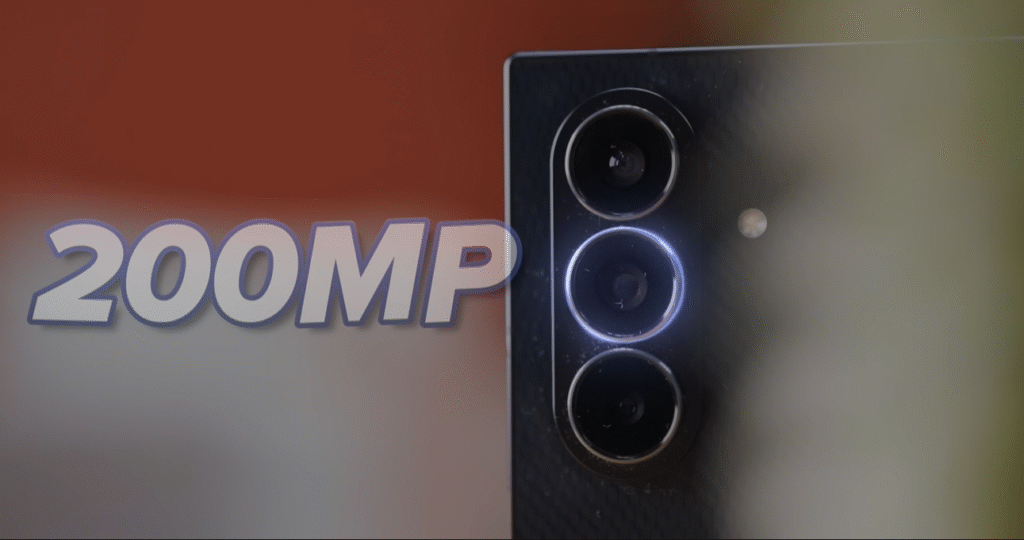
You get the usual foldable benefits — letting your subject see themselves while you shoot, using the main cameras for selfies, and seeing recent shots while capturing new ones. But there’s no distinct camera advantage from this being a trifold versus a bifold.
Battery: A Welcome Upgrade
Here’s something that made me smile: 5,600mAh capacity.
Compare that to the 4,400mAh on the Z Fold 7, and that’s a significant jump. Because the phone is so thin, Samsung achieved this with three separate batteries — one per slice.
45W wired charging (same as the S25 Ultra)
15W wireless charging
4.5W reverse wireless charging
And it retains IP48 water and dust resistance — which is good for a foldable, but less than what you’d get on a regular bar phone.
The Display: This Is Why You Buy It
Let me cut to the chase: the only reason this is a compelling phone is the 10-inch, 16:11 aspect ratio display you get on the inside and what Samsung has enabled you to do with it.
I’d split this into three categories:
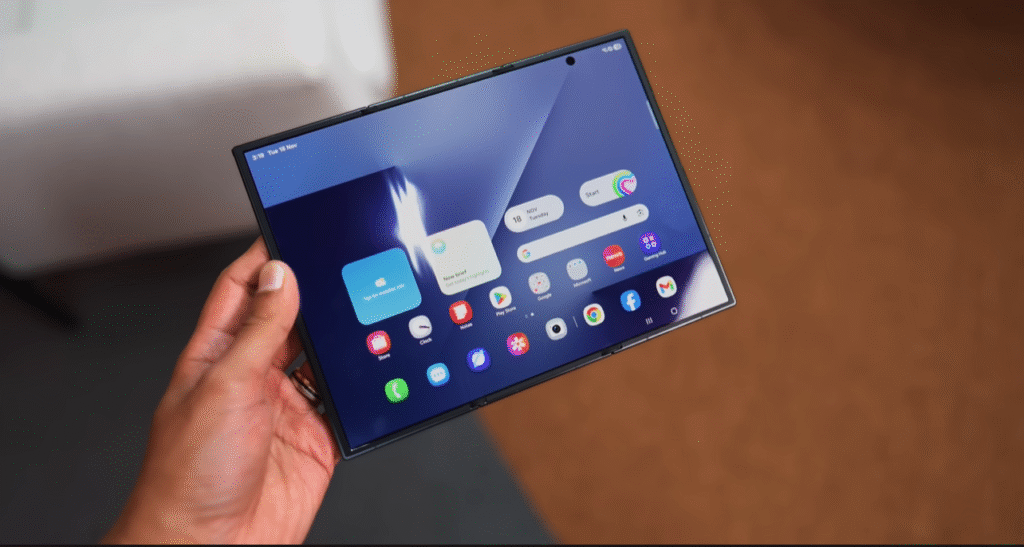
1. Information Density: Apps Actually Work Better
The moment you start opening full-screen apps, it’s immediately clear this isn’t just a stretched foldable experience. The apps actually work better.
Files app: You can now go into folders and subfolders while keeping the entire file directory on screen at once.
Gallery: Tweaked interface with a slick navigation bar, but still tons of extra room to see your photos.
Samsung Health: Look at how much more content fits compared to the Z Fold 7. Way less scrolling required.
YouTube: It’s not just bigger — it’s completely reformatted. You can see and scroll through suggested videos, flick through comments, all without interrupting the video you’re watching.
2. Better Aspect Ratio for Video
Because the TriFold opens out to be more rectangular than square, widescreen content (which, let’s be honest, is almost everything) gives you a 50% bigger overall picture with much smaller black bars on top and bottom.
Plus, you get two different orientations. Unlike the square Z Fold, the TriFold lets you rotate into portrait orientation — perfect for doom scrolling.
The Key Insight
Instead of a bifold where you’re straddling two form factors and apps feel like a clumsy halfway house, the TriFold lets you move between two very clear, distinct classes of app:
📱 Pure smartphone layout when folded
📱📱📱 Pure tablet layout when unfolded
Samsung has had over a decade to optimize 10-inch tablet experiences. That expertise shows here.
Samsung DeX: Your Phone IS the Monitor
Here’s where things get wild.
Samsung phones have had DeX for years — you connect your phone to a monitor, and it casts a desktop-style interface. But the TriFold is the first phone where you can’t just use Samsung DeX, but where the phone itself IS Samsung DeX.
How It Works
- Flick down from the control panel
- Click DeX
- You’re in it
When you open apps in DeX mode, they default to this windowed view where you can:
✅ Move them around by dragging the top bar
✅ Resize them by dragging corners
✅ Have multiple permanent desktops
The Laptop Replacement Question
Let’s say you’re playing a game, but you’re done for a minute. You can keep that game in memory while you temporarily flick to the football match you’re watching and the app you’re downloading from the Play Store on your second desktop.
It’s not quite a laptop — intense applications will pause when you’re not actively using them. But for office work? It’s pretty close, especially when you connect a mouse and keyboard and use the fancy kickstand case to prop it up.
The fact that this setup folds up to fit in your pocket is well past the point of being gimmicky. This is genuinely impressive.
Dual Monitor Mode
DeX has one final trick: you can still connect to an external monitor, and when you do, the TriFold itself becomes an extension to that monitor.
Even if you just have your phone and laptop, you can have a dual monitor display on the go. You’ve been able to do this on Samsung tablets before, but the fact you can now do it with a phone that’s almost always with you? That’s sick.
Multitasking: Three Apps, Buttery Smooth
I probably won’t be doing a lot of DeXing because the way this phone handles multitasking without it is already so intuitive.
Three-App Multitasking
Load up Netflix on one side, a browser on another for casual shopping while you watch. Then drag a third app (like a VPN) to the far right, and you’ve got three apps running in parallel.
It legitimately feels like three normal bar phones glued together.
Layout Options
Uniform three-app portrait view — Equal screen space for each
One big, two small view — Focus mostly on one app while keeping an eye on others (like a football score or WhatsApp chat)
There’s a button to quickly swap app positions, so you’re not bound by the order you opened them in.
Saved App Trios
My favorite feature: you can save any three apps as a trio. Launch them all at once by tapping one icon.
The icon even shows you:
- Which apps they are
- What layout they’ll open in
If your trio opens in portrait view, the logos appear small and side-by-side. If one app is set as the main window, its logo displays bigger than the other two.
Even with tons going on at once, every animation I tested was buttery smooth.
Vs. Huawei Mate XT: This Isn’t the First TriFold
Let’s be clear: this is not the first triple-folding phone. Huawei already took a stab at this form factor last year with the Mate XT.
What Huawei Did Better
Z-fold design — Huawei’s phone folded out like a Z, meaning you could use one, two, OR three parts of the screen. Samsung’s U-fold design only lets you use the cover screen or the fully unfolded inner screen.
Single folding display — Huawei achieved all three form factors with one folding display. Samsung’s cover screen is a completely separate component, which makes the TriFold heavier.
Samsung’s Defense
I brought this up with Samsung. They said their design ensures that when the phone is folded, no part of the soft inner display is exposed to the elements.
Given just how soft that inner display is, this feels somewhat justified.
The One Downside: Brightness
The TriFold inner display has a peak of 1,600 nits.
Compare that to 2,600 nits on the Z Fold 7, and you might think it’s a massive downgrade.
In reality? It will matter occasionally, but the day-to-day difference won’t be nearly as much as that number suggests. I never found myself struggling to see the screen outdoors.
Who Should Buy the Samsung Galaxy Z TriFold?
After extensive hands-on time, here’s my honest take:
Buy This Phone If You:
✅ Want a genuine tablet that fits in your pocket
✅ Use Samsung DeX or do productivity work on the go
✅ Need serious multitasking — Three apps simultaneously is game-changing
✅ Are in the Samsung ecosystem — This pairs beautifully with Galaxy Buds, Watches, etc.
✅ Can afford the luxury — This is a $2,400-$3,000 device
✅ Are willing to baby it — Screen care is essential
Skip This Phone If You:
❌ Want the best camera — Regular flagships have better zoom cameras
❌ Need cutting-edge specs — Snapdragon 8 Elite is already a generation behind
❌ Can’t deal with creases — Two creases, both visible
❌ Need ruggedness — The soft inner display scratches easily
❌ Want Huawei’s flexibility — Z-fold design lets you use two screens; this doesn’t
Pricing & Availability
South Korea: ₩3,249,000 (approximately $2,400 USD)
Expected US Price: Around $3,000
Expected Release: December 12, 2025
Available Configurations:
- 16GB RAM / 512GB storage
- 16GB RAM / 1TB storage
Color: Crafted Black (only option)
The Final Verdict: The Definitive Samsung Foldable
I’m going to say something bold: I don’t think the TriFold is this experimental quirky phone option.
I actually think this phone has immediately become the definitive Samsung foldable.
Yes, you’ll have to handle it with care. Yes, you’ll definitely have to pay for the privilege. But because Samsung has spent so long making normal foldables AND so long making tablets, this fusion of the two doesn’t feel like a first-gen experiment.
It’s already polished. It’s already taking full advantage of the extra space.
When I first heard about a trifold phone, I expected it to feel half-baked — a concept device rushed to market to beat competitors. Instead, what Samsung delivered is a device that makes every other foldable feel incomplete.
The Z Fold 7 now feels like you’re stuck between phone and tablet. The TriFold? You get the best of both worlds with a clear, intentional transition between them.
Is it perfect? Absolutely not. The screen scratches easily, the creases are visible, it’s expensive, and you need to constantly wipe fingerprints off.
Is it worth it? For the right person — the productivity-focused power user who wants a genuine tablet experience in their pocket — absolutely yes.
Just think of it like a grander slice. And maybe invest in a good insurance plan.
Rating: 9/10 — Samsung’s most ambitious and most compelling foldable yet.
Top 5 Reasons to Avoid the Samsung Galaxy Z TriFold
Top 10 Reasons to Buy the Samsung Galaxy Z Trifold
The Korean price converts to around $2,400, but expect closer to $3,000 when it launches in the US on December 12, 2025.
What do you think about the Samsung Galaxy Z TriFold? Is it the future of foldables, or is it too expensive and fragile for mainstream adoption? Drop your thoughts in the comments below!