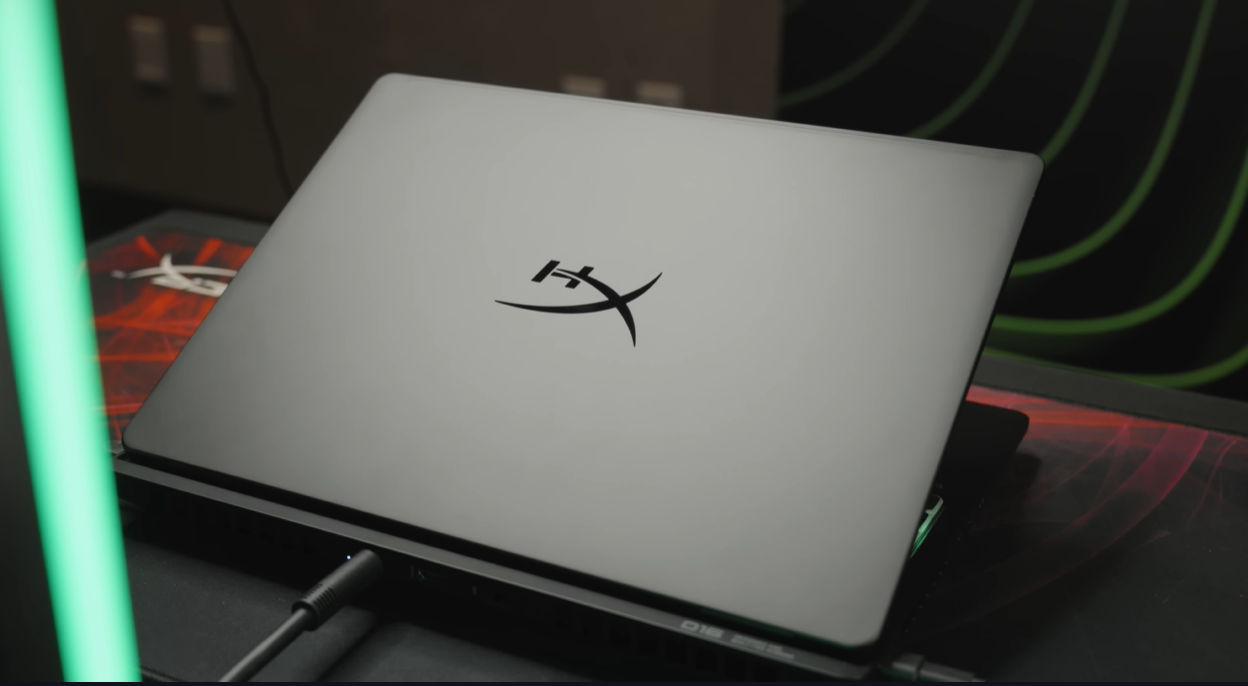
HyperX making laptops? Yes, you read that right. The gaming peripheral giant has entered the laptop market with the HyperX OMEN Max 16, and it’s not messing around. This is a 300-watt powerhouse that somehow manages to look reasonably slim despite packing desktop-class performance.
We got hands-on time with this absolute beast at the HyperX Arena, and after testing its vapor chamber cooling, 240Hz OLED display, and 1000Hz polling rate keyboard, we can confirm: this isn’t just another gaming laptop. It’s a legitimate desktop replacement that fits in a backpack.
Whether you’re a competitive esports player, content creator, or just someone who wants the absolute best gaming performance in a portable form factor, the HyperX OMEN Max 16 demands your attention. Here’s everything you need to know.
QUICK VERDICT: IS THE HYPERX OMEN MAX 16 WORTH IT?
TL;DR Summary:
- Performance: Desktop-Class (300W TDP, RTX 5090 available)
- Display: Exceptional (2.5K OLED, 240Hz, 0.2ms, 1000 nits)
- Keyboard: Industry-Leading (1000Hz polling rate)
- Cooling: Engineering Marvel (massive vapor chamber)
- Build Quality: Excellent (HP OMEN lineage)
- Portability: Decent for power (chunky but well-designed)
- Price: Premium (flagship pricing expected)
- Target: Serious gamers & creators wanting desktop replacement
VERDICT: The HyperX OMEN Max 16 is one of the most powerful gaming laptops ever made. If you need maximum performance and don’t want to compromise, this is it. The 300W TDP, exceptional display, and innovative cooling make it a true desktop replacement. Just be prepared for premium pricing and modest battery life.
THE HYPERX SURPRISE: WHY THIS LAPTOP EXISTS
Let’s address the elephant in the room: HyperX has always been known for gaming peripherals—headsets, keyboards, mice, RAM. So why are they suddenly making laptops?
The Answer: They’re Not (Sort Of)
The HyperX OMEN Max 16 is actually manufactured by HP, leveraging their highly successful OMEN laptop lineup that’s been excellent for years. HyperX is owned by HP, and this represents the merging of HP’s laptop engineering expertise with HyperX’s gaming brand identity.
Why This Matters:
✓ HP’s OMEN laptops have proven track record
✓ Mature thermal solutions and build quality
✓ Established supply chain and support network
✓ HyperX branding targets core gaming audience
This isn’t a random peripheral company trying to make laptops. It’s a strategic move combining the best of both brands, and the result speaks for itself.
DESIGN & BUILD QUALITY: DECEPTIVELY SLIM FOR 300W
First Impressions: Surprisingly Good Looking
For a laptop packing 300 watts of power, the OMEN Max 16 looks remarkably refined:
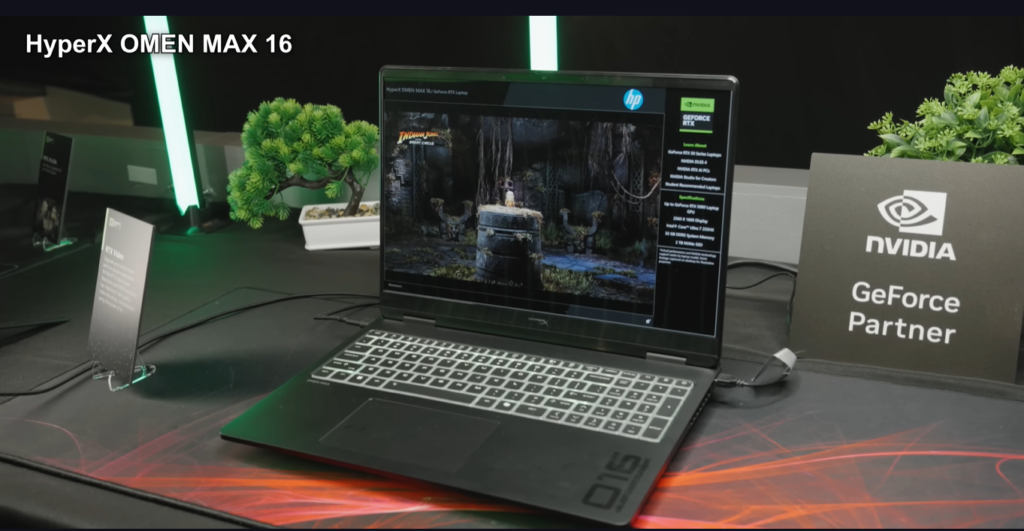
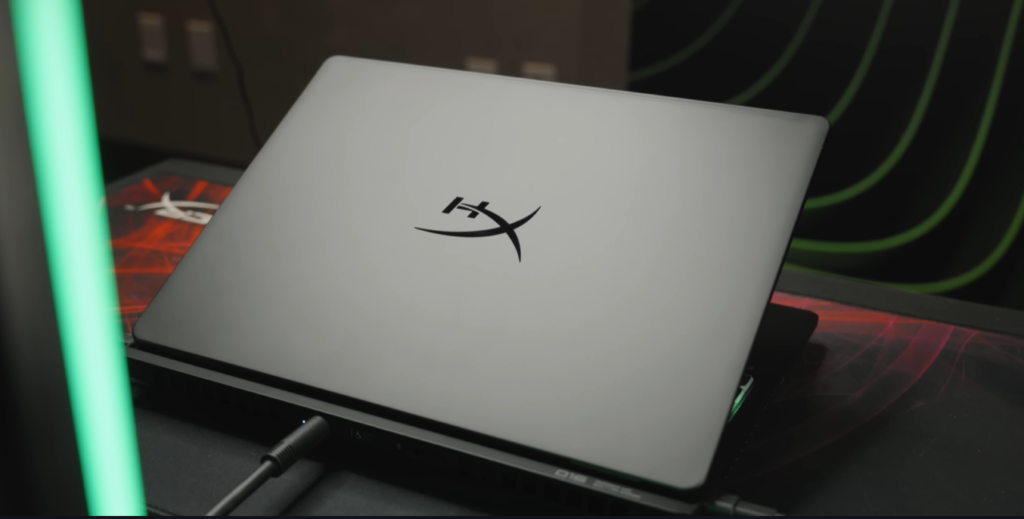
Design Highlights:
✓ Visually slim profile from the top
✓ Massive bottom tray cleverly hidden
✓ Clean, professional aesthetic
✓ Gaming elements without being obnoxious
✓ Premium build quality throughout
The Engineering Trick:
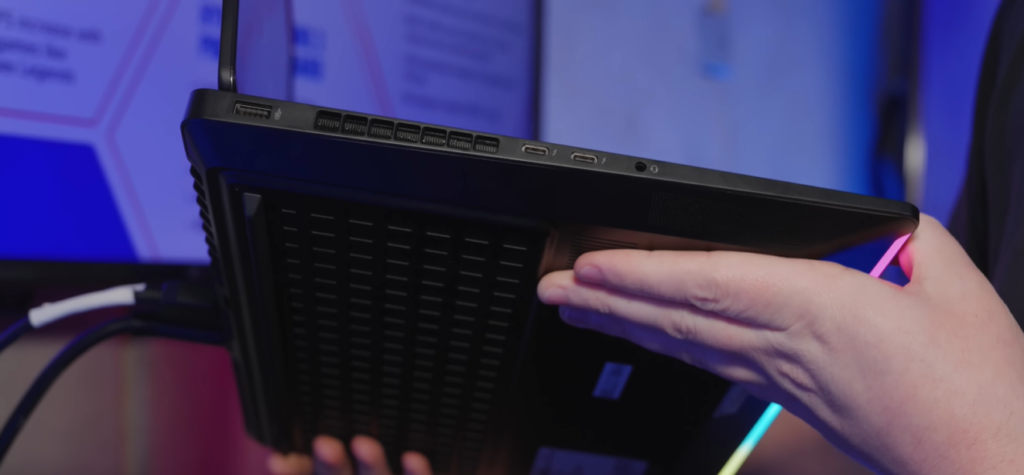
HyperX did an excellent job making this laptop appear thinner than it actually is. From the top, it looks like a reasonably slim gaming laptop. It’s only when you see the massive tray underneath that you realize where all that cooling capacity comes from.
“In fairness to HyperX, they did a really good job making it look like it’s pretty thin, even though it has this absolutely massive tray underneath it.”
Build Quality Assessment
✓ Solid construction (HP OMEN heritage)
✓ Premium materials throughout
✓ Minimal flex in keyboard deck
✓ Sturdy hinge mechanism
✓ Professional appearance suitable for work environments
Size Reality Check:
Yes, this is a big laptop. But it’s not “absolutely gargantuan” considering what’s packed inside. The visual design makes it appear more portable than competitors with similar power levels.
Portability Factor:
- Weight: Heavy (exact specs TBA)
- Thickness: Chunky bottom, slim appearance
- Backpack-Friendly: Yes, but you’ll know it’s there
- Lap Use: Possible but not ideal for extended periods
DISPLAY: FLAGSHIP OLED BRILLIANCE
The Star of the Show: 2.5K OLED Panel
Display Specifications:
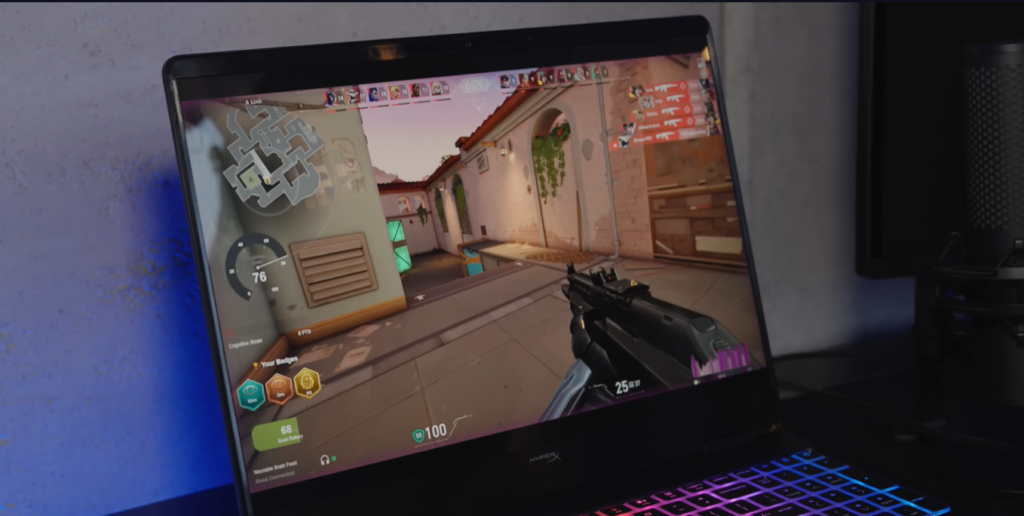
- Resolution: 2.5K (2560 x 1440 approximate)
- Technology: OLED
- Refresh Rate: 240Hz
- Response Time: 0.2ms
- Color Coverage: 100% DCI-P3
- Peak Brightness: 1000 nits (HDR)
- Size: 16 inches
This is one of the best laptop displays we’ve seen in 2025.
Why This Display Is Exceptional
240Hz OLED at 2.5K:
The combination of high refresh rate, OLED’s perfect blacks, and sharp resolution creates an incredibly immersive gaming and content creation experience.
Benefits:
✓ Buttery smooth motion (competitive gaming advantage)
✓ Perfect blacks and infinite contrast (OLED magic)
✓ Vibrant, accurate colors (100% DCI-P3)
✓ Ultra-fast response time (0.2ms = zero ghosting)
✓ Eye-searing brightness when needed (1000 nits HDR)
0.2ms Response Time:
This virtually eliminates motion blur and ghosting. Fast-paced games look incredibly crisp, and competitive gamers will appreciate the pixel-perfect clarity during rapid movements.
1000 Nits Peak Brightness:
Most laptop OLEDs struggle with brightness. The OMEN Max 16’s 1000-nit peak (in HDR) means:
- Usable outdoors in bright conditions
- HDR content looks spectacular
- Excellent for content creation in various lighting
100% DCI-P3 Color Coverage:
This professional-grade color gamut means:
✓ Accurate color representation for content creation
✓ Vibrant gaming visuals
✓ Suitable for photo/video editing work
✓ No need for external monitor for color-critical work
Alternative Display Option
If OLED pricing is too steep:
- 3.2K IPS panel available
- Lower cost alternative
- Still excellent quality
- Sacrifices: No perfect blacks, likely lower contrast
Recommendation: Spring for the OLED if possible. The difference is substantial and worth the premium for the laptop’s intended use cases.
PERFORMANCE: 300W OF DESKTOP-CLASS POWER
Processor Options: Intel & AMD Flagship CPUs
Intel Option:
- Up to Intel Core Ultra Series 200 HX
- Exact SKUs not released at time of testing
- Desktop-class performance expected
- High core counts and clock speeds
AMD Option:
- Up to AMD Ryzen 9 AI HX 475
- Confirmed specification
- Excellent multi-threaded performance
- Strong efficiency when not gaming
Performance Expectation:
“This will be absolutely ripping by the time that those arrive here with that 300W TDP.”
Both options represent the absolute top tier of laptop processors. You won’t find more powerful mobile CPUs.
Graphics: Up to RTX 5090 Mobile
The crown jewel of this laptop:
- Up to NVIDIA RTX 5090 mobile GPU
- 300W total system TDP to feed both CPU and GPU
- Desktop-class gaming performance
- Ray tracing at maximum settings
- DLSS 4.5 support (more on this later)
What 300W TDP Means:
Most gaming laptops max out at 150-180W total power. The OMEN Max 16 DOUBLES that, allowing:
✓ Higher sustained boost clocks
✓ Less thermal throttling
✓ Desktop-equivalent performance
✓ Future-proofing for demanding titles
“Look at the size of the heat sinks in the back here. She’s a thick boy.”
The Reality of 300W Performance:
This isn’t marketing fluff. This laptop genuinely delivers desktop-class gaming performance. Games that struggle on other gaming laptops will run maxed out here.
RAM: Up to 64GB SODIMM (User Upgradeable!)
Memory Specifications:
- Up to 64GB at purchase
- SODIMM slots (NOT soldered)
- User-upgradeable (critical feature)
- DDR5 (specification TBA)
The SODIMM Advantage:
✓✓ Upgrade RAM yourself when prices drop
✓✓ No need to pay HP’s premium RAM pricing
✓✓ Future-proof as your needs grow
✓✓ Easy to repair/replace if failure occurs
“Fortunately, all of HyperX’s laptops come with SODIMM memory. So in the future… you can just rip your 16GB or whatever out and throw a bunch more in.”
This is increasingly rare in premium laptops. Apple, Dell, and others solder RAM for no good reason. HyperX keeping it upgradeable is consumer-friendly and appreciated.
Recommendation: Start with 16GB or 32GB, save money, upgrade later when RAM prices normalize.
Storage: Up to 2TB SSD
Storage Options:
- Up to 2TB NVMe SSD
- Fast PCIe Gen 4/5 speeds expected
- Likely user-upgradeable (standard M.2 slot)
For Modern Gaming:
2TB is increasingly necessary:
- Modern AAA games: 50-150GB each
- Call of Duty: ~200GB
- Flight simulators: 150GB+
- Content creation files: Massive
Recommendation: 1TB minimum for serious gamers, 2TB for content creators or those with extensive game libraries.
COOLING SYSTEM: ENGINEERING MARVEL
How They Fit 300W in This Package
The cooling system is genuinely impressive engineering:
Cooling Components:
- Massive vapor chamber (central component)
- Dedicated heat pipes for additional dissipation
- Dual fan system (high-CFM blowers)
- Strategic vent placement (back and sides)
- Thermal interface materials (high-performance TIM)
The Vapor Chamber Excellence
What makes this special:
✓ Blown-apart demonstration unit shown at event
✓ Covers both CPU and GPU simultaneously
✓ Integrated wick system for liquid return
✓ Prevents dry-out under sustained load
✓ Massive surface area for heat spreading
Technical Explanation:
The vapor chamber has individual wicks going to CPU and GPU contact points. As the coolant vaporizes from heat, it moves to the heat sinks (cooler areas). The wicks then draw the condensed liquid back to ensure continuous, efficient cooling without dry spots.
“You can see that it not only has a whole bunch of little areas, but also they have it so that the GPU and CPU have wicks that go to them to make sure that as that vapor boils off, it moves to the heat sinks, and then the wicks bring all of that back.”
Why This Matters:
Vapor chambers are superior to traditional heat pipes for high-power systems. They spread heat more evenly and handle higher thermal loads more efficiently.
Real-World Cooling Performance
Expected Results:
✓ Sustained high performance without throttling
✓ Lower internal temperatures vs competitors
✓ Longer component lifespan
✓ Quieter operation (efficient cooling = less aggressive fans)
The “thick boy” design accommodates:
- Larger heat sinks with more surface area
- Better fin spacing for airflow
- Thicker, more effective fans
- More generous exhaust vents
Trade-off:
You sacrifice some portability for thermal headroom. But if you want 300W performance, you need 300W cooling. There’s no cheating physics.
KEYBOARD: 1000HZ POLLING RATE REVOLUTION
The Competitive Advantage
Keyboard Specifications:
- Polling Rate: 1000Hz
- Per-Key RGB Lighting
- Tactile, responsive switches
- Full-size layout with number pad
- Zero-lattice design (unique aesthetic)

Why 1000Hz Polling Matters
The Problem with Traditional Keyboards:
Most laptop keyboards poll at 125-250Hz. This means:
- Key presses register every 4-8ms
- On a 240Hz display (4.16ms per frame), inputs can be delayed multiple frames
- Competitive disadvantage in fast-paced games
The 1000Hz Solution:
- Key presses register every 1ms
- Effectively eliminates input lag
- Every key press registers within same frame on 240Hz display
- Tangible advantage in competitive gaming
“You might get a 240Hz monitor and also have a 250Hz polling rate on your keyboard. So you can end up in situations where you’re pressing a key and it won’t be registering for a couple of frames.”
Who Benefits:
✓ Competitive FPS players (CS2, Valorant, Overwatch)
✓ Fighting game enthusiasts (frame-perfect inputs)
✓ Rhythm gamers (precise timing)
✓ Fast typists (immediate response)
Typing Experience: Excellent
Beyond polling rate, the keyboard itself is excellent:
✓ Great tactile feedback
✓ Comfortable key travel
✓ Consistent actuation across all keys
✓ Excellent key stability (no wobble)
✓ Premium typing feel
“HP and by extension HyperX have been making fantastic keyboards for ages and this one is no exception.”
Design Aesthetic:
The zero-lattice design creates a unique, futuristic look. The per-key RGB lighting shines through beautifully, and the overall appearance is premium without being gaudy.
Touchpad: Solid but Standard
Touchpad Performance:
✓ Responsive and accurate
✓ Good size for a gaming laptop
✓ Smooth surface for gestures
✓ Windows Precision drivers
The 1000Hz Touchpad Joke:
“It would be hilarious to have a 1000Hz touchpad, HyperX, you should make that happen.”
While amusing, touchpad polling rate matters less since gamers use mice anyway. The included touchpad is perfectly adequate for productivity tasks.
BATTERY LIFE: THE INEVITABLE COMPROMISE
The Reality of 300W Gaming
Battery Specifications:
- Capacity: 83Wh
- Charger: 460W power brick
- Battery Life: Limited when gaming
The Math:
83Wh battery ÷ 300W gaming load = ~16 minutes gaming unplugged
“Given it’s a 300-watt laptop, I don’t think you’re going to be getting the most battery life out of it.”
Expected Real-World Battery Life:
- Gaming (unplugged): 30-45 minutes maximum
- Light productivity: 2-4 hours
- Video playback: 3-5 hours
- Web browsing: 3-4 hours
The 460W Charger:
The massive power brick charges the battery quickly:
✓ Fast charge when plugged in
✓ Necessary for sustained gaming
✓ Heavy and bulky (unavoidable)
The Bottom Line on Battery:
This is a desktop replacement, not an ultrabook. Expect to be tethered to power for gaming sessions. The battery is there for:
- Moving between rooms
- Light work away from desk
- Keeping system alive during brief unplugs
If battery life is your priority, this isn’t your laptop. But that’s not the point of a 300W gaming machine.
DLSS 4.5: THE GAME-CHANGING AI FEATURE
The Frame Generation Revolution
What We Tested:
- DLSS 4.5 beta on RTX 5060 laptop (OMEN 15)
- 500Hz external monitor
- Before and after comparison
- Real-world gaming scenarios
The Problem with Old Frame Generation:
Previous DLSS/FSR implementations suffered from:
✗ Visible smearing and ghosting
✗ Artifacts during fast camera movement
✗ Unnatural motion feel
✗ Hair and fine details looked terrible
✗ UI elements ghosting
“Before we did the little update, there was so much smearing… you could see her hair, especially when you like moved the camera around, there would be weird ghosting.”
DLSS 4.5: Night and Day Improvement
The Transformation:
✓✓ Smearing virtually eliminated
✓✓ Fast camera movements look natural
✓✓ Fine details (hair, particles) render correctly
✓✓ Impossible to distinguish from native rendering
✓✓ Massive FPS boost with no visual compromise
“If you told me that there was no frame generation on it, just a really fast GPU, I would believe you. That is just how good this is.”
The Technology Behind It:
NVIDIA’s breakthrough:
- Extracts light position data from game engine
- Uses depth information directly
- Analyzes motion vectors in real-time
- Feeds into second-generation transformer model
- Generates frames with unprecedented accuracy
Why This Matters for OMEN Max 16:
With RTX 5090 and DLSS 4.5:
- Hit 240Hz on the OLED display in demanding games
- Max settings with high frame rates
- Future-proof for next-gen games
- Legitimate competitive advantage
The Honest Take:
“AI is annoying because I want to be able to buy RAM, but like this is actually pretty freaking good.”
DLSS 4.5 represents AI actually solving real problems rather than creating hype. It meaningfully improves gaming experience.
I/O & CONNECTIVITY: DESKTOP-CLASS PORTS
Port Selection: Near-Desktop Experience
Available Ports:
✓ Multiple USB-A ports (3+)
✓ USB-C with Thunderbolt support
✓ HDMI 2.1 output
✓ Ethernet (RJ45) – Crucial for gaming
✓ 3.5mm headphone jack
✓ SD card reader (likely)
The Ethernet Port Appreciation:
“I know you guys are going to be stoked about that.”
Why Ethernet matters:
✓ Lower latency vs Wi-Fi (competitive advantage)
✓ More stable connection
✓ No wireless interference
✓ Maximum bandwidth utilization
Having Ethernet on a laptop in 2025 is increasingly rare but essential for serious gaming.
Wireless Connectivity:
- Wi-Fi 7 (latest standard)
- Bluetooth 5.3+
- Excellent wireless performance when needed
WHO SHOULD BUY THE HYPERX OMEN MAX 16?
Perfect For:
✓ Competitive gamers wanting desktop performance in laptop form
✓ Content creators (video editing, 3D rendering, streaming)
✓ Professional users needing maximum mobile power
✓ Users with desktop PC who want equivalent laptop
✓ Those who game at desk but need portability option
✓ Esports professionals traveling to tournaments
✓ Anyone wanting to maximize performance over battery life
✓ Gamers with high-refresh external monitors
Not Recommended For:
✗ Budget-conscious buyers
✗ Users prioritizing battery life and portability
✗ Casual gamers (overkill for your needs)
✗ Students needing all-day unplugged use
✗ Anyone who primarily games on the go
✗ Those wanting thin-and-light form factor
✗ Users on tight budgets (premium pricing expected)
The Honest Assessment:
This laptop makes sense if:
- You need desktop-class gaming performance
- You sometimes need portability
- You’re willing to sacrifice battery life
- Budget isn’t primary constraint
- You understand it’s a desktop replacement
This laptop doesn’t make sense if:
- You rarely game at maximum settings
- You need all-day battery life
- Portability is critical
- Budget is tight
- You game casually on the go
PRICING & VALUE PROPOSITION
Expected Pricing (Estimated):
- Base Configuration: $2,200-2,500
- Mid-Range Config: $2,800-3,200
- Maxed Out Spec: $3,500-4,000+
What You’re Paying For:
- RTX 5090 mobile GPU (premium component)
- Flagship CPU (Intel Ultra 200 HX / Ryzen 9 HX 475)
- 2.5K OLED 240Hz display (expensive panel)
- Advanced vapor chamber cooling
- 1000Hz keyboard with per-key RGB
- Premium build quality
- HyperX/HP brand and support
Value Comparison:
vs. Desktop PC:
- Desktop: More performance per dollar
- Laptop: Portability + space saving
- Verdict: Laptop makes sense if you value portability
vs. Competing Laptops:
- Razer Blade 18: Similar performance, higher price
- ASUS ROG Strix Scar: Comparable specs, similar price
- MSI Titan: More expensive, similar performance
- Alienware m18: Similar price bracket
The OMEN Max 16 competes directly with flagship gaming laptops and holds its own on specs while potentially undercutting on price.
Is It Worth It?
Yes, if:
- You need maximum mobile performance
- You value display quality (OLED is worth it)
- You appreciate engineering excellence (that cooling!)
- You’re willing to pay for best-in-class
No, if:
- You can’t justify $2,500+ laptop
- Mid-range performance would suffice
- You need all-day battery life
- You game casually
FINAL VERDICT: 9/10 – DESKTOP REPLACEMENT DONE RIGHT
Rating Breakdown:
- Performance: 10/10 (300W = desktop class)
- Display: 10/10 (2.5K OLED 240Hz perfection)
- Keyboard: 10/10 (1000Hz polling + great typing)
- Cooling: 10/10 (engineering marvel)
- Build Quality: 9/10 (premium HP OMEN heritage)
- Portability: 6/10 (manageable but chunky)
- Battery Life: 5/10 (physics can’t be cheated)
- Value: 8/10 (premium price, premium product)
OVERALL: 9/10 – Highly Recommended for Target Audience
What Makes It Special:
The HyperX OMEN Max 16 succeeds because:
✓ It doesn’t compromise on performance
✓ The cooling solution actually works
✓ The display is genuinely best-in-class
✓ The keyboard innovation is meaningful
✓ Build quality inspires confidence
✓ SODIMM RAM is consumer-friendly
What Holds It Back:
The only real negatives:
✗ Battery life is mediocre (unavoidable at 300W)
✗ Premium pricing (expected for specs)
✗ Chunky form factor (necessary for cooling)
The Bottom Line:
This is one of the most impressive gaming laptops we’ve tested. HyperX’s entry into the laptop market is strong, leveraging HP’s OMEN expertise while adding genuine innovation.
If you need maximum gaming performance in a portable package and understand the trade-offs (battery life, size, price), the HyperX OMEN Max 16 delivers spectacularly.
This isn’t for everyone. But for its target audience—serious gamers, content creators, and power users—it’s one of the best options available in 2025.
Should You Buy It?
Buy if:
- You need desktop-class mobile performance
- You value exceptional display quality
- You appreciate engineering excellence
- Budget allows for premium laptop
Skip if:
- You need all-day battery life
- Portability is critical priority
- You game casually
- Budget is tight
Wait for:
- Reviews with final retail units
- Pricing announcement
- Availability in your region
- Competing launches from ASUS/MSI
Final Recommendation: For those who can afford it and need what it offers, the HyperX OMEN Max 16 is an excellent choice that won’t disappoint.