Last Updated: February 8, 2026 | Complete Feature Breakdown | 18 min read
🚀 HyperOS 3 Is Finally Here in India — And It’s a Game-Changer
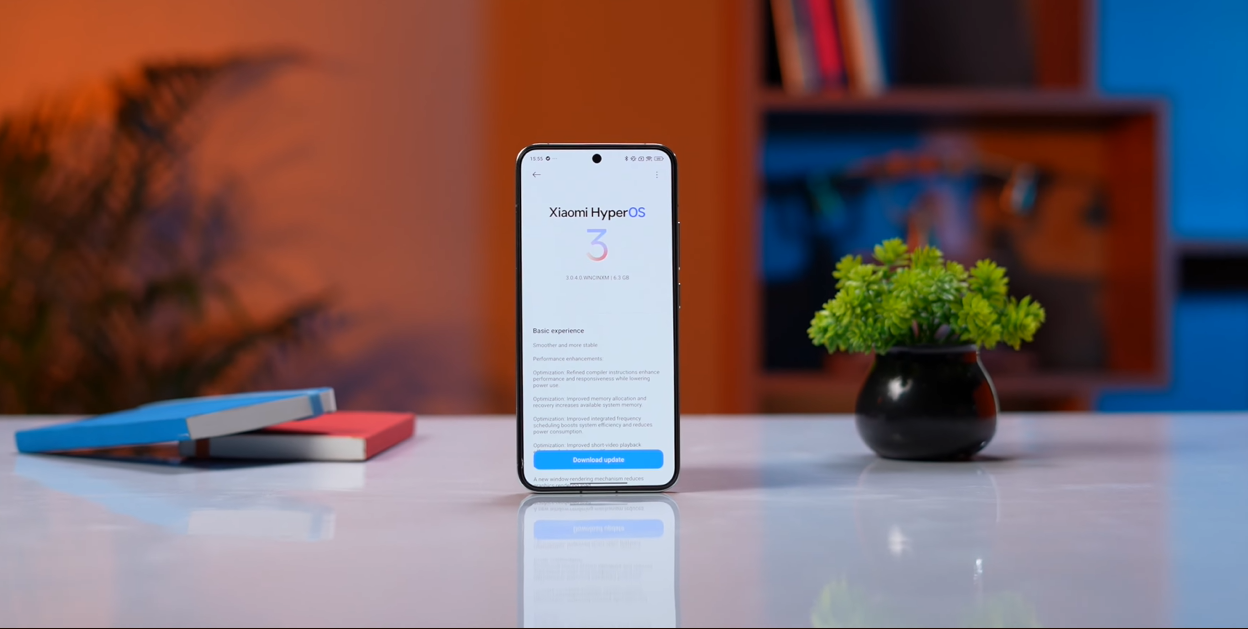
HyperOS 3 has officially started rolling out in India, and after installing it on the Xiaomi 15 Ultra and spending days exploring every feature, I can confirm: this is Xiaomi’s biggest software update ever.
Based on Android 16 with a completely refreshed UI, powerful AI features, and seamless ecosystem integration, HyperOS 3 brings Xiaomi devices closer to the premium iOS experience — while maintaining Android’s customization flexibility.
But there are some India-specific changes, missing features, and hidden settings you absolutely need to know about before updating.
This is everything you need to know about HyperOS 3 in India.
What Is HyperOS 3?
HyperOS 3 is Xiaomi’s third-generation custom Android skin, built on Android 16 with native support for Android 15.
Key Stats
- Release Date (China): September 24, 2025
- India Rollout Begins: December 2025 – February 2026
- Based On: Android 16 (with Android 15 support for older devices)
- Devices Supported: 50+ Xiaomi, Redmi, and POCO models
- Update Commitment: Up to 4 major OS updates, 5 years of security patches (flagships)
What Makes HyperOS 3 Special?
HyperOS 3 isn’t just an incremental update. It’s a complete visual and functional overhaul that brings:
✅ iOS-inspired polish (HyperIsland, redesigned UI)
✅ Android 16 foundation (latest Google features + security)
✅ Powerful AI integration (writing tools, transcription, image enhancement)
✅ Cross-device ecosystem (works with iPhone, iPad, Mac)
✅ Performance optimizations (smoother animations, better battery life)
Rollout Timeline: When Will Your Phone Get It?
Current Rollout Status (February 2026)
Already Rolled Out (December 2025 – January 2026):
- Xiaomi 15, 15 Pro, 15 Ultra
- Xiaomi 14, 14 Pro, MIX Flip
- Redmi Note 14 Pro+, Note 14 Pro 5G
- POCO F7 Ultra, F7 Pro, X7 Pro
Rolling Out Now (February 2026):
- Xiaomi 13 series (13 Ultra, 13 Pro, 13, 13T Pro, 13T)
- Xiaomi 12 series (12 Pro, 12, 12T Pro)
- Redmi Note 13 series
- POCO F5 Pro, F5, X6
- Redmi Pad Pro, Xiaomi Pad 7
Coming Soon (March – April 2026):
- Older Redmi Note series (Note 12, Note 11)
- Budget POCO phones (M7 Pro, C85)
- Xiaomi 11 series (select models)
How to Check if Your Device Is Eligible
- Go to Settings → My Device
- Tap the HyperOS banner at the top
- Select Check for updates
- If available, you’ll see “Download and Install Update.”
Pro Tip: Download the MemeOS Enhancer app fromthe Google Play Store to check your device’s update eligibility and get estimated rollout dates.
Feature #1: HyperIsland — Better Than Dynamic Island
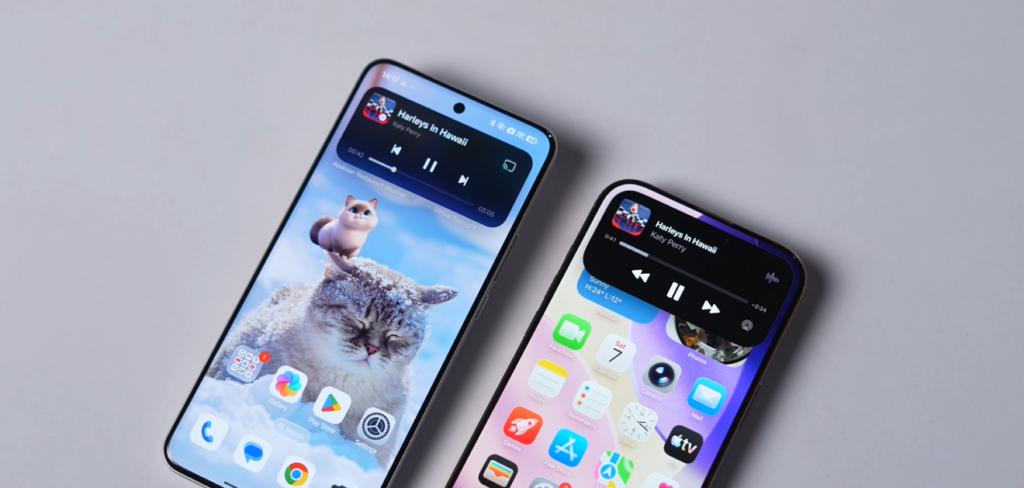
This is my favorite HyperOS 3 feature, and honestly, it’s better than Apple’s Dynamic Island.
What Is HyperIsland?
HyperIsland is Xiaomi’s take on the Dynamic Island concept — a pill-shaped notification area at the top of your screen that displays live activities in real-time.
Supported Activities:
- 🎵 Music playback (with animated album art)
- ⏱️ Timers and stopwatches
- 🎙️ Voice recording
- 🔋 Charging status
- 📞 Ongoing calls
Why It’s Better Than Dynamic Island
1. You Can Run Up to 3 Activities Simultaneously
Apple’s Dynamic Island shows one activity at a time. HyperIsland can display three live activities and lets you swipe between them seamlessly.
Example:
- Music playing on Spotify
- Timer counting down
- Voice recorder running in background
All three show up in the island, and you can switch between them with a swipe.
2. Album Art-Based Animations
When you play music, the island’s animation changes based on the album art colors.
- Classical music with blue album art → Blue gradient animations
- Rock music with red/orange art → Warm color transitions
The moment you pause music, the animation pauses instantly. It’s responsive and visually stunning.
3. Floating Window Integration
This is genius. You can flick any live activity into a floating window with a simple gesture.
- Flick the music player → It becomes a floating bubble you can move around
- When done, flick it back into the island
The animations are buttery smooth, making multitasking feel natural.
The Limitation
HyperIsland currently supports:
- ✅ Xiaomi’s own apps (Clock, Recorder, Phone)
- ✅ Select music apps (Spotify, White Music, YouTube Music)
- ❌ Food delivery apps (Swiggy, Zomato, Blinkit)
- ❌ Ride-hailing apps (Uber, Ola)
- ❌ Third-party productivity apps
I really hope Xiaomi opens this up to more apps. The potential is huge — imagine seeing your food delivery status, cab ETA, or workout timer in the island.
Feature #2: Lock Screen Customization Gets Major Upgrade
The lock screen is where HyperOS 3 shines with iOS-inspired customization.
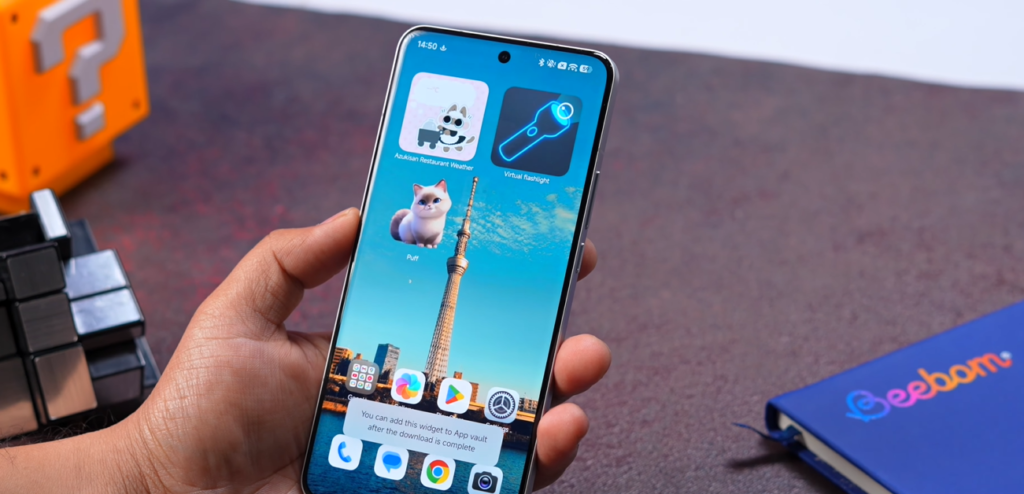
My Sets: Save Multiple Lock Screen Setups
My Sets lets you create and save multiple lock screen configurations, then switch between them anytime.
How it works:
- Long-press on the lock screen
- Create different setups (work, personal, travel, etc.)
- Switch between them with a swipe
Example setups:
- Work: Minimalist black wallpaper + digital clock
- Personal: Photo wallpaper + analog clock
- Travel: Dynamic wallpaper + weather widget
This is directly inspired by iOS, but Xiaomi takes it further with more wallpaper variety.
New Classic Wallpaper Section
HyperOS 3 adds a Classic section with 5 new wallpapers that support depth effect — where the clock and widgets appear behind the subject in your wallpaper.
The depth effect implementation is excellent. It accurately detects subjects (people, objects) and layers the UI behind them naturally.
Mix & Match Clock Styles
This is huge.
In previous HyperOS versions, certain clock styles were locked to specific wallpapers. Not anymore.
In HyperOS 3, you can pair any clock style with any wallpaper.
Want a digital clock with a nature wallpaper? Done.
Want an analog clock with an abstract gradient? Go for it.
This level of flexibility makes personalization genuinely enjoyable.
What’s Missing: AI Wallpaper Effects
Here’s the disappointing part: The China version has AI wallpaper effects (cartoon effect, knitting effect, sketch mode) that create unique artistic variations of your photos.
These are NOT available in the India version.
I really hope Xiaomi adds them in a future update, because they looked genuinely cool in the Chinese variant.
Feature #3: Refreshed Home Screen & System Icons
Finally: New System App Icons
Xiaomi has finally refreshed the system app icons after what feels like forever.
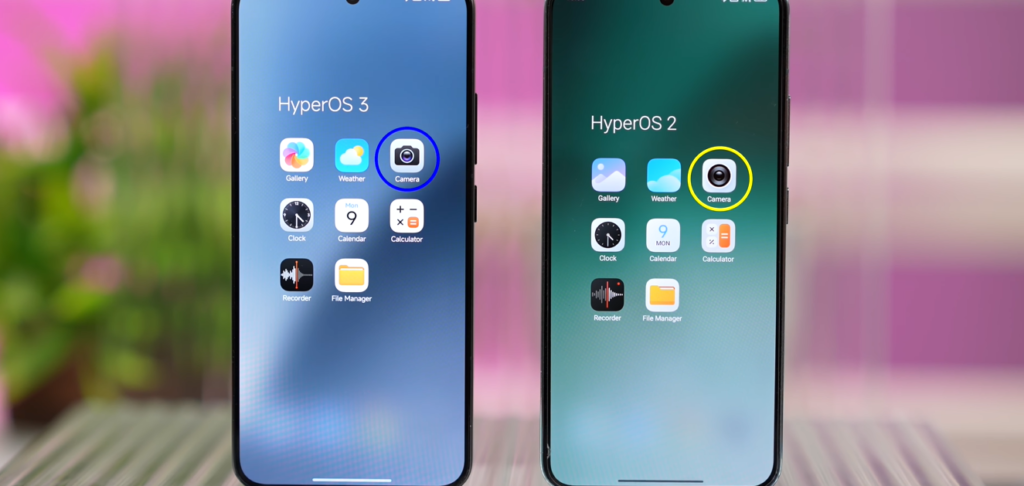
What’s new:
- 📷 Camera app icon — cleaner, more modern
- 🌤️ Weather app icon — updated design
- 🖼️ Gallery app icon — refined look
- ⚙️ Settings app icon — simplified
The new icons look cleaner, more cohesive, and less skeuomorphic. They fit better with the overall HyperOS 3 aesthetic.
New Widgets for Pets & Weather
HyperOS 3 adds several new widgets:
- Pet widgets — Track your pet’s schedule, feeding times, activities
- Weather widgets — More detailed forecasts with better visuals
- Calendar widgets — Enhanced design with better readability
These widgets make the home screen feel more personalized and alive.
Gaussian Blur Search & Edit Button
Small but noticeable: The search button and edit mode toggle now use Gaussian blur effects, making them blend beautifully with whatever wallpaper you’re using.
AI Home Search
The home screen search is now AI-powered.
You can search for:
- Files on your phone
- Apps (obviously)
- Contacts
- Messages
- Calendar events
- Notes
There’s also an AI search option that uses Gemini integration to provide smarter results.
Feature #4: Reimagined Control Center
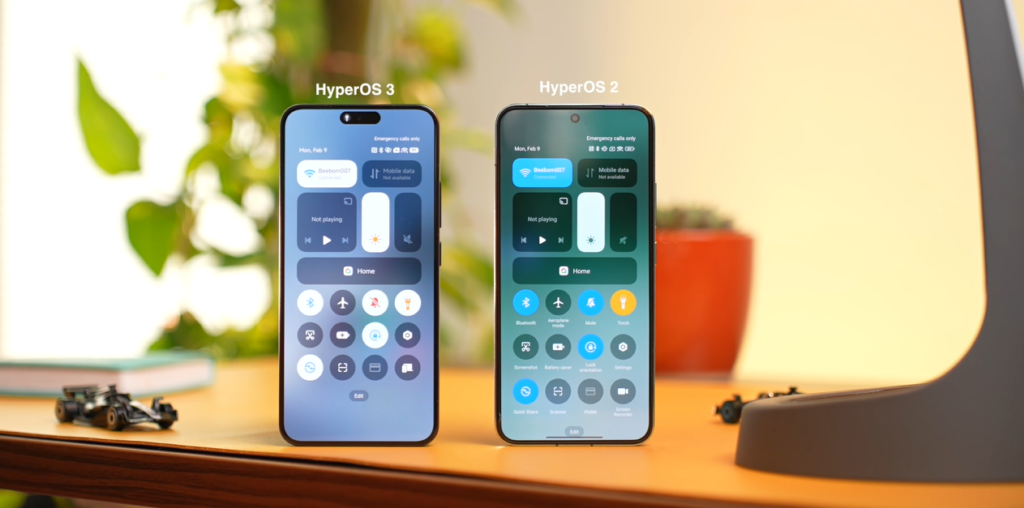
The Control Center has been completely redesigned — and it’s very iOS-inspired.
What’s Changed
Colorful Icons: Every toggle now has a unique color instead of the previous monochrome blue theme.
Examples:
- Wi-Fi → Blue
- Bluetooth → Blue
- Flashlight → Yellow
- Screen recording → Red
- Airplane mode → Orange
White Background: All tiles now use a white/translucent background instead of the previous colored tiles.
If this design looks familiar… it’s because it’s nearly identical to iOS’s Control Center.
Do I Like It?
Yes. Honestly, I prefer this design over HyperOS 2’s Control Center.
It’s visually cleaner, the colors make it easier to identify toggles at a glance, and the white background feels fresher.
The Big Problem: Still Not Customizable
Here’s the frustrating part: You still can’t rearrange or customize Control Center tiles.
Want to put Screen Recording at the top? Can’t do it.
Want to remove tiles you never use? Can’t do it.
This feels like a major oversight, especially since iOS allows full Control Center customization.
Xiaomi, please add this feature.
Feature #5: AI Features — The Productivity Boost
HyperOS 3 doesn’t have a dedicated “AI Mindspace” like ColorOS 16, but it has several genuinely useful AI features scattered throughout the system.
AI in the Gallery App
1. Image Expansion
Tap on any photo → Select Expand → AI intelligently extends the edges of the image to create a wider view.
Use case: You took a portrait photo but want landscape orientation for a wallpaper. AI expansion fills in the missing areas naturally.
2. Ultra HD Upscaling
Low-quality image? Use Ultra HD mode to upscale it.
The AI sharpens details, reduces noise, and improves clarity. It’s not magic, but it’s surprisingly effective for old photos or screenshots.
3. AI Erase
Select any unwanted object in a photo (photobombers, power lines, trash cans) and AI Erase removes it cleanly.
Quality: Works well for simple removals. Complex scenarios (like removing people with intricate backgrounds) can look a bit artificial.
4. AI Sky Replacement
This is my favorite.
Living in Delhi (or any polluted city), you rarely get clear blue skies in photos. AI Sky lets you replace dull/gray skies with beautiful blue skies, sunsets, or dramatic clouds.
Result: Photos genuinely look better without looking overly processed.
AI Writing Features
Available in Notes, Messages, and any text field:
1. Summarize: Condense long text into bullet points
2. Polish: Improve grammar, fix typos, refine phrasing
3. Adjust Tone: Make text more formal, casual, friendly, or professional
Use case: I drafted a long work email. AI Polish cleaned it up, made it more professional, and cut it from 8 sentences to 5 without losing meaning.
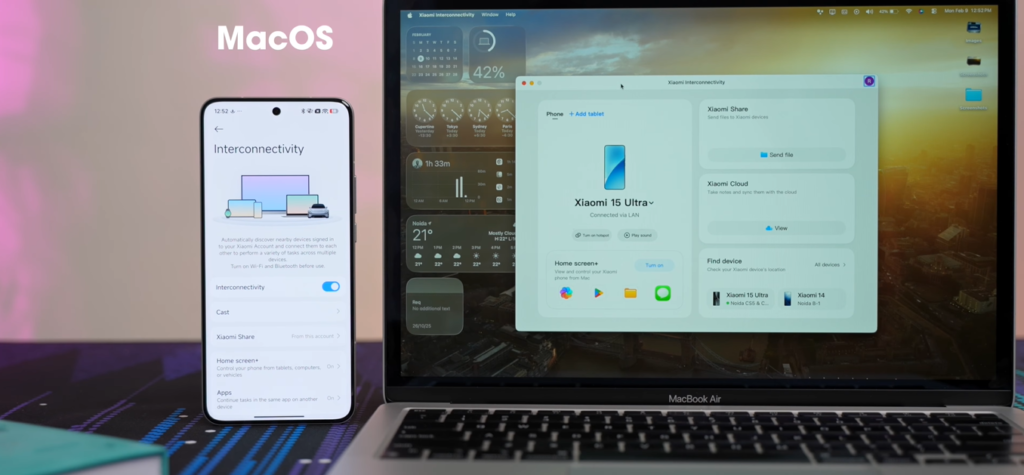
Feature #6: Xiaomi Interconnectivity with iPhone & Mac
This is huge for anyone in a mixed-device ecosystem.
What Is Xiaomi Interconnectivity?
It’s Xiaomi’s ecosystem feature that connects your Xiaomi phone with:
- Other Xiaomi/Redmi/POCO phones
- iPhones (yes, iPhones!)
- iPads
- Macs
Features When Connected to iPhone
1. Notification Syncing
Your iPhone notifications appear on your Xiaomi phone. You can read them, dismiss them, and even interact with some.
2. Hotspot Control
Turn on your Xiaomi phone’s hotspot directly from your iPhone without unlocking the Xiaomi device.
Use case: Your Xiaomi has better data connectivity. You want to tether your iPhone. Do it instantly without touching the Xiaomi.
3. Use One Phone to Control Both
Basically, you can manage both phones from a single device, making dual-phone life significantly easier.
Features When Connected to Mac
1. Screen Mirroring
Mirror your Xiaomi phone directly on your Mac screen. No cables required.
2. Touch ID Unlock
Unlock your Xiaomi phone using your MacBook’s Touch ID. This is genuinely convenient when your phone is on the desk and you don’t want to reach for it.
3. Multi-App Windows
Open up to 4 different phone apps on your Mac simultaneously. You can:
- Drag and drop files between apps
- Copy text from phone to Mac
- Move photos effortlessly
4. Notification & Call Integration
- Phone notifications appear on your Mac
- Answer phone calls from your Mac
- Send SMS from your Mac
This is essentially what Apple’s Continuity does — but for Android users with Macs.
How to Set It Up
For iPhone:
- Install Xiaomi Link app (or equivalent) from the App Store
- Pair devices via Bluetooth
- Grant permissions
For Mac:
- Download Xiaomi Link for Mac from Xiaomi’s website
- Install and pair your Xiaomi phone
- Done
Feature #7: Gallery App Gets Smarter
The Gallery app has received several quality-of-life improvements.
New Floating Menu
The floating action button is now more rounded and visually refined.
Better Sorting Options
New sorting options include:
- By date (ascending/descending)
- By size
- By location (photos taken in specific places)
- By category (AI-detected: Food, People, Pets, Landscapes, Screenshots)
Improved Search
The search feature now uses AI-powered object recognition.
Search for:
- “Food” → Shows all food photos
- “Dog” → Shows all photos with dogs
- “Sunset” → Shows sunset photos
- “Screenshot” → Shows all screenshots
It’s accurate and genuinely helpful for finding photos in a massive library.
Feature #8: Voice Recorder with AI Transcription
The Voice Recorder app is now feature-packed and genuinely useful.
Enhanced Voice Mode
New Enhanced Voice mode improves recording quality in noisy environments.
I tested this at a coffee shop — background chatter was significantly reduced while my voice remained clear.
Multi-Speaker Detection
The app can identify different speakers in a conversation and label them as Speaker 1, Speaker 2, etc.
Use case: Recording a meeting with 3 people. The transcript shows who said what.
AI Transcription with Translation
Record a conversation in real-time and get:
- Instant transcription (text appears as you speak)
- Translation (supports multiple languages)
- AI Summary at the top of the transcript
Example:
I recorded a 15-minute project discussion call. The AI summary gave me:
- Meeting topic
- Key decisions
- Action items
- Deadlines mentioned
This is genuinely useful for anyone who takes a lot of meetings.
Feature #9: Smoother Animations & Parallel Processing
HyperOS 2 already had parallel processing (similar to OxygenOS), where app closing and opening animations happen simultaneously.
HyperOS 3 takes this further with even smoother, more refined system-level animations.
What Changed
- App transitions are smoother and more fluid
- UI elements respond faster to touch input
- Multitasking animations feel more polished
The overall experience feels more premium — closer to iOS in terms of animation quality.
Real-World Difference
Opening the camera from the lock screen? Instant.
Switching between apps? Seamless.
Swiping up to go home? Smooth as butter.
It’s a noticeable improvement over HyperOS 2, especially on mid-range devices.
Feature #10: Status Bar & System App Redesign
Updated Status Bar Icons
The status bar has been refreshed with more modern icons:
- Wi-Fi icon: Cleaner lines, better visibility
- Battery icon: Refined shape, easier to read at a glance
- Signal strength: Updated design
Small details, but they add up to a more polished look.
Settings App Icon Refresh
Icons inside the Settings app have been updated to be more consistent and visually appealing.
Previously, some icons felt dated or inconsistent. Now they all follow a unified design language.
What’s Missing in the India Version
1. AI Wallpaper Effects
The China version has AI-generated wallpaper effects:
- Cartoon effect
- Knitting/textile effect
- Sketch mode
These are NOT in the India version. Disappointing, because they genuinely look cool.
2. Control Center Customization
You still can’t rearrange or remove Control Center tiles. This should be a basic feature.
3. Haptic Feedback for Volume/Brightness
Adjusting volume or brightness doesn’t trigger haptic feedback.
Why not? It’s such a small detail that makes the experience feel more tactile and refined.
4. Lock Screen Widgets
iOS has had lock screen widgets for years. ColorOS 16 has them. HyperOS 3 doesn’t.
5. Some Native Android 16 Features
Certain Android 16 features are missing or disabled in HyperOS 3, likely due to Xiaomi’s custom implementation replacing them.
I hope Xiaomi addresses these gaps in future updates.
Should You Update to HyperOS 3?
✅ YES, Update If:
1. You Want the Latest Android 16 Features
HyperOS 3 is based on Android 16, giving you:
- Latest security patches
- New Google features
- Improved performance and battery life
2. You Value iOS-Like Polish
The redesigned lock screen, HyperIsland, and refined UI bring HyperOS closer to iOS in terms of polish and fluidity.
3. You Use Multiple Devices
If you have an iPhone, iPad, or Mac, the Xiaomi Interconnectivity features are genuinely useful.
4. You Care About AI Productivity
AI transcription, writing tools, and gallery enhancements save time and improve workflows.
5. You Want Better Performance
System-level optimizations make HyperOS 3 smoother and more responsive than HyperOS 2.
⚠️ WAIT If:
1. You’re on an Older Device
Some older devices get HyperOS 3 based on Android 15 (not 16). Check if your device gets the full Android 16 version before updating.
2. You Rely on Specific Apps
Some apps may have compatibility issues immediately after updating. Give it 1-2 weeks for app developers to catch up.
3. You’re Happy With HyperOS 2
If HyperOS 2 works perfectly for you, there’s no urgent need to update immediately. Wait for the stable rollout to complete.
How to Install HyperOS 3
Method 1: OTA Update (Recommended)
- Go to Settings
- Scroll down to My Device
- Tap the HyperOS banner at the top
- Select Check for updates
- If available, tap Download and Install Update
- Your device will restart to complete installation
Make sure you have:
- ✅ At least 5GB free storage
- ✅ Battery above 50% (or plugged in)
- ✅ Stable Wi-Fi connection
Method 2: Using MemeOS Enhancer App
- Download MemeOS Enhancer from Google Play Store
- Open the app
- It will automatically check your device eligibility
- View rollout timeline and update status
- Follow prompts to download and install
Rollout started in December 2025 and continues through March 2026. Flagships (Xiaomi 15, 14, 13 series) are already receiving it. Mid-range devices (Redmi Note 14, POCO F7/X7) are getting it in February 2026. Budget devices will receive it by March-April 2026. Check Settings → My Device → Check for updates.
Yes, HyperOS 3 is based on Android 16 for newer devices (Xiaomi 14/15 series, Redmi Note 14 series, POCO F7/X7 series). Some older devices receive HyperOS 3 based on Android 15.
Final Verdict: HyperOS 3 Is a Major Upgrade
After spending extensive time with HyperOS 3 on the Xiaomi 15 Ultra, I can confidently say: this is Xiaomi’s most polished software ever.
What Xiaomi Got Right
✅ HyperIsland is genuinely better than Dynamic Island
✅ Lock screen customization rivals iOS
✅ AI features are useful, not gimmicky
✅ Ecosystem integration with iPhone/Mac is game-changing
✅ Smoother animations make everything feel premium
✅ Android 16 foundation ensures long-term relevance
What Still Needs Work
❌ Control Center customization
❌ AI wallpaper effects missing in India
❌ No lock screen widgets
❌ Some Android 16 features disabled
❌ Haptic feedback gaps
Should You Update?
Yes — but wait for the stable rollout to reach your device. Don’t force the update via sideloading. Let it come via OTA for the smoothest experience.
HyperOS 3 represents a massive step forward for Xiaomi’s software. If you own a Xiaomi, Redmi, or POCO phone, this update is absolutely worth installing.
Got HyperOS 3? What’s your favorite new feature? Share this with other Xiaomi users who need to know about this update!
Disclaimer: Features, availability, and rollout timelines are based on the India version as of February 2026 and may vary by region and device model. Always back up your data before updating.