Most laptops make you choose. Work machine or entertainment device. Portable or powerful. Business tool or creative workstation. The HP OmniBook X Flip refuses to pick a lane.
This is a 14-inch 2-in-1 Windows 11 laptop that twists 360 degrees, packs an OLED display, runs on Intel Core Ultra 5, handles light video editing, plays Diablo 4 smoothly, and claims up to 32 hours of battery life — all in a slim, light chassis that slides effortlessly into a backpack.
After spending time with the OmniBook X Flip across real work and play scenarios, here’s the full breakdown on whether this versatile machine lives up to its impressive spec sheet.
Design & Build — Slim, Tough, and Genuinely Premium
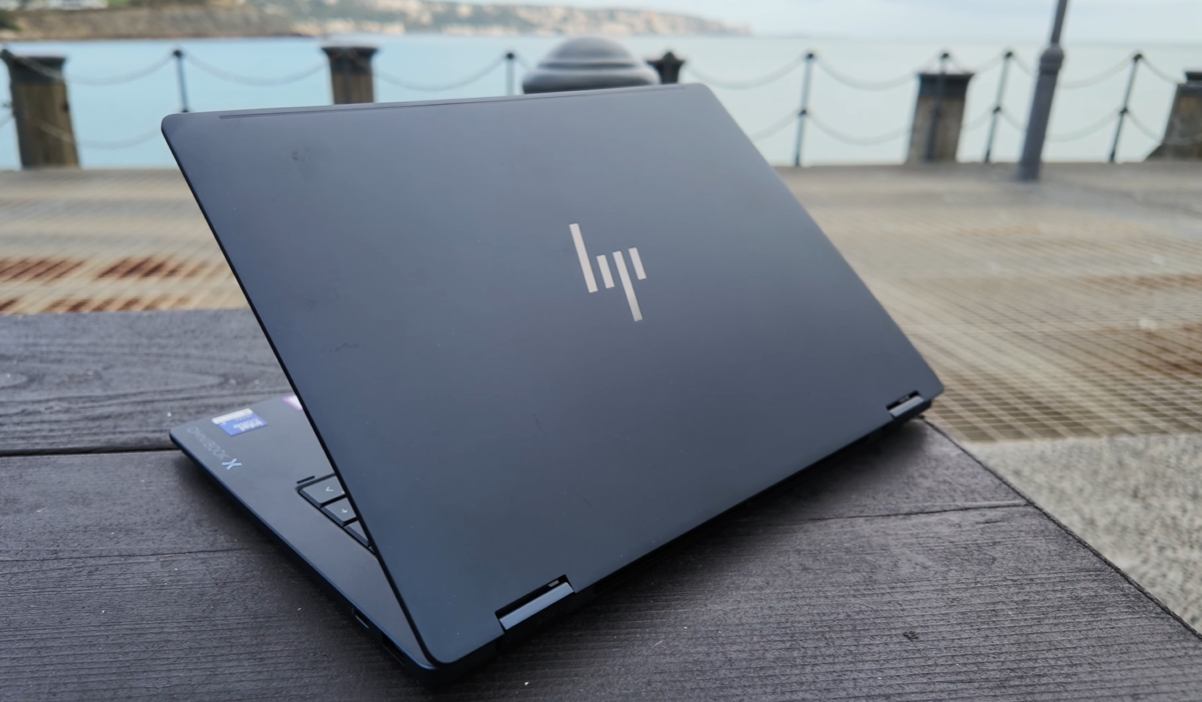
The HP OmniBook X Flip makes an immediate impression. It’s slim. It’s light. And the dark sandblasted metal finish gives it a professional, refined appearance that would look at home in a boardroom, a coffee shop, or a content creator’s studio.
Build Details
| Spec | Details |
|---|---|
| Size | 14 inches |
| Finish | Sandblasted dark matte metal |
| Frame | Metal — tough, travel-ready |
| Form Factor | 2-in-1 — 360-degree hinge |
| Portability | Slides into compact backpacks easily |
The metal frame is built to handle the knocks and bumps of daily travel — not a premium-looking but fragile machine. This is genuinely tough.
One small honest note: the matte sandblasted surface picks up smudges over time. A quick wipe keeps it looking sharp, but it’s worth knowing before you buy.
360-Degree Hinge — Four Modes in One Device
This is the OmniBook X Flip’s defining physical feature. The screen rotates a full 360 degrees, giving you four distinct usage modes:
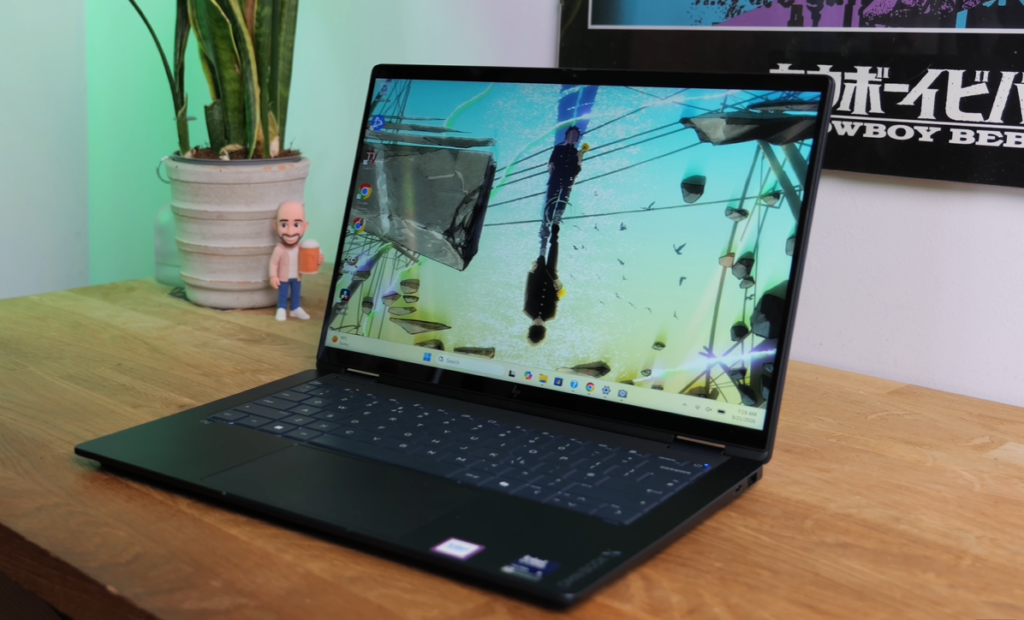
Laptop Mode — standard position for typing and productivity work
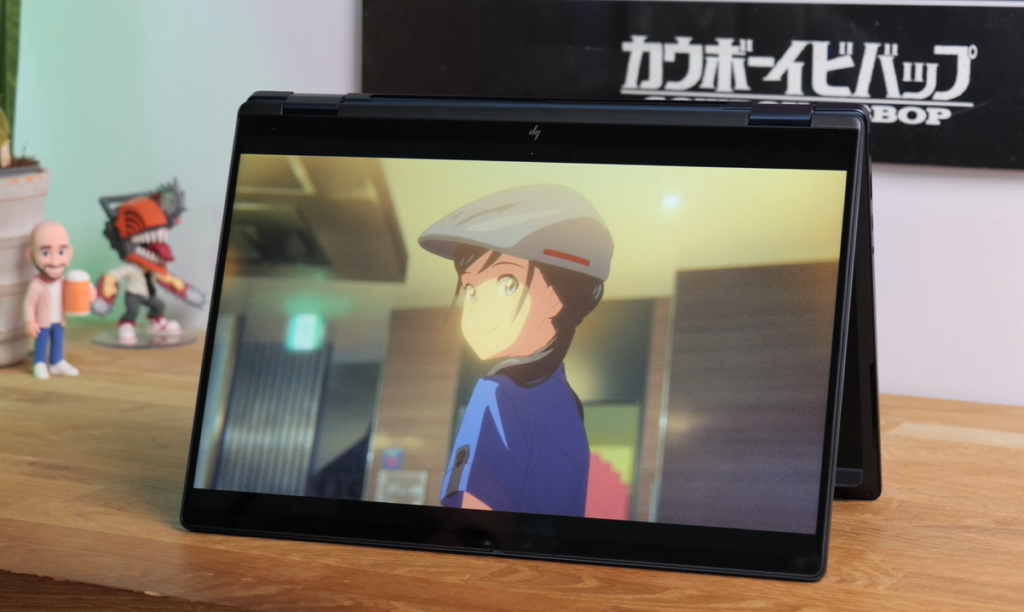
Tent Mode — screen folded back into an inverted V shape, ideal for watching content on a train table or desk without taking up full laptop footprint
Stand Mode — screen folded further back for a more upright display position, useful for presentations
Tablet Mode — fully folded flat, screen facing outward — a proper 14-inch Windows tablet for sketching, reading, or touch-based navigation
For commuters, travellers, and anyone who switches between desk work and on-the-go consumption, this flexibility is genuinely practical rather than a gimmick.
Display — 14-Inch OLED That Earns Its Premium Tag
The display is one of the OmniBook X Flip’s strongest selling points — and it delivers.
| Spec | Details |
|---|---|
| Size | 14 inches |
| Type | OLED |
| Resolution | 1920 x 1200 pixels |
| Aspect Ratio | 16:10 |
| Refresh Rate | 120Hz |
| Colour Gamut | 100% DCI-P3 coverage |
| Outdoor Use | Bright enough for comfortable outdoor visibility |
Real-World Display Experience
OLED advantages at their best: True blacks — not very dark grey, actual black. Vibrant, accurate colours with 100% DCI-P3 coverage. For photo editing, video work, and creative tasks, colour accuracy matters enormously — and this panel delivers it.
120Hz refresh rate: Scrolling, animations, and gaming all benefit from the smoother motion. On a 2-in-1 used in multiple modes, the 120Hz refresh makes touch interactions feel more responsive and natural.
16:10 aspect ratio: Taller than the standard 16:9 — gives you more vertical screen real estate for documents, code, web browsing, and video editing timelines. A practical choice for productivity work.
Outdoor visibility: Bright enough to use comfortably outside — important for a laptop marketed at mobile professionals and on-the-go creators.
For photo editing, thumbnail design, video colour grading in DaVinci Resolve, or just watching movies on a train — this OLED panel punches well above what most 14-inch laptops offer.
Performance — Intel Core Ultra 5 325 Gets It Done
The HP OmniBook X Flip is powered by the Intel Core Ultra 5 325 processor paired with 16GB RAM and a 1TB SSD.
| Spec | Details |
|---|---|
| Processor | Intel Core Ultra 5 325 |
| RAM | 16GB |
| Storage | 1TB SSD |
| OS | Windows 11 |
Daily Productivity Performance
Windows 11 runs beautifully smoothly on this configuration. Multi-app workloads — multiple browser tabs, Microsoft Office suite running simultaneously, email, communication tools — handled without hesitation or slowdown.
The 16GB RAM gives enough headroom for demanding multitasking scenarios without the performance cliff that 8GB configurations can hit.
Creative Work
- Photo editing: Comfortable for Lightroom and Photoshop-level work
- Light video editing: 4K video editing on the go — the 1TB SSD handles large Ultra HD files without bottlenecking
- 4K footage: The storage and processor combination manages 4K editing workflows — not a desktop replacement, but capable enough for on-location and travel editing in DaVinci Resolve
Gaming — Better Than Expected
The OmniBook X Flip handles light to moderate gaming without difficulty.
Diablo 4 ran at a consistent, smooth frame rate even during chaotic on-screen action. For a slim 2-in-1 laptop, that’s genuinely impressive.
The OMEN Gaming Hub — HP’s gaming management software — assists here by:
- Optimising performance automatically for supported games using AI
- Freeing up background resources before gaming sessions
- Managing system performance without manual tuning
For a laptop primarily designed for work and creativity, the gaming capability is a welcome bonus rather than a central feature. Don’t expect it to replace a dedicated gaming machine, but for casual gaming on the road, it performs comfortably.
AI Features — Copilot Plus on the Intel Core Ultra 5
The Intel Core Ultra 5 325 includes a capable NPU (Neural Processing Unit) — powerful enough to handle AI tasks locally on the device.
The OmniBook X Flip has full Copilot Plus support, enabling:
- AI-assisted email drafting
- Thumbnail and image design assistance
- Document summarisation and organisation
- Local AI processing — no cloud dependency for AI features
- OMEN AI for gaming performance optimisation
For content creators, business professionals, and students who use AI tools daily, running these locally rather than through cloud servers means faster response, better privacy, and functionality even without an internet connection.
Webcam — 5MP Infrared with AI Video Features
The OmniBook X Flip has a 5-megapixel infrared webcam fitted into the slim bezel above the display.
| Feature | Details |
|---|---|
| Resolution | 5MP infrared |
| Windows Hello | Yes — instant face recognition |
| AI Features | Windows Studio Effects |
| Privacy Shield | Physical camera cover — hardware switch |
Windows Hello
Instant face recognition on lid open — no password, no PIN, no delay. The camera recognises you and gets you into Windows immediately. For professionals moving between meetings and locations, this frictionless login is a daily quality-of-life improvement.
Windows Studio Effects
For video calls and online meetings:
- Automatic framing — keeps you centred as you move
- Background blur — removes messy backgrounds professionally
- AI enhancement — optimises image quality automatically
Physical Privacy Shield
A hardware slide-over cover for the camera — no software required, no settings to toggle. When it’s covered, the camera is physically blocked. Simple, reliable, reassuring for privacy-conscious users.
Keyboard & Touchpad — Properly Sized for a 14-Inch
A compact laptop with a cramped keyboard is a daily frustration. HP has avoided this.
| Feature | Details |
|---|---|
| Keyboard | Full-sized for 14-inch — well-proportioned |
| Key Travel | Firm, responsive — good typing feel |
| Backlight | Yes — backlit keys |
| Touchpad | Large — generous size for the chassis |
| Multi-touch | Full gesture support |
The keyboard has firm, responsive key action with reasonable travel — comfortable for extended typing sessions. The backlit keys work well in low-light environments like planes and dimly lit meeting rooms.
The touchpad is large — notably spacious for a compact 14-inch chassis — and supports all Windows multi-touch gestures smoothly.
Ports — Comprehensive for a Slim Laptop
| Port | Quantity / Details |
|---|---|
| USB-C with Thunderbolt 4 | 2 ports |
| USB-A | 2 ports |
| HDMI | 1 port |
Two Thunderbolt 4 USB-C ports enable high-speed data transfer, external display connectivity, and charging. For users who need to connect to external monitors, docking stations, or high-speed storage — Thunderbolt 4 is the right connection standard.
Dual USB-A ports ensure compatibility with legacy accessories — mice, keyboards, USB drives — without needing an adapter. This matters for business users who travel with established peripherals.
HDMI port for direct connection to projectors, conference room screens, and external monitors without adapters or dongles.
For a slim 2-in-1, this port selection is generous and practical.
Connectivity — Wi-Fi 7 Included
| Feature | Details |
|---|---|
| Wi-Fi | Wi-Fi 7 |
| Speed | Fast uploads and downloads |
Wi-Fi 7 is the latest wireless standard — faster speeds, lower latency, better performance in congested wireless environments like hotels, conference centres, and airports. For a laptop designed for mobile professionals, Wi-Fi 7 future-proofs the connectivity experience.
Audio — DTS:X Ultra Stereo Speakers
The OmniBook X Flip has a stereo speaker setup with DTS:X Ultra audio processing.
For a compact 14-inch laptop, the speakers are impressively powerful — loud and clear enough for:
- Watching Disney Plus or Netflix without headphones
- Gaming audio in casual sessions
- Video calls and meeting audio
- Music playback during work sessions
DTS:X Ultra adds spatial audio processing — sound feels wider and more immersive than typical thin laptop speakers. Not a substitute for external speakers or headphones, but genuinely good for a built-in setup.
Battery Life — Up to 32 Hours Claimed
| Spec | Details |
|---|---|
| Claimed Battery Life | Up to 32 hours |
| Real-World Expectation | Full working day comfortably |
| Heavy Use (4K editing / gaming) | Reduced but still strong |
HP claims up to 32 hours of battery life — the caveat being that this depends heavily on what you’re doing. Continuous 4K video editing or gaming will drain the battery significantly faster than document work and browsing.
In realistic mixed-use scenarios — productivity work, browsing, video calls, occasional media — a full working day on a single charge is comfortably achievable. Probably beyond that for lighter users.
For a laptop designed to go wherever you go, not needing a charger for a full day of work is a genuine practical advantage.
Who Is the HP OmniBook X Flip For?
Perfect for:
- Business professionals who travel frequently
- Students who switch between lecture, library, and home environments
- Content creators who edit on the move
- Anyone who values display quality for photo and video work
- Users who want one device that handles work, entertainment, and light gaming
- People who want premium build quality in a compact form factor
Not ideal for:
- Hardcore gamers wanting dedicated GPU performance
- Heavy 3D rendering or animation workloads
- Users who need maximum processing power over portability
Pros & Cons
What’s Great:
- 14-inch OLED display — 100% DCI-P3, 120Hz, true blacks
- 360-degree hinge — laptop, tent, stand, and tablet modes
- Intel Core Ultra 5 325 — capable for productivity and light creative work
- Copilot Plus support — on-device AI processing
- 1TB SSD — generous storage for creative files
- Two Thunderbolt 4 USB-C ports
- Dual USB-A + HDMI — comprehensive port selection
- Wi-Fi 7 — future-proof wireless
- 5MP IR webcam with Windows Hello — instant, passwordless login
- Physical camera privacy shield
- Windows Studio Effects — AI video call enhancement
- OMEN Gaming Hub — gaming optimisation built in
- Diablo 4 runs smoothly — better gaming than expected
- DTS:X Ultra stereo speakers — genuinely good for the size
- Full-sized backlit keyboard
- Large, responsive touchpad
- Up to 32 hours battery claimed — strong endurance
- Slim and light — fits compact backpacks effortlessly
- 16:10 aspect ratio — more screen for productivity
- Sandblasted metal build — premium and durable
What to Consider:
- Sandblasted surface picks up smudges over time
- Intel Core Ultra 5 — not a hardcore gaming or rendering chip
- 32-hour battery claim dependent on light usage
- No dedicated GPU — gaming limited to lighter titles
- 1920×1200 resolution — not 2.5K or 4K
Full Specs Summary
| Spec | Details |
|---|---|
| Display | 14″ OLED, 1920×1200, 120Hz, 100% DCI-P3 |
| Processor | Intel Core Ultra 5 325 |
| RAM | 16GB |
| Storage | 1TB SSD |
| OS | Windows 11 |
| Hinge | 360-degree — 4 usage modes |
| Webcam | 5MP infrared — Windows Hello |
| Ports | 2x Thunderbolt 4 USB-C, 2x USB-A, HDMI |
| Wi-Fi | Wi-Fi 7 |
| Audio | DTS:X Ultra stereo speakers |
| Keyboard | Backlit — full-sized |
| Battery | Up to 32 hours |
| AI | Copilot Plus + OMEN Gaming Hub |
| Privacy | Physical camera shield |
| Gaming | OMEN Gaming Hub supported |
| Finish | Sandblasted dark metal |
Final Verdict
The HP OmniBook X Flip is one of the most well-rounded 2-in-1 laptops available in 2026. It doesn’t try to be the most powerful laptop on the market — it tries to be the most versatile. And it succeeds.
The OLED display is genuinely excellent — 100% DCI-P3 coverage and true blacks at 120Hz make creative work and media consumption a pleasure. The 360-degree hinge is not a gimmick — tent mode on a train, tablet mode for presentations, laptop mode for work. It all makes sense in daily use.
The Intel Core Ultra 5 with Copilot Plus support handles productivity workloads, light creative work, and even Diablo 4 without complaint. Wi-Fi 7, Thunderbolt 4, a 5MP webcam with AI video features, and up to 32 hours of claimed battery life round out a package that genuinely covers every base.
For students, business professionals, and content creators who need one machine that does everything in a portable chassis — the HP OmniBook X Flip is one of the best choices of 2026.
My PitShop Rating: 8.7 / 10
Work. Create. Play. Travel. One laptop. Done.

