Last Updated: February 8, 2026 | 90-Day Daily Driver Review | 20 min read
🔥 Hot Take: ColorOS 16 Is Now the Best Android UI Available
After 90 days of daily driving the Oppo Find X9 Pro with ColorOS 16, I’m making a statement that might shock you:
ColorOS 16 is now the GOAT (Greatest Of All Time) Android UI.
Not just good. Not “surprisingly decent.” The absolute best.
And here’s the even more controversial take: Android has finally reached a point where iOS should be taking inspiration from it — not the other way around.
Let me explain why.
Why This Review Matters
This isn’t a quick hands-on. This isn’t a first impressions piece based on a weekend with the phone.
This is a 90-day daily driver review.
I’ve used the Oppo Find X9 Pro with ColorOS 16 as my primary phone for almost three months. Alongside it, I daily drove an iPhone 17 Air for the same period.
Why does this matter?
Because hardware fades into the background after a few weeks. What bothers you — or delights you — every single day is the software experience.
And ColorOS 16 has fundamentally changed my perspective on what Android can be.
The GOAT Tier Ranking: From “You Know It” to “Best Ever”
In our recent smartphone UI ranking video, we placed ColorOS 16 in the GOAT tier.
For context, last year’s ColorOS 15 was in the “You Know It, I Know It” tier — good, but not exceptional.
So what changed?
Everything.
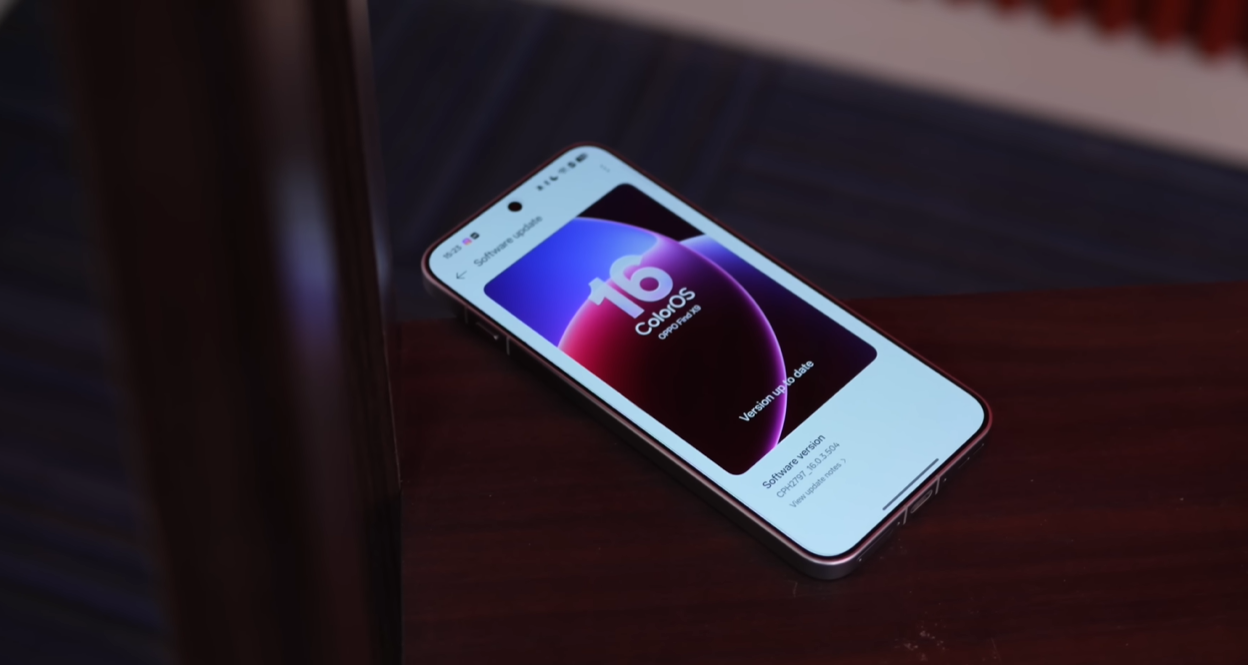
ColorOS 16, based on Android 16, represents a massive leap in design, functionality, and polish. It’s no longer “trying to catch up” to Samsung’s One UI or Google’s Pixel UI.
It’s now leading the pack.
Lock Screen: Flux Theme 2.0 Changes Everything {#lock-screen}
The Visual Revolution
The first thing you notice about ColorOS 16 is the Flux Theme 2.0 on the lock screen.
What’s new:
- Live wallpapers that actually look good (not gimmicky)
- Text behind moving subjects (not just static objects)
- Customizable text on the lock screen
- Depth-aware layering that creates genuine 3D effects
Why This Matters
Most Android skins let you place text behind a static subject on the lock screen — a tree, a person, a building.
ColorOS 16 lets you place text behind a moving subject.
If you have a live wallpaper with clouds moving across the sky, the text layers behind those clouds as they move. If you have a video wallpaper of waves crashing, the text layers behind the waves dynamically.
It’s a small detail. But it’s the kind of detail that makes you smile every time you unlock your phone.
Motion Photos as Wallpapers
You can now use Motion Photos (short video clips) as lock screen wallpapers with smooth transitions between Always-On Display and lock screen.
The transition is seamless. No jarring cuts, no stuttering — just a fluid, natural animation that makes the entire experience feel alive.
Home Screen: The Folder Revolution
Enlarged Folders & App Extensions
ColorOS 16 introduces a feature I didn’t know I needed until I couldn’t live without it: enlarged folders and app extensions.
Here’s how it works:
- Long-press on an app
- Select “Extend app”
- The app widget or quick shortcuts appear directly on the home screen
Real-world examples:
Cred App:
- Add QR scanner widget
- Add credit card widget
- No need to open app → tap scanner
- Just tap the widget → scanner opens instantly
WhatsApp:
- Quick access to favorite contacts
- New message shortcut
- Status camera shortcut
Instagram:
- Quick post shortcut
- Stories camera shortcut
- DMs shortcut
Swiggy (Indian food delivery):
- Instamart widget (groceries only)
- This is a lifesaver — I used to open Swiggy for groceries, see a food offer, and end up ordering kebabs at 11 PM
- Now I go straight to groceries without temptation
The Addiction Problem
I’ve gotten so used to this feature that switching to other phones feels… incomplete.
Something’s missing. I reach for a widget that isn’t there. I long-press, expecting shortcuts that don’t appear.
That’s the mark of a truly good feature — when its absence becomes frustrating.
The Details That Matter: Calculator App Lighting
This is where ColorOS 16 separates itself from “good” Android skins.
The calculator app.
Yes, the calculator app.
The Light Spill Effect
When you press a number, light spills around the nearby numbers with a subtle glow effect.
Press “5” and you see a soft light radiating outward, gently illuminating “2,” “4,” “6,” and “8.”
Press the equal button, and the orange light spills across the entire keypad in a wave.
It’s a detail so small you might not consciously notice it. But subconsciously? It makes the entire experience feel polished, premium, refined.
This level of attention to detail in a calculator app is extraordinary.
Parallel Processing: Buttery Smooth Animations
What Is Parallel Processing?
In ColorOS 15, Oppo introduced parallel processing for animations.
What it means:
- When you close one app, its closing animation starts
- Simultaneously, the next app’s opening animation also starts processing
- Both animations happen at the same time
- Result: zero lag between app transitions
ColorOS 16’s Seamless Animations
ColorOS 16 takes this further with Seamless Animations.
These aren’t just eye candy. There’s logic to them.
Example 1: Camera Button
- Lock screen camera button opens from the bottom-right
- When you close the camera, it shrinks back into the same bottom-right position
- The spatial relationship is maintained
Example 2: Music Player
- When music is playing, lock screen widgets align horizontally
- Swipe away the music player
- Widgets smoothly transition back to vertical alignment
- The layout responds to context
Example 3: Home Screen Widgets
- Expand a widget on the home screen
- Apps shift to accommodate the larger widget
- Shrink the widget back
- Apps return to their exact previous positions
- Nothing feels random or jarring
The Luminous Rendering Engine & Trinity Engine
Under the hood, two systems power this smoothness:
Luminous Rendering Engine:
- Handles visual rendering and lighting effects
- Creates the “glow” and “spill” effects throughout the UI
- Optimizes frame delivery for consistent 120Hz/165Hz
Trinity Engine:
- Manages CPU, GPU, and RAM allocation
- Ensures sustained performance over time
- Prevents thermal throttling during heavy multitasking
Result: Even with a dozen apps open, the Find X9 Pro never slowed down.
AI Features: Mindspace, Transcription & More
ColorOS 16 has a dedicated AI Hub in Settings where all AI features live in one place.
AI Mindspace: The Game-Changer
This is the feature I found myself using constantly.
How it works:
- Take screenshots of anything (flight info, hotel bookings, restaurant recommendations, articles)
- AI Mindspace automatically organizes them
- Ask Google Gemini (integrated) to create summaries, itineraries, action plans
Real-world example:
I’m planning a trip to Japan. I screenshot:
- Flight details
- Hotel booking confirmation
- Popular tourist spots in Tokyo
- Restaurant recommendations
Then I ask Gemini: “Create a 5-day Tokyo itinerary using my saved Mindspace information.”
Gemini pulls all the data:
- Knows my flight arrival time
- Understands how many days I have
- Sees my saved restaurant and tourist spot screenshots
- Generates a personalized, day-by-day itinerary
This is genuinely useful AI — not a gimmick.
The Snap Key
The Oppo Find X9 series has a dedicated Snap Key button:
- Short press: Take a screenshot and save to Mindspace
- Long press: Add a voice note to Mindspace
- Press and hold: Open Mindspace app
When I switched to other phones, I kept reaching for the Snap Key.
That’s when I knew this feature had fundamentally changed my workflow.
AI Transcribe & Call Recording
AI Transcribe for WhatsApp Calls:
- Record WhatsApp audio calls
- Get automatic transcription
- Generate AI summary of the call
Use case: I had a WhatsApp call about a video project. I recorded it, got a full transcript, and had an AI summary of all the key points — meeting time, deliverables, deadlines.
Recorder App:
- Record meetings or conversations
- AI generates minutes of the meeting in seconds
- Organizes action items, decisions, and notes
Clear Voice:
- Automatically removes background noise during calls
- I tested this standing in peak traffic
- The difference is night and day
Ecosystem Integration: MacBook + Android Finally Works
This is huge.
For years, the Apple ecosystem (iPhone + Mac + iPad) was unbeatable. Android phones simply couldn’t integrate seamlessly with Macs.
ColorOS 16 changes that.
O+ Connect: Android Meets MacBook
Install the O+ Connect app on your MacBook.
Now your Android phone is connected to your Mac:
- ✅ Phone notifications appear on MacBook
- ✅ Answer phone calls from MacBook
- ✅ Send SMS from MacBook
- ✅ Control your phone from the Mac screen
- ✅ Drag and drop files between phone and Mac
Tap to Share
This feature is insanely convenient.
How it works:
- I have a photo on my Oppo Find X9
- I want to send it to my iPhone 17 Air
- I just tap the two phones together
- Photo is shared instantly
No opening Quick Share. No selecting the device. Just tap and done.
Works with:
- Oppo phones
- Realme phones
- OnePlus phones
- iPhones (with O+ Connect app installed)
- OnePlus tablets
Remote MacBook Control
This is borderline magical.
I can remotely connect to my office MacBook from my phone and completely control it.
Use case: I’m out for lunch. My manager Slack messages me asking for a file that’s on my office Mac.
I open O+ Connect on my phone. Connect to the office Mac remotely. Navigate to the file. Send it. All from my phone.
Is ColorOS a Copy of iOS?
Short answer: No. Not anymore.
The Evolution
ColorOS 13-14: Yes, it was heavily iOS-inspired. The control center, notification panel, even icon shapes — clear iOS influence.
ColorOS 15: Started developing its own personality. Still borrowed elements, but began diverging.
ColorOS 16: Has its own unique identity. Yes, there are still some visual similarities to iOS (rounded square icons, frosted glass effects), but the overall experience is distinctly ColorOS.
The Philosophy of Becoming the GOAT
To become the GOAT, you first follow the GOAT.
You study what makes them great. You pick up the best elements. You implement them. And then — and this is critical — you find your own path.
ColorOS followed this exact trajectory:
- Study iOS (what makes it smooth, intuitive, polished)
- Implement the best ideas (control center, notification system)
- Add unique features (Flex-Drop windows, enlarged folders, AI Mindspace)
- Develop a unique identity (Flux Theme, parallel processing, ecosystem features)
Result: ColorOS 16 is no longer “iOS for Android.”
It’s ColorOS — with its own strengths, features, and personality.
Has Android Surpassed iOS?
The Question That Changes Everything
After 90 days daily driving both ColorOS 16 (Android 16) and iOS 26, one question kept coming back to me:
Should iOS start taking inspiration from Android?
My answer: Yes. Absolutely yes.
Why Android (Specifically ColorOS 16) Has Pulled Ahead
1. Look and Feel
- ColorOS 16 feels fresh and exciting
- iOS 26 feels stagnant and iterative
- Android skins are experimenting with genuinely new UX paradigms
2. Features and Functionality
- AI Mindspace (no iOS equivalent)
- Enlarged folders with app extensions (no iOS equivalent)
- Seamless ecosystem features with non-Apple devices (iOS can’t do this)
- Customization depth (iOS is still rigid)
3. Ecosystem Integration
- ColorOS 16 works with MacBooks, iPhones, OnePlus tablets, Realme phones
- iOS only works with Apple devices
- Android has become the more flexible ecosystem
4. Innovation
- Android skins (ColorOS, OxygenOS, OneUI) are pushing boundaries
- iOS 26 introduced… Liquid Loss (and it’s buggy)
iOS 26’s Liquid Loss Disaster
Let’s talk about iOS 26 for a moment.
The Liquid Loss Feature
Apple introduced Liquid Loss — a visual effect for notifications and UI elements.
The problem: What they showed in the keynote isn’t what you get on your phone.
The feature is:
- Buggy on older iPhones
- Buggy on newer iPhones
- Causes UI glitches, lag, and crashes
In our years of reviewing Apple devices, we’ve never seen this many bug issues.
iOS 26 has been a disaster in terms of stability.
Apple’s Siri + Google Partnership
Apple recently had to partner with Google to make Siri better.
Let that sink in.
The company that prided itself on “we control the whole stack” had to admit defeat and bring in Google’s AI because Siri couldn’t keep up.
Meanwhile, ColorOS has Gemini integration built into AI Mindspace, and it works seamlessly.
Who Should Use ColorOS 16? {#who-should-use}
✅ You Should Switch to ColorOS 16 If:
1. You Want the Smoothest Android Experience
- Parallel processing and seamless animations are unmatched
- Even heavy multitasking stays buttery smooth
2. You Value AI That’s Actually Useful
- AI Mindspace genuinely improves productivity
- AI transcription and call recording save hours of work
- Clear Voice makes outdoor calls bearable
3. You Use Multiple Devices
- MacBook + Android integration finally works well
- Tap to Share is life-changing
- Remote device control is genuinely useful
4. You Want Customization With Polish
- Flux Theme 2.0 is beautiful
- Enlarged folders and app extensions are practical
- Attention to detail is everywhere
5. You’re Tired of iOS Stagnation
- ColorOS 16 feels fresh and exciting
- iOS 26 feels… boring
❌ You Should Stick With iOS If:
1. You’re Deep in the Apple Ecosystem
- If you own Apple Watch, AirPods, iPad, HomePod, etc.
- ColorOS can’t replace that level of integration (yet)
2. You Prioritize Camera Consistency
- iPhone cameras are more consistent year-over-year
- Android flagships can vary wildly
3. You Need iMessage
- If your social circle is iMessage-dependent
- RCS has improved, but it’s not quite there
4. You Prefer Simplicity Over Customization
- iOS is simpler (sometimes too simple)
- ColorOS offers more options (which some find overwhelming)
ColorOS 16 is rolling out to Oppo Find X9 series, Find N5 foldables, Reno 13/14 series, and older Find/Reno models.
Yes, ColorOS 16 is built on Android 16. It includes all Android 16 features plus Oppo’s custom additions like AI Mindspace, Flux Theme, parallel processing animations, and ecosystem integration.
Final Verdict: The New Android King
After 90 days of daily driving ColorOS 16 on the Oppo Find X9 Pro, I can confidently say:
ColorOS 16 is the best Android UI available right now.
Not “surprisingly good.” Not “better than expected.”
The best.
It’s smoother than One UI. More feature-rich than Pixel UI. More polished than OxygenOS. And yes, in many ways, more exciting than iOS.
The Tipping Point
For years, Android skins copied iOS. And iOS remained the gold standard.
That dynamic has shifted.
ColorOS 16 represents a tipping point where Android skins have caught up to iOS in polish and smoothness, then surpassed it in innovation and functionality.
What ColorOS 16 Gets Right
✅ Smoothness: Parallel processing and seamless animations are unmatched
✅ AI Integration: Mindspace is genuinely useful, not a gimmick
✅ Ecosystem: Finally works seamlessly with Macs, iPhones, tablets
✅ Attention to Detail: Calculator app lighting is just one example
✅ Customization: Flux Theme, enlarged folders, app extensions
✅ Practicality: Every feature serves a purpose
What It Still Needs to Improve
❌ App Ecosystem: Some iOS apps still aren’t on Android (or are worse)
❌ Consistency: Different Android phones have different UIs (fragmentation)
❌ Perception: Many people still think “Android = laggy” (outdated belief)
Should iOS Take Inspiration From Android?
Yes. Absolutely.
iOS has been iterating on the same formula for years. It’s polished. It’s stable (usually). But it’s also… stagnant.
Android skins like ColorOS 16 are experimenting. They’re innovating. They’re taking risks.
And those risks are paying off.
The Bottom Line
If you’re looking for the smoothest, most feature-rich, most innovative Android experience in 2026, ColorOS 16 is it.
After a long time, an Android skin has made me genuinely excited to use my phone.
And that’s why it’s the new Android king.
Have you tried ColorOS 16? Are you considering switching from iOS? Share this with anyone still debating Android vs iPhone in 2026.
Disclaimer: This review is based on 90 days of daily driver experience with the Oppo Find X9 Pro running ColorOS 16 (global version, Android 16). Your experience may vary based on device model, region, and usage patterns.