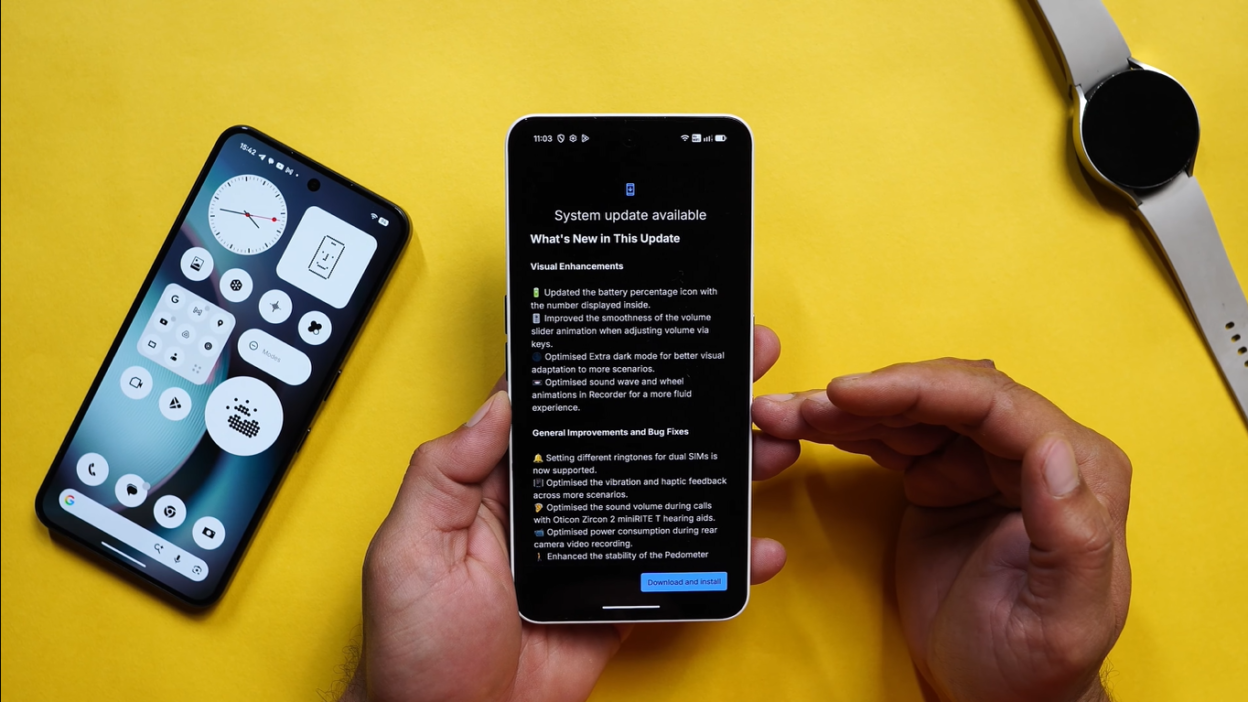
Nothing has just dropped a significant update for its Phone 2A and 3A series users, and this isn’t just another incremental patch. NothingOS 4.0’s latest December security update brings substantial improvements that address long-standing user complaints, remove unnecessary bloatware, and introduce thoughtful refinements that genuinely improve the daily user experience.
If you own a Nothing Phone 2A, 2A Plus, 3A, or 3A Plus, this is an update you’ll want to install immediately. Let’s dive deep into everything that’s changed, including several improvements Nothing didn’t even mention in the official changelog.
How to Get the Update
Before we explore the changes, here’s how to check if the update is available for your device:
Step 1: Open Settings
Step 2: Navigate to “Software Info”
Step 3: Tap on “NothingOS”
Step 4: Check for the update
Update Details:
- Version: NothingOS 4.0
- Security Patch: December 2024
- Update Size: Approximately 123-150 MB (varies by device and region)
- Availability: Rolling out for Nothing Phone 2A series and 3A series
Current Rollout: The update is rolling out in phases, so if you don’t see it immediately, be patient—it should arrive within a few days. The phased rollout helps Nothing identify and address any critical issues before reaching all users.
Hidden Changes Nothing Didn’t Mention
Perhaps the most interesting aspects of this update are the improvements Nothing didn’t explicitly list in the official changelog. These quality-of-life enhancements show the company is listening to user feedback and addressing real pain points.
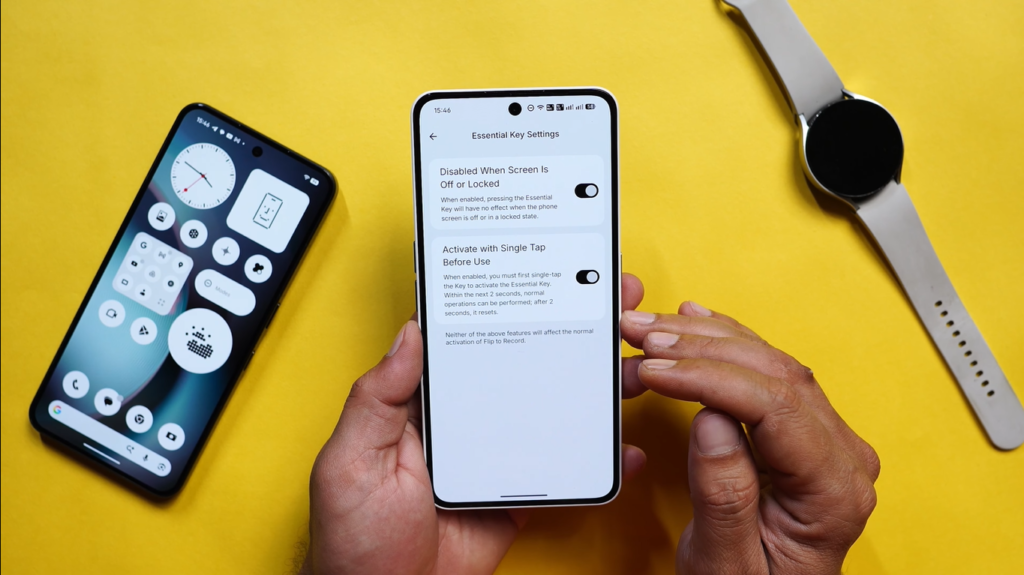
1. Enhanced Essential Key Settings
Under Intelligent Toolkit > Features, you’ll find a new option called “Essential Key Settings” that wasn’t available in previous builds.
This new section includes two game-changing options:
Option 1: Disabled When Screen is Off or Locked
What It Does: When enabled, this setting prevents the Essential Key from functioning when your screen is locked or turned off.
Why It Matters: This eliminates accidental triggers when the phone is in your pocket, bag, or face-down on a table. Previously, unintentional key presses could activate features you didn’t mean to use, draining battery or causing confusion.
Real-World Testing: After enabling this setting and locking the screen, pressing the Essential Key produces no response whatsoever—exactly as intended. The feature only becomes active once you unlock your device.
Option 2: Activate with Single Tap Before Use
The Problem This Solves: Many users reported that Essential Space was frequently triggered accidentally—a frustrating experience that disrupted workflow and caused unintended actions.
The Solution: This brilliant two-step activation process requires:
- First tap: Primes the Essential Key (you have a 2-second window)
- Second tap: Actually activates Essential Space
How It Works: After the first tap, you have approximately 2 seconds to perform the second tap. If you don’t tap within this window, the system resets and you need to start over with a fresh first tap.
Testing Results: When tested with a deliberate 2-3 second delay between taps, Essential Space doesn’t activate—confirming the timeout mechanism works as designed. This prevents accidental activations while still keeping the feature easily accessible when you actually want to use it.
Important Note: Neither of these new features affects the “Flip to Record” functionality, which continues to work normally regardless of these settings.
2. Lock Screen Magazine Removal
What’s Gone: The “Lock Screen Glimpse” feature has been completely removed from NothingOS 4.0.
Background: Lock Screen Glimpse was Nothing’s implementation of a lock screen magazine feature—rotating wallpapers and images that changed regularly. While some users appreciated this feature, it received significant negative feedback from the community.
Why It Was Removed: Based on extensive user feedback, Nothing determined that most users found this feature:
- Unnecessary and distracting
- Battery-draining without sufficient benefit
- Cluttered the lock screen experience
- Difficult to customize or disable
The Result: Your lock screen is now cleaner and more focused, allowing your chosen wallpaper to shine without automated interruptions.
Where to Verify: Previously, you would find this option under Lock Screen Settings. After the December update, it’s simply gone—a refreshingly straightforward approach to bloatware removal.
Official Changelog Improvements
Now let’s explore the changes Nothing actually documented in the official changelog. These refinements touch multiple aspects of the user experience.
Battery Percentage Display Redesign
The Change: Battery percentage now appears inside the battery bar rather than outside it.
Before: The percentage appeared as separate text next to the battery icon
After: The percentage is integrated within the battery bar itself
Visual Impact: This creates a cleaner, more unified status bar appearance that reduces visual clutter. The change brings NothingOS in line with design trends from other modern Android skins and iOS.
Minor Inconsistency: There’s one odd quirk: while the status bar shows the percentage inside the battery bar, pulling down the control center (quick settings panel) reverts to showing the percentage outside the battery bar.
This inconsistency seems like an oversight—hopefully, Nothing will address this in a future update to maintain visual consistency across all UI elements.
Charging Animation Overhaul
Complete Redesign: The charging animation has been thoroughly reimagined for NothingOS 4.0.
Previous Design:
- Thunder (lightning bolt) icon positioned at the edge of the battery bar
- No percentage display during charging animation
- Simpler, less refined appearance
New Design:
- Thunder icon now positioned inside the battery bar
- Percentage display integrated into the charging animation
- More polished, cohesive visual design
- Status bar shows both percentage and thunder icon within the battery indicator
Why It’s Better: The new charging animation provides more information at a glance while maintaining a cleaner aesthetic. You can now see exactly how charged your battery is during the charging process without any additional steps.
Status Bar Integration: The status bar mirrors the charging animation design, showing both the thunder icon and percentage within the battery bar—maintaining consistency across the charging experience.
Battery Saver Mode Visual Update
Location: Settings > Battery > Battery Saver Mode
Previous Design: When Battery Saver Mode was enabled, a plus icon (+) appeared on the edge of the battery bar in the status bar.
New Design: The plus icon has been removed entirely, creating a cleaner, more minimalist appearance.
Visual Impact: The battery bar now looks sleeker even when Battery Saver is active, reducing visual noise in the status bar. The mode is still clearly indicated through other UI elements, so you won’t lose track of whether it’s enabled.
Volume Slider Smoothness Improvement
The Claim: Nothing states they’ve “improved the smoothness of volume slide while using the keys.”
Real-World Experience: Testing confirms a noticeable difference in animation fluidity when adjusting volume with the physical buttons. The volume indicator slides more smoothly, with less stuttering or frame drops.
Technical Improvement: This likely involves improved frame pacing, reduced input latency, or optimized rendering of the volume overlay. While subtle, these refinements contribute to the overall polish of the OS.
Why It Matters: Volume adjustment is one of the most frequent interactions users have with their phones. Improving this seemingly small detail enhances the perceived quality of the entire system.
Extra Dark Mode Optimization
The Claim: Nothing says they’ve “optimized the Extra Dark mode.”
Testing Results: Honestly, this one’s hard to verify objectively. The reviewer didn’t notice any significant visual changes to Extra Dark Mode after the update.
Possible Improvements:
- Battery efficiency gains (not visible but measurable over time)
- Reduced OLED pixel burn-in risk
- Slightly adjusted black levels or contrast
- Performance optimizations for dark UI rendering
User Input Requested: If you’ve noticed specific improvements to Extra Dark Mode, sharing observations with the community would help identify what exactly changed.
Recorder App Animation Refinement
The Claim: “Optimized the soundwave and the wheel animation in the recorder for a more fluid experience.”
This Change is Noticeable: Side-by-side comparison reveals clear improvements to the recording interface animations.
Soundwave Visualization Enhancement
Previous Behavior: The audio waveform graph displayed constant, uniform waves regardless of actual audio input variations.
New Behavior: The waveform now gradually and dynamically responds to actual audio levels, with peaks and valleys that accurately represent the sound being recorded.
Visual Comparison:
- Left (old build): Flat, constant waveform
- Right (new build): Dynamic, responsive waveform that pulses with actual audio
Practical Benefit: This provides real-time visual feedback confirming that audio is being captured properly, helping users identify recording issues immediately rather than discovering problems after the fact.
Wheel Animation Improvement
The Change: The circular recording indicator (wheel/timer) animates more fluidly during recording.
Comparison: Placing old and new recordings side-by-side shows the new wheel animation is noticeably smoother, with better frame pacing and less judder.
User Experience Impact: While this won’t affect recording quality, it contributes to the premium feel of the software—small details matter in creating a polished, refined experience.
Dual SIM Ringtone Customization
New Feature: Users with two SIM cards installed can now set different ringtones for each SIM.
How to Access: Settings > Sounds and Vibration > Ringtones
What You’ll See:
- Slot 1 ringtone option
- Slot 2 ringtone option
Why This Matters: This is incredibly useful for users who maintain separate personal and work numbers on the same device. You can instantly identify which line is ringing without looking at the screen:
Use Cases:
- Personal SIM: Fun, casual ringtone
- Work SIM: Professional, subdued tone
- Primary number: Loud, attention-grabbing
- Secondary number: Subtle alert
This level of customization was a frequently requested feature in Nothing community forums, and it’s great to see it implemented.
Vibration Feedback Optimization
The Claim: Nothing mentions “vibration feedback optimization” in the changelog.
Testing Results: Similar to Extra Dark Mode, no immediately noticeable differences were detected during testing.
Possible Changes:
- Refined haptic motor calibration
- Adjusted vibration intensity for specific interactions
- Improved battery efficiency of haptic feedback
- More consistent haptic response across different scenarios
Subjective Nature: Haptic feedback is highly subjective and can be difficult to measure without specialized equipment. Long-term usage may reveal subtle improvements.
Power Consumption During Video Recording
The Claim: “Optimized power consumption during rear video recording.”
Testing Challenge: The reviewer accidentally restarted their device after installing the update, losing the opportunity for direct before/after comparison.
New Build Test Results: Recording a 4K 30fps video for 11 minutes:
- Starting battery: 66%
- Ending battery: 62%
- Total drain: 4% over ~11 minutes
Per-Minute Calculation: Approximately 0.36% battery drain per minute of 4K 30fps recording.
Community Input Needed: Users on the previous build should test identical recording scenarios and report their battery consumption to establish whether this represents a genuine improvement.
Factors Affecting Results:
- Screen brightness during recording
- Network activity (cellular/Wi-Fi)
- Background app activity
- Ambient temperature
- Battery health/age
Camera Improvements
Documented Fixes:
- Corrected focal length/location metadata issues
- Resolved face blurring problems in certain scenarios
Testing Limitation: Because the device was restarted post-update (clearing certain temporary states), comprehensive before/after comparison wasn’t possible.
Focal Length Metadata Fix
The Problem: Some users reported that photos had incorrect focal length or GPS location metadata, causing issues with photo organization apps and EXIF data.
The Fix: This update corrects how the camera system records and embeds this technical information in image files.
Why It Matters: Correct metadata is essential for:
- Proper photo organization by location
- Accurate lens information for photography enthusiasts
- Compatibility with third-party photo editing apps
- Photo management workflows
Face Blur Issue Resolution
The Problem: In certain lighting conditions or scenarios, front-facing camera shots would show unexpected blurring on faces, particularly in edge cases or with specific settings enabled.
Testing Results: Post-update selfie testing showed no blurring issues, but without pre-update comparison, it’s difficult to definitively confirm the fix.
User Experiences Needed: If you experienced face blurring issues before this update, testing after installation will help confirm whether the problem is genuinely resolved.
The Bloatware Question
The headline promises “kills bloatware for good”—but what does this actually mean?
What Qualifies as Bloatware?
Bloatware Definition: Pre-installed applications or features that:
- Users don’t want or need
- Cannot be easily disabled or removed
- Consume storage, battery, or system resources
- Detract from the user experience
What Nothing Removed
Lock Screen Glimpse/Magazine: This was arguably bloatware because:
- Many users found it unwanted
- It consumed battery for wallpaper rotation
- It cluttered the lock screen experience
- Feedback was overwhelmingly negative
By removing this feature entirely, Nothing demonstrated responsiveness to user complaints and willingness to simplify the experience.
Essential Key Accidental Triggers: While not traditional bloatware, the lack of proper Essential Key configuration options caused unwanted activations—effectively making a feature act like bloatware by doing things users didn’t want. The new settings fix this.
The Bigger Picture
Nothing’s Philosophy: Unlike many Android manufacturers who burden their devices with:
- Duplicate apps (manufacturer versions of standard apps)
- Promotional third-party apps
- Unremovable social media clients
- Carrier bloatware
Nothing has maintained a relatively clean approach to software. NothingOS is closer to stock Android than most manufacturer skins, with thoughtful additions rather than overwhelming modifications.
This Update’s Contribution: Rather than adding bloat, this update removes annoyances and refines existing features, continuing Nothing’s philosophy of respecting user preferences and device resources.
Should You Install This Update?
Absolutely, yes. Here’s why:
Reasons to Update Immediately
1. Security: The December security patch addresses known vulnerabilities. Security updates should always be installed promptly.
2. Quality of Life Improvements: The Essential Key settings alone justify the update—eliminating accidental activations is a game-changer for daily usability.
3. Visual Refinements: Cleaner status bar, improved charging animation, and refined recorder interface contribute to a more polished experience.
4. Bug Fixes: Camera improvements and metadata corrections resolve real issues affecting photo quality and organization.
5. Minimal Risk: At approximately 123-150MB, the update is small enough to install over mobile data if needed, and Nothing’s track record with stable updates is solid.
Who Benefits Most
Heavy Essential Key Users: If you use Nothing’s unique features extensively, the new Essential Key settings are transformative.
Dual SIM Users: Custom ringtones per SIM is a highly practical addition for users juggling multiple numbers.
Photography Enthusiasts: Camera metadata fixes and face blur resolution improve the photography experience.
Battery-Conscious Users: Video recording optimization (if confirmed effective) helps heavy video shooters.
Aesthetics-Focused Users: Cleaner UI elements and smoother animations enhance visual polish.
Potential Issues and Considerations
Minor Inconsistencies
Control Center Battery Display: The percentage appears outside the battery bar in the control center, inconsistent with the status bar. This is a minor visual quirk that hopefully gets addressed.
Subjective Improvements
Extra Dark Mode and Vibration Optimization: Some claimed improvements aren’t immediately noticeable, making them difficult to verify without extensive testing or specialized measurement tools.
Testing Limitations
Camera and Power Consumption: The device restart after update installation prevented comprehensive before/after testing for some features, leaving some improvements unverified.
Waiting for Confirmation
Community Validation: For features like video recording battery optimization, widespread user testing across multiple devices and conditions will provide clearer confirmation of improvements.
How to Maximize Your Update Experience
Before Updating
1. Backup Your Data: While updates rarely cause data loss, it’s always prudent to back up important photos, documents, and app data.
2. Charge Your Device: Ensure at least 50% battery before installing to prevent interruption during installation.
3. Connect to Wi-Fi: Unless you have a generous data plan, use Wi-Fi to download the update and avoid unnecessary mobile data consumption.
After Updating
1. Explore New Settings: Navigate to Intelligent Toolkit to configure the new Essential Key options according to your preferences.
2. Customize Ringtones: If you use dual SIM, set up distinct ringtones for each SIM card for easy identification.
3. Test Camera Improvements: Take various photos and selfies to see if previously experienced issues have been resolved.
4. Provide Feedback: If you notice improvements or ongoing issues, report them through Nothing’s official channels to help refine future updates.
5. Don’t Immediately Restart: Unless you encounter problems, avoid restarting immediately after the update to allow all optimizations to settle and enable proper before/after testing if desired.
Community Feedback Request
The reviewer specifically requests community input on several aspects:
1. Extra Dark Mode Changes: Have you noticed any visual or performance differences in Extra Dark Mode? Share your observations.
2. Video Recording Battery Consumption: If you’re on the previous build, record a 10-minute 4K 30fps video and report battery drain to establish a baseline for comparison.
3. Camera Face Blur Issues: If you previously experienced face blurring in selfies, confirm whether this issue is resolved after updating.
4. Overall Experience: Would you like a detailed, in-depth review of this build covering every aspect of the update?
Where to Share: Drop your experiences, observations, and questions in the comment section to help the community understand the full impact of this update.
The Bigger Story: Nothing’s Software Strategy
Listening to Users
This update exemplifies Nothing’s approach to software development:
1. User Feedback Integration: Features like Lock Screen Glimpse were removed directly in response to community complaints.
2. Quality Over Quantity: Rather than adding flashy new features, this update refines existing functionality.
3. Transparency: While not perfect (some changes weren’t in the official changelog), Nothing generally communicates updates clearly.
4. Rapid Iteration: The company is responsive with updates, addressing issues relatively quickly compared to some competitors.
NothingOS Philosophy
Near-Stock Experience: NothingOS stays close to stock Android while adding thoughtful, purpose-driven features.
Minimal Bloat: Nothing avoids the bloatware trap that plagues many Android manufacturers.
Glyph Interface Integration: Unique features like the Glyph Interface and Essential Key are integrated thoughtfully rather than gimmicky add-ons.
Community-Driven: User feedback clearly influences development priorities, as evidenced by this update.
Looking Forward: What’s Next for NothingOS?
Potential Future Improvements
1. Control Center Consistency: Addressing the battery percentage display inconsistency between status bar and control center.
2. More Customization: Expanding options for Glyph Interface patterns, Essential Key functions, and UI elements.
3. Performance Optimization: Continued refinement of battery life, app launch speeds, and overall system responsiveness.
4. Camera Enhancements: Further improvements to image processing, particularly in challenging lighting conditions.
5. Extended Software Support: Commitment to longer update cycles and security patch cadence.
The Nothing Ecosystem
As Nothing expands its product lineup (phones, earbuds, potentially more), cross-device integration and ecosystem features will become increasingly important.
Potential Features:
- Seamless device switching for audio
- Unified notification management
- Cross-device Glyph Interface synchronization
- Enhanced Quick Settings integration
Final Verdict: Update Now
Rating: 4.3/5 stars
Strengths:
- Essential Key settings eliminate accidental triggers (huge quality-of-life improvement)
- Bloatware removal (Lock Screen Glimpse gone)
- Refined visual design (battery display, charging animation)
- Dual SIM ringtone customization
- Improved recorder animations
- December security patch
- Camera metadata and face blur fixes
Weaknesses:
- Minor UI inconsistencies (Control Center battery display)
- Some claimed optimizations not immediately noticeable
- Limited before/after testing data for certain features
- Small update, not groundbreaking changes
Bottom Line: This is a must-install update for Nothing Phone 2A and 3A series users. While not revolutionary, it delivers meaningful quality-of-life improvements, removes annoying bloatware, and demonstrates Nothing’s commitment to refining the user experience based on community feedback.
The Essential Key settings alone justify the update—eliminating accidental activations is transformative for daily usability. Combined with visual refinements, security improvements, and bloatware removal, NothingOS 4.0’s December update is a clear win for Nothing users.
Recommendation: Install immediately. Make sure you’re connected to Wi-Fi, have adequate battery, and explore the new settings after installation to customize your experience.
For Nothing: Keep listening to users, maintain the bloat-free philosophy, and continue refining the experience with each update. You’re on the right track.
Have you installed the NothingOS 4.0 December update? What improvements have you noticed? Share your experiences in the comments below and let’s help the community understand the full impact of these changes!
Update Checklist:
- [ ] Back up important data
- [ ] Charge device to 50%+
- [ ] Connect to Wi-Fi
- [ ] Navigate to Settings > Software Info > NothingOS
- [ ] Download and install update
- [ ] Explore new Essential Key settings
- [ ] Configure dual SIM ringtones (if applicable)
- [ ] Test camera improvements
- [ ] Share feedback with community
Stay tuned for future NothingOS updates and comprehensive reviews. If you found this guide helpful, share it with fellow Nothing users who might have missed these important changes!